


I came across this during Experts Live Netherlands and thought it would be a great topic to discuss especially with some PowerShell magic thrown in, of course.
Today we’re talking about the Azure SRE Agent!
Every on-call engineer knows this moment. It’s 3 AM. Your phone buzzes. PagerDuty. Something is wrong. You open your laptop and check seven tabs Grafana, Application Insights, Azure portal, GitHub, Slack and spend forty-five minutes figuring out what happened.
Azure SRE Agent is made to stop this kind of work. Microsoft released it in March 2026: an AI agent that links your monitoring, code repos, and incident tools into one automated system. Something breaks? The agent checks, connects the dots, and suggests a fix. You approve. Done.
And of course, can I control this from PowerShell? Yes!
Hope you are ready, cause we’re going in!
throughout this post, you’ll see 🎬for action steps you can follow along with, and 📒 for the technical deep-dives where I explain what’s actually happening under the hood.
And a new one, I use AI as well for assisting me. Where I used it I will flag it from now on with: 🤖
What does Azure SRE Agent do?
Imagine your payment service starts showing 500 errors at 2:47 AM. The SRE Agent checks Application Insights, finds a memory leak, links it to a deployment from GitHub two hours earlier, finds the exact commit, and suggests the fixes. The on-call engineer reads the summary and approves. All done in minutes. No need for a war room.
Integrations
Monitoring: Azure Monitor, Application Insights, Log Analytics, Grafana
Incidents: PagerDuty, ServiceNow, Azure Monitor Alerts
Source control: GitHub, Azure DevOps
Communication: Slack, Microsoft Teams
Data: Azure Data Explorer, 40+ MCP connectors (Datadog, Splunk, Dynatrace, and more)
Deploying
This shouldn’t come as a surprise are we are having focus on everything we do here with PowerShell! We’ll be deploying the SRE agent with PowerShell.
🎬 Follow the steps below to deploy your own Azure SRE agent
- Copy the script below and save it as ‘Deploy-SREAgent.ps1’
function Get-ArmToken {
    $token = az account get-access-token --query accessToken -o tsv
    if (-not $token) { throw "Failed to get ARM token. Run 'az login' first." }
    return $token
}

function Get-ArmHeaders {
    $token = Get-ArmToken
    return @{
        "Authorization" = "Bearer $token"
        "Content-Type"  = "application/json"
    }
}

function New-SREAgent {
    param(
        [Parameter(Mandatory)]
        [string]$SubscriptionId,

        [Parameter(Mandatory)]
        [string]$ResourceGroup,

        [Parameter(Mandatory)]
        [string]$AgentName,

        [Parameter(Mandatory)]
        [string]$Location,

        [ValidateSet("Anthropic", "MicrosoftFoundry")]
        [string]$ModelProvider = "Anthropic",

        [ValidateSet("Review", "Automatic", "ReadOnly")]
        [string]$ActionMode = "Review",

        [ValidateSet("Low", "High")]
        [string]$AccessLevel = "Low",

        [ValidateSet("Stable", "Preview")]
        [string]$UpgradeChannel = "Stable",

        [int]$MonthlyAauLimit = 0,

        [string]$ApiVersion = "2025-05-01-preview"
    )

    $headers = Get-ArmHeaders

    $body = @{
        location   = $Location
        identity   = @{ type = "SystemAssigned" }
        properties = @{
            defaultModel = @{
                provider = $ModelProvider
                name     = "Automatic"
            }
            actionConfiguration = @{
                mode        = $ActionMode
                accessLevel = $AccessLevel
                identity    = "system"
            }
            upgradeChannel = $UpgradeChannel
        }
    }

    if ($MonthlyAauLimit -gt 0) {
        $body.properties.monthlyAgentUnitLimit = $MonthlyAauLimit
    }

    $url = "https://management.azure.com/subscriptions/$SubscriptionId/resourceGroups/$ResourceGroup/providers/Microsoft.App/agents/$AgentName`?api-version=$ApiVersion"
    $json = $body | ConvertTo-Json -Depth 10
    $jsonBytes = [System.Text.Encoding]::UTF8.GetBytes($json)

    Write-Host "  Creating SRE Agent '$AgentName' in $Location..." -ForegroundColor Cyan

    $response = Invoke-RestMethod -Method Put -Uri $url -Headers $headers -Body $jsonBytes

    Write-Host "  Provisioning state: $($response.properties.provisioningState)" -ForegroundColor Green
    Write-Host "  Agent endpoint: $($response.properties.agentEndpoint)" -ForegroundColor White

    return $response
}

function Get-SREAgent {
    param(
        [Parameter(Mandatory)]
        [string]$SubscriptionId,

        [Parameter(Mandatory)]
        [string]$ResourceGroup,

        [string]$AgentName,

        [string]$ApiVersion = "2025-05-01-preview"
    )

    $headers = Get-ArmHeaders

    if ($AgentName) {
        $url = "https://management.azure.com/subscriptions/$SubscriptionId/resourceGroups/$ResourceGroup/providers/Microsoft.App/agents/$AgentName`?api-version=$ApiVersion"
        $response = Invoke-RestMethod -Method Get -Uri $url -Headers $headers

        Write-Host "  Agent: $($response.name)" -ForegroundColor Cyan
        Write-Host "  State: $($response.properties.powerState)" -ForegroundColor White
        Write-Host "  Endpoint: $($response.properties.agentEndpoint)" -ForegroundColor White
        Write-Host "  Model: $($response.properties.defaultModel.provider)" -ForegroundColor White
        Write-Host "  Action mode: $($response.properties.actionConfiguration.mode)" -ForegroundColor White

        return $response
    }

    $url = "https://management.azure.com/subscriptions/$SubscriptionId/resourceGroups/$ResourceGroup/providers/Microsoft.App/agents?api-version=$ApiVersion"
    $response = Invoke-RestMethod -Method Get -Uri $url -Headers $headers

    $agents = $response.value
    if (-not $agents -or $agents.Count -eq 0) {
        Write-Host "  No SRE Agents found in $ResourceGroup." -ForegroundColor Yellow
        return @()
    }

    Write-Host "  $($agents.Count) agent(s) found:" -ForegroundColor Cyan
    foreach ($agent in $agents) {
        Write-Host "    $($agent.name) [$($agent.properties.powerState)] - $($agent.location)" -ForegroundColor White
    }

    return $agents
}

function Start-SREAgent {
    param(
        [Parameter(Mandatory)]
        [string]$SubscriptionId,

        [Parameter(Mandatory)]
        [string]$ResourceGroup,

        [Parameter(Mandatory)]
        [string]$AgentName,

        [string]$ApiVersion = "2025-05-01-preview"
    )

    $headers = Get-ArmHeaders
    $url = "https://management.azure.com/subscriptions/$SubscriptionId/resourceGroups/$ResourceGroup/providers/Microsoft.App/agents/$AgentName/start?api-version=$ApiVersion"

    Write-Host "  Starting agent '$AgentName'..." -ForegroundColor Cyan
    Invoke-RestMethod -Method Post -Uri $url -Headers $headers | Out-Null
    Write-Host "  Agent started." -ForegroundColor Green
}

function Stop-SREAgent {
    param(
        [Parameter(Mandatory)]
        [string]$SubscriptionId,

        [Parameter(Mandatory)]
        [string]$ResourceGroup,

        [Parameter(Mandatory)]
        [string]$AgentName,

        [string]$ApiVersion = "2025-05-01-preview"
    )

    $headers = Get-ArmHeaders
    $url = "https://management.azure.com/subscriptions/$SubscriptionId/resourceGroups/$ResourceGroup/providers/Microsoft.App/agents/$AgentName/stop?api-version=$ApiVersion"

    Write-Host "  Stopping agent '$AgentName'..." -ForegroundColor Cyan
    Invoke-RestMethod -Method Post -Uri $url -Headers $headers | Out-Null
    Write-Host "  Agent stopped." -ForegroundColor Green
}

function Remove-SREAgent {
    param(
        [Parameter(Mandatory)]
        [string]$SubscriptionId,

        [Parameter(Mandatory)]
        [string]$ResourceGroup,

        [Parameter(Mandatory)]
        [string]$AgentName,

        [string]$ApiVersion = "2025-05-01-preview"
    )

    $headers = Get-ArmHeaders
    $url = "https://management.azure.com/subscriptions/$SubscriptionId/resourceGroups/$ResourceGroup/providers/Microsoft.App/agents/$AgentName`?api-version=$ApiVersion"

    Write-Host "  Deleting agent '$AgentName'..." -ForegroundColor Cyan
    Invoke-RestMethod -Method Delete -Uri $url -Headers $headers | Out-Null
    Write-Host "  Agent deleted." -ForegroundColor Green
}

function Get-SREAgentUsage {
    param(
        [Parameter(Mandatory)]
        [string]$SubscriptionId,

        [Parameter(Mandatory)]
        [string]$ResourceGroup,

        [Parameter(Mandatory)]
        [string]$AgentName,

        [switch]$Daily,

        [string]$ApiVersion = "2025-05-01-preview"
    )

    $headers = Get-ArmHeaders
    $suffix = if ($Daily) { "dailyusages" } else { "usages" }
    $url = "https://management.azure.com/subscriptions/$SubscriptionId/resourceGroups/$ResourceGroup/providers/Microsoft.App/agents/$AgentName/$suffix`?api-version=$ApiVersion"

    $response = Invoke-RestMethod -Method Get -Uri $url -Headers $headers

    Write-Host "  Usage for '$AgentName':" -ForegroundColor Cyan
    $response | ConvertTo-Json -Depth 5 | Write-Host

    return $response
}

function Add-SREConnector {
    param(
        [Parameter(Mandatory)]
        [string]$SubscriptionId,

        [Parameter(Mandatory)]
        [string]$ResourceGroup,

        [Parameter(Mandatory)]
        [string]$AgentName,

        [Parameter(Mandatory)]
        [string]$ConnectorName,

        [Parameter(Mandatory)]
        [ValidateSet("Kusto", "Mcp", "Outlook", "Teams")]
        [string]$ConnectorType,

        [Parameter(Mandatory)]
        [string]$DataSource,

        [string]$Identity = "system",

        [string]$ApiVersion = "2025-05-01-preview"
    )

    $headers = Get-ArmHeaders

    $body = @{
        properties = @{
            name              = $ConnectorName
            dataConnectorType = $ConnectorType
            dataSource        = $DataSource
            identity          = $Identity
        }
    }

    $url = "https://management.azure.com/subscriptions/$SubscriptionId/resourceGroups/$ResourceGroup/providers/Microsoft.App/agents/$AgentName/DataConnectors/$ConnectorName`?api-version=$ApiVersion"
    $json = $body | ConvertTo-Json -Depth 10
    $jsonBytes = [System.Text.Encoding]::UTF8.GetBytes($json)

    Write-Host "  Adding connector '$ConnectorName' ($ConnectorType)..." -ForegroundColor Cyan
    $response = Invoke-RestMethod -Method Put -Uri $url -Headers $headers -Body $jsonBytes
    Write-Host "  Connector added." -ForegroundColor Green

    return $response
}

function Get-SREConnector {
    param(
        [Parameter(Mandatory)]
        [string]$SubscriptionId,

        [Parameter(Mandatory)]
        [string]$ResourceGroup,

        [Parameter(Mandatory)]
        [string]$AgentName,

        [string]$ConnectorName,

        [string]$ApiVersion = "2025-05-01-preview"
    )

    $headers = Get-ArmHeaders

    if ($ConnectorName) {
        $url = "https://management.azure.com/subscriptions/$SubscriptionId/resourceGroups/$ResourceGroup/providers/Microsoft.App/agents/$AgentName/DataConnectors/$ConnectorName`?api-version=$ApiVersion"
    }
    else {
        $url = "https://management.azure.com/subscriptions/$SubscriptionId/resourceGroups/$ResourceGroup/providers/Microsoft.App/agents/$AgentName/DataConnectors?api-version=$ApiVersion"
    }

    $response = Invoke-RestMethod -Method Get -Uri $url -Headers $headers

    if ($ConnectorName) {
        Write-Host "  Connector: $($response.properties.name) [$($response.properties.dataConnectorType)]" -ForegroundColor Cyan
    }
    else {
        $connectors = $response.value
        if (-not $connectors -or $connectors.Count -eq 0) {
            Write-Host "  No connectors found." -ForegroundColor Yellow
            return @()
        }
        Write-Host "  $($connectors.Count) connector(s):" -ForegroundColor Cyan
        foreach ($c in $connectors) {
            Write-Host "    $($c.properties.name) [$($c.properties.dataConnectorType)]" -ForegroundColor White
        }
    }

    return $response
}
🤖 AI Was used here for structuring and improving the script
- Now you can run it with the commands below
. .\Deploy-SREAgent.ps1
New-SREAgent -SubscriptionId "xxxxxxxxxxxxxxxxxxxxxxxxx" -ResourceGroup "xxxxxxxxxxxxxxxxxxxxxxxxx" -AgentName "SREAgent" -Location "eastus2" -ModelProvider "Anthropic" -ActionMode "Review" -AccessLevel "Low" -MonthlyAauLimit 500When you run it you should be given the output like below and the running SRE agent in Azure
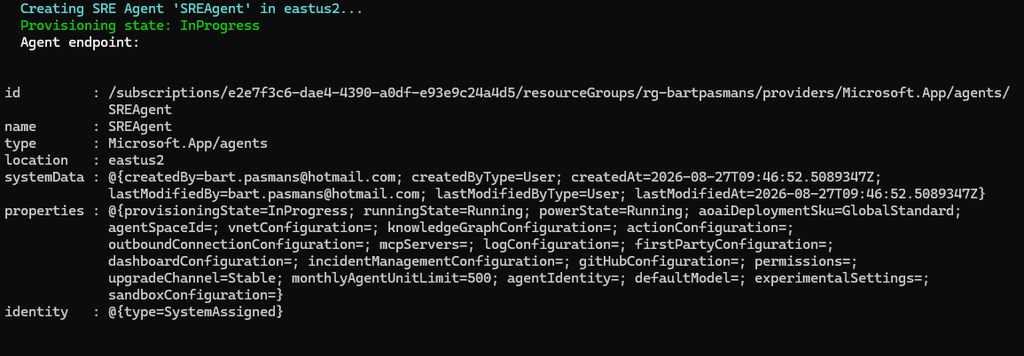

Note: the foundry resources I already had
Agent Lifecycle
Get-SREAgent -SubscriptionId "your-subscription-id" -ResourceGroup "rg-sre-demo" -AgentName "sre-prod-agent"Start-SREAgent -SubscriptionId "your-subscription-id" -ResourceGroup "rg-sre-demo" -AgentName "sre-prod-agent"
Stop-SREAgent -SubscriptionId "your-subscription-id" -ResourceGroup "rg-sre-demo" -AgentName "sre-prod-agent"
📒 Cost control
The agent costs 4 AAU/hour (Azure Agent Unit) while running (always-on baseline), plus 0.25 AAU/second when actively working. Stop it outside business hours to save costs.
You can find more about it here: https://learn.microsoft.com/en-us/azure/sre-agent/pricing-billing
Make sure you grant yourself permission to the SRE agent otherwise we’ll bump into a 403
az role assignment create --assignee "xxxxxxxxxxxxxxxxxxxxxxxxx" --role "SRE Agent Administrator" --scope "/subscriptions/xxxxxxxxxxxxxxxxxxxxxxxxx/resourceGroups/xxxxxxxxxxxxxxxxxxxxxxxxx/providers/Microsoft.App/agents/$agentname"⚠️ Make sure you update the variables before running
Adding tools and testing the agent
Now it’s time to go to Azure, discover the agent and add some tools to it so it can understand your environment.
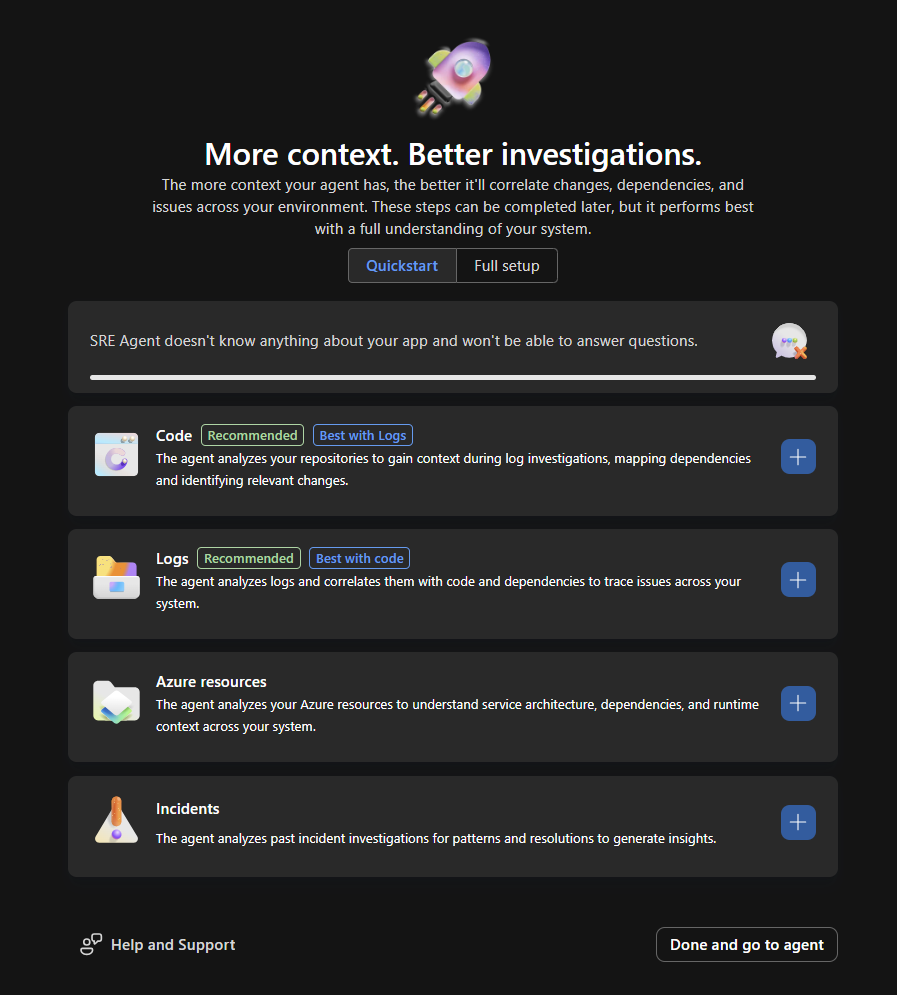
🎬 Head onwards to Azure and open the SRE agent you deployed. You should be greeted with the page somewhat shown below
⚠️ Before you start you need to make sure the SRE agent is granted permissions (read) on the scope you want to give it. You can find it as ‘SRE’ in the IAM part when granting permissions.
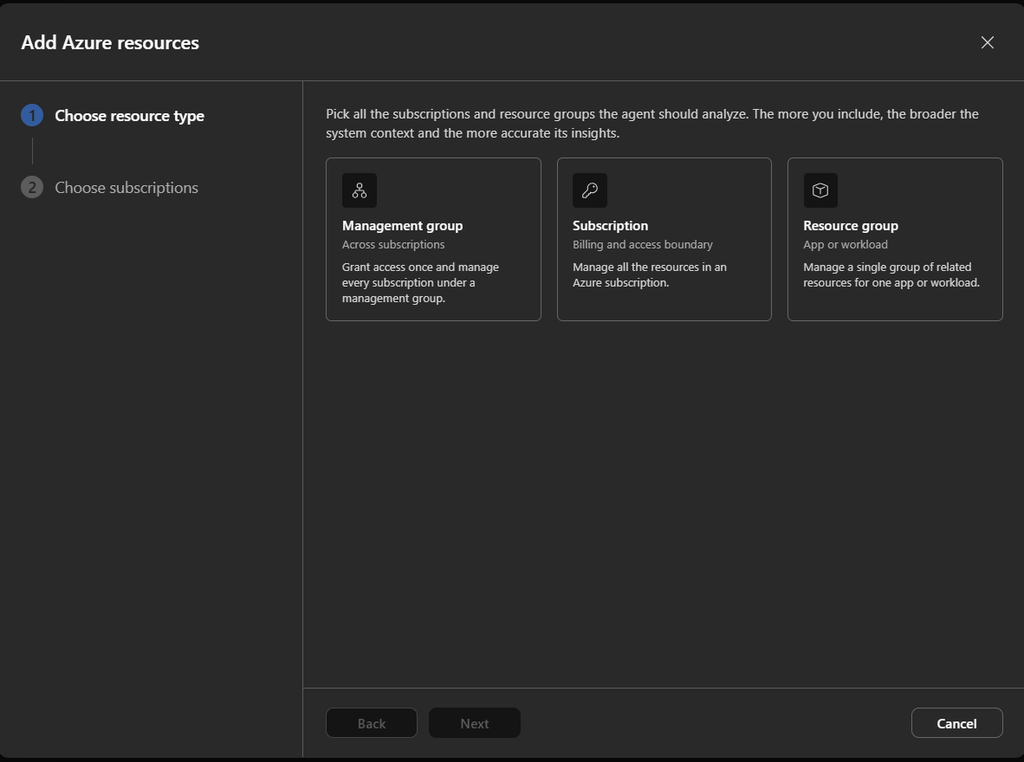
- Choose Azure resources and configure the SRE agent to access a specific subscription (or management group)
Now validate underneath settings and managed resources that the resource group has been set you want to grant the agent access to
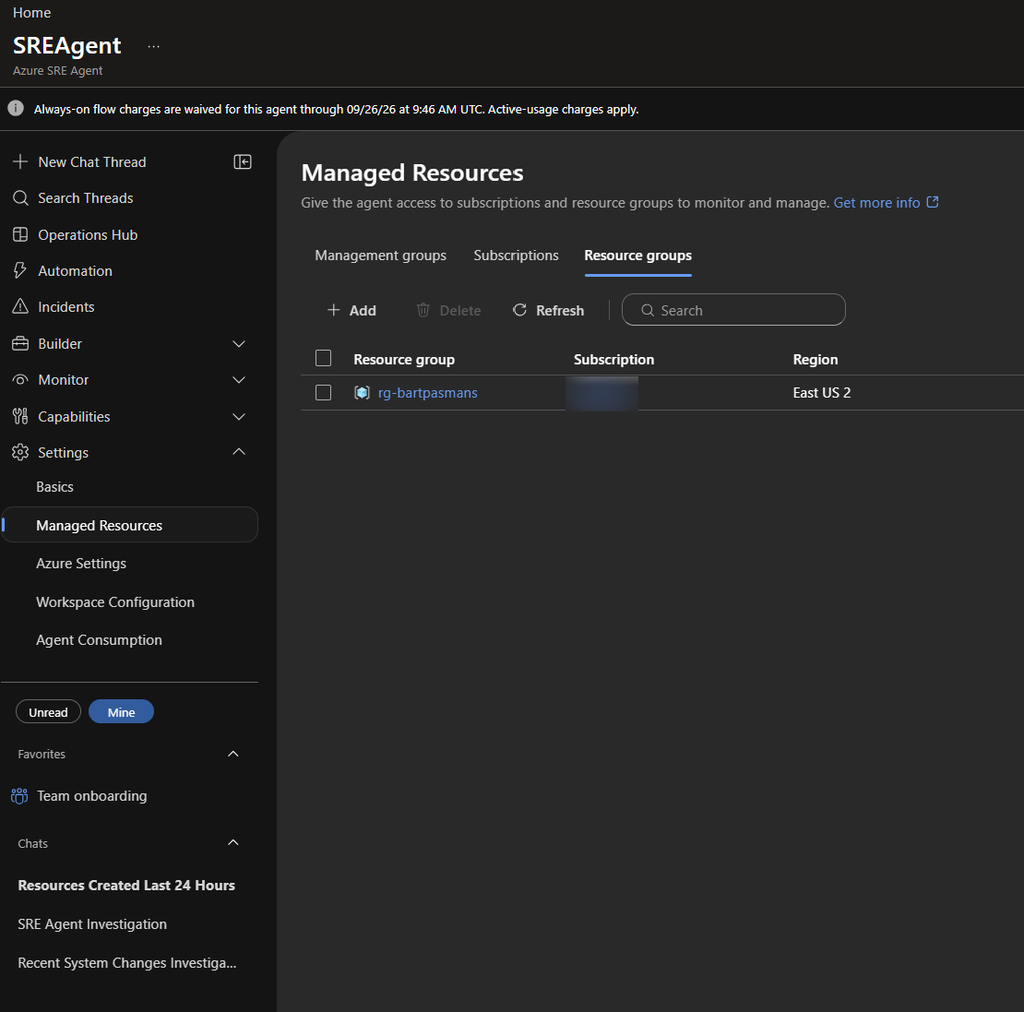
Now the agent has access and we can start doing things!
Chatting
Now ask the agent the question on the resource group you just configured. I do so by asking “which resources are in rg-bartpasmans?”
And you will be given the result:
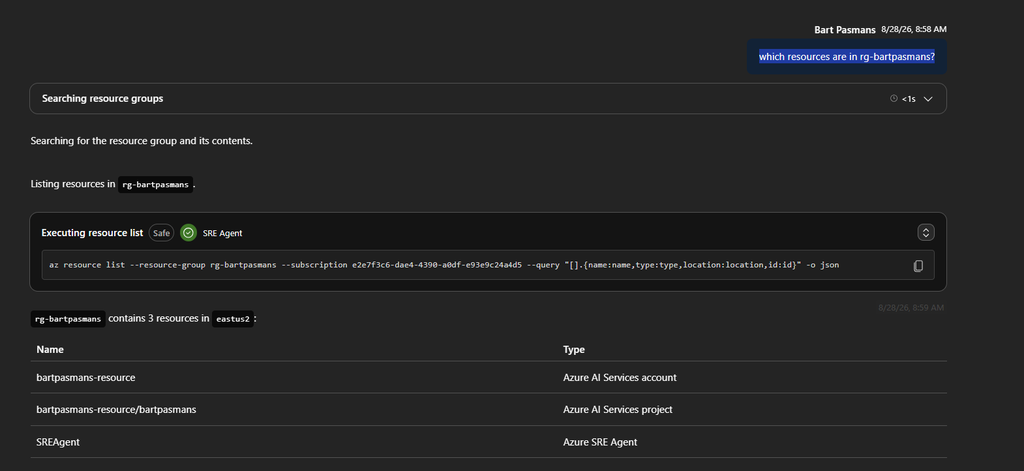
Thats an easy one, but lets challenge a bit lets ask which changes occurred in that resource group last 24 hours
Prompt the question: “which changes occurred last 24 hours in rg-bartpasmans?”
And you will see what happened there!
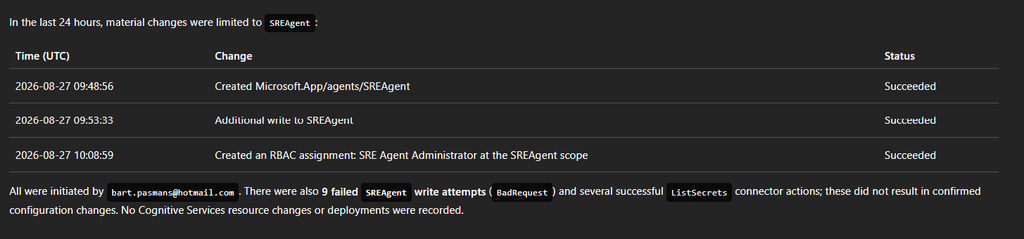
Cool right? You don’t have to dive in anymore manual with this!
⚠️ If you’re done stop the agent (it will otherwise create additional cost) or leave it, in the next posts we’ll dive even deeper into the Azure SRE Agent!
Wrapping Up
We started deploying the SRE agent which will be the start for the next blogs to come. You chatted with the agent and have seen how the agent communicates with Azure and helps you in your day-to-day job!
Next blogs we’ll expand the agent!
Have fun!