

Wow, I received an overwhelming amount of LinkedIn messages, post reactions, thumbs up you name it on my previous blog about the Azure SRE agent! Thanks all!
So as promised here it is, our next step into the Azure SRE world where we’ll be diving today in enhancing the SRE agent we created in the previous blog. Haven’t catched up yet? No problem! I got you covered! You can find it here:
So for this follow-up to blog, we’re giving Azure SRE Agent something harder.
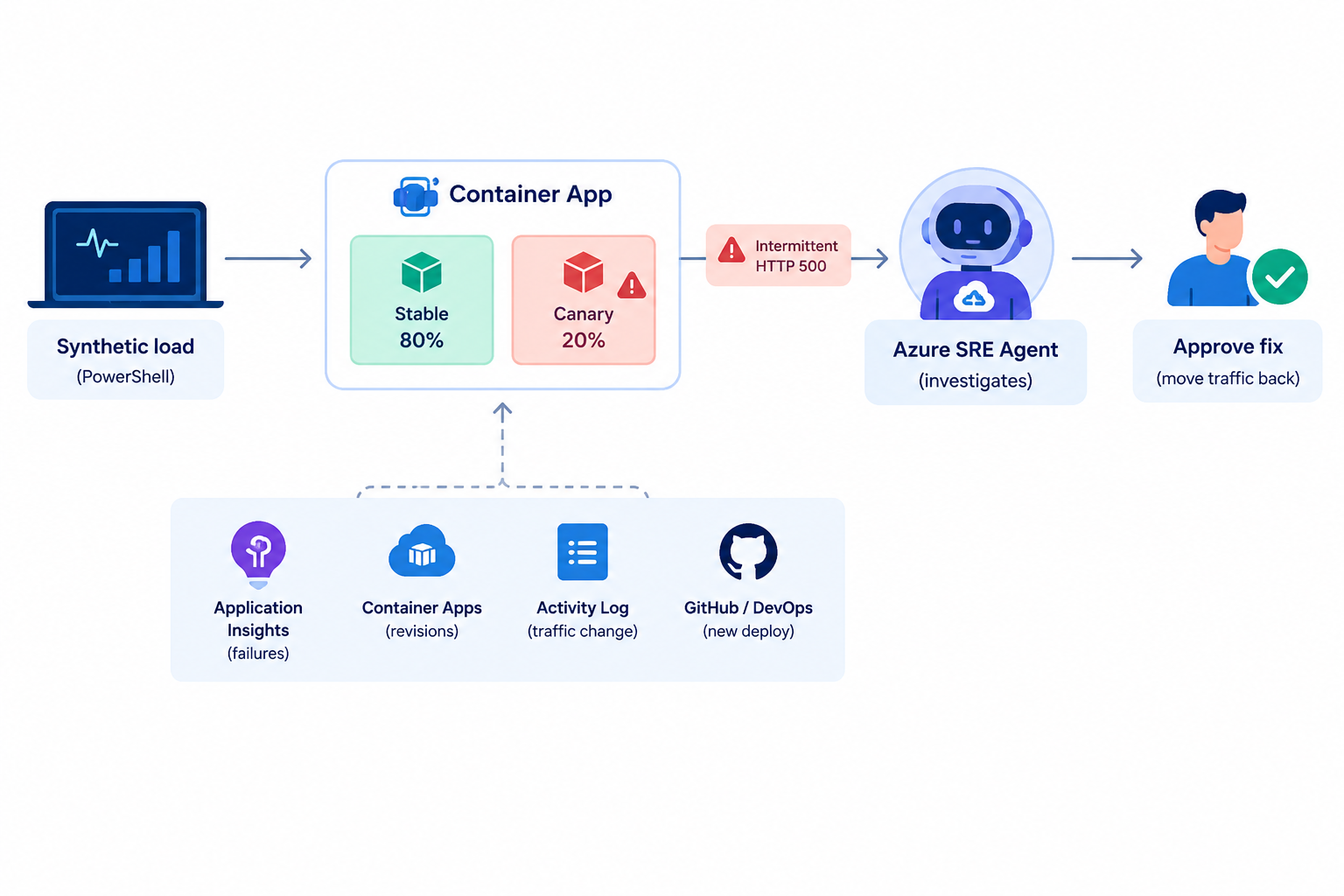
We will run a controlled chaos drill against an Azure Container App with two revisions. The stable revision handles most traffic. A faulty canary receives only 20%, but intermittently returns HTTP 500 responses. PowerShell creates the traffic split, generates synthetic load, captures the first evidence, and hands the incident to Azure SRE Agent.
The agent then has to correlate four different stories:
- Application Insights says requests are failing.
- Azure Container Apps says two revisions are active.
- Azure Activity Log says the traffic weights changed recently.
- The connected repository says a canary deployment happened before the errors started.
Then it must propose the smallest reversible fix: move traffic back to the stable revision. Because this is production-style infrastructure, the response plan stays in **Review** mode. The agent investigates autonomously, but a human approves the write operation.
That is much closer to a real 3 AM decision.
Like always 🎬 marks the steps you can follow, and 📒 marks the technical deep-dives.
Let’s break something safely, oh and get some drinks and something to eat, this is gonna be a long one!🚀
And again our buddy: 🤖 this will be the mark indicating I’ve used AI (text/code improvement/images etc.)
What We’re Building
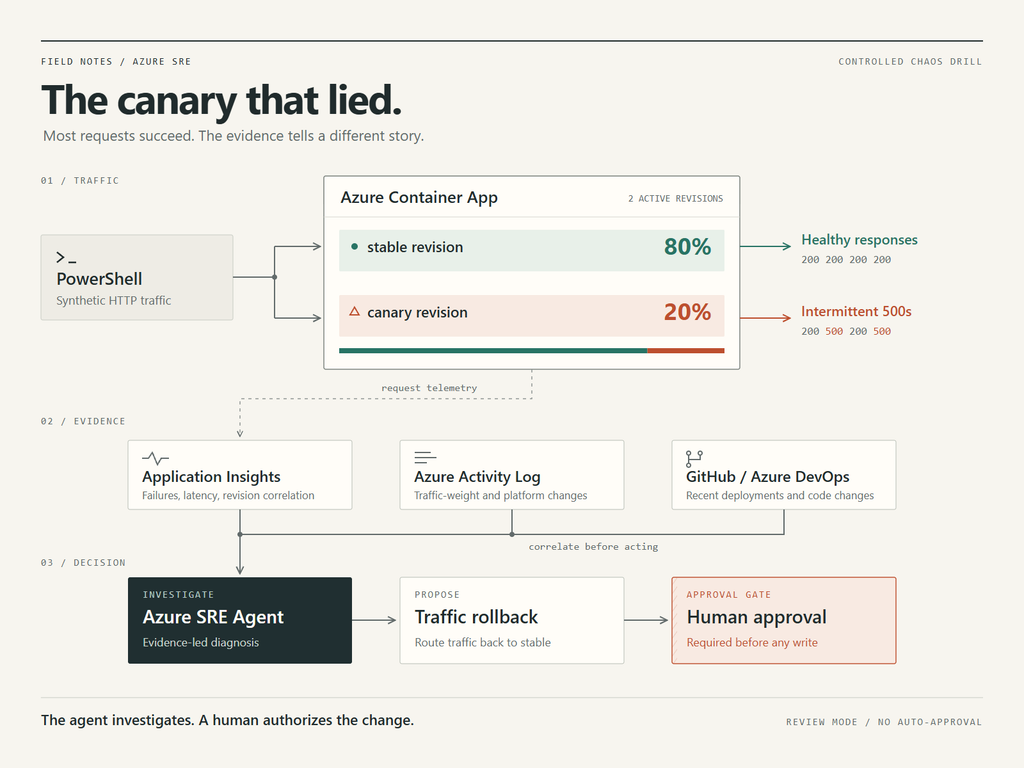
🤖 Sorry guys I’m not a designer and AI perfectly visualized what I want!
What I do know is PowerShell and Azure!
So we’ll be creating some PowerShell which will do the following:
The PowerShell script in this post performs five jobs:
- Validates PowerShell, Azure CLI, and the Container Apps extension
- Confirms that both revisions exist
- Routes a limited percentage of traffic to the faulty revision
- Generates concurrent requests and calculates error rate and P95 latency
- Sends a tightly bounded investigation request to Azure SRE Agent.
It deliberately does not auto-approve the mitigation. The point of the drill is not to see how quickly AI can change production. The point is to see whether it gathers enough evidence for a human to make a safe decision.
So don’t expect all AI magic here! Humans are still required 😉
📒 A 20% canary failure (as you can see in the illustration above) is more interesting than a completely dead application.
If the canary returns errors half the time, the total failure rate is only around 10%. Most requests still succeed. A quick manual test might return HTTP 200 and convince you that the alert is noise. CPU and memory can remain perfectly normal. Restarting the app might do nothing. Scaling out might only create more broken replicas.
The useful evidence is the combination of:
- Failures beginning after the traffic-weight change
- Failed requests resolving to the canary revision
- The stable revision remaining healthy
- No matching platform-wide dependency failure
- A recent code or configuration change for the canary.
Only then is a traffic rollback justified.
This is exactly where an SRE agent should earn its keep: collecting evidence across tools before asking for one small, reversible action.
Prerequisites
Before we can actually start doing something there are some things that need to be in place, below is the list of tools which should be available before starting (make sure you have them)
- PowerShell 7 or newer
- Azure CLI, logged in with `az login`
- The Container Apps CLI extension
- An Azure Container App in multiple revision mode
- Two active revisions: one stable and one intentionally faulty
- Application Insights or Log Analytics connected to the app
- Azure SRE Agent from my previous blog, with access to the resource group
- The monitoring and source-control connectors configured in SRE Agent
- A response plan or agent fallback configured for Review mode.
🎬 Container apps CLI install (follow the steps below to install if you don’t have it yet)
az extension add --name containerapp --upgradeNow let’s make sure you have a small container setup (we’ll just create a dummy to show you the principles of the SRE agent)
🎬 Create in a directory a ‘server.js’ file and give it the content below
const http = require("http");

const port = process.env.PORT || 8080;
const failurePercent = Number(process.env.CHAOS_FAILURE_PERCENT || 0);

http.createServer((req, res) => {
    const shouldFail = Math.random() * 100 < failurePercent;
    res.writeHead(shouldFail ? 500 : 200, { "Content-Type": "text/plain" });
    res.end(shouldFail ? "simulated failure" : "ok");
}).listen(port);and the corresponding docker file:
FROM node:20-alpine
WORKDIR /app
COPY server.js .
ENV PORT=8080
EXPOSE 8080
CMD ["node", "server.js"]📒 I assume here that you know how to build a dockerfile and get it pushed to your Azure environment and create a containerapp out of it.
📒 Keep in mind, this is for the showcase only, take a representative application if you want to see it work for you own case. Above example is just here for showing you the principles.
To give you an overview on what I have now (taking previous blog into account)

Prepare the faulting canary
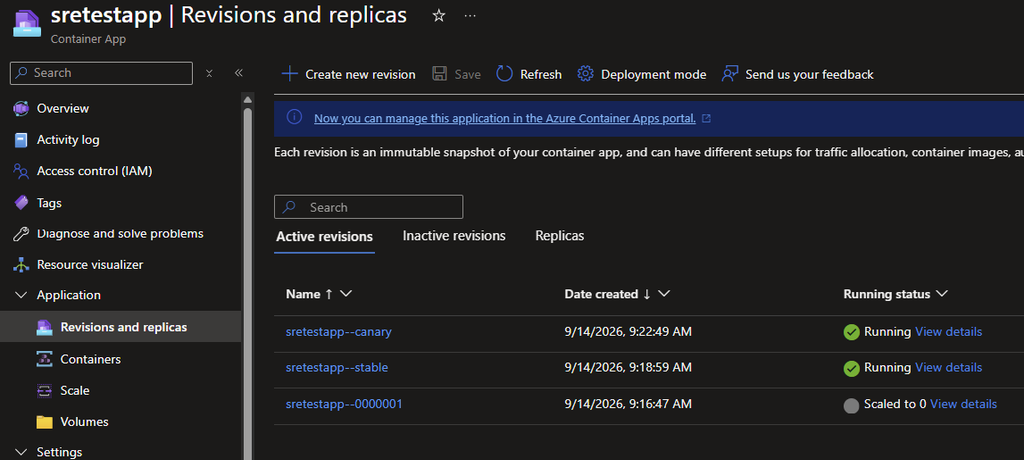
We need something to trigger, so intentionally we’ll break something this time. For that we’ll be focusing on creating a new revision out of the container app (see picture above) for creating a malfunctioning revision.
🎬 You can use my command below for doing this (make sure it reflects the correct naming you have)
az containerapp update `
  --resource-group "rg-bartpasmans" `
  --name "sretestapp" `
  --set-env-vars "CHAOS_FAILURE_PERCENT=50" `
--revision-suffix "canary"That will create a new revision for us:
📒 Keep the failure inside the application boundary. Do not create the demo by deleting databases, revoking Key Vault permissions, or breaking shared networking. A good chaos drill is realistic enough to exercise detection and recovery, but isolated enough that the blast radius is known.
We set the CHAOS_FAILURE_PERCENT as you saw in the server.js we have this line:
“const failurePercent = Number(process.env.CHAOS_FAILURE_PERCENT || 0);”
Which we can tweak to ‘break things’.
🎬 Test it by going to the URL of the container app. In my case it’s: “https://sretestapp–canary.politefield-c8906200.westeurope.azurecontainerapps.io/”

Hard refresh the page until you see it succeed

If everything works to this point you are good to go! 😉
Step 1 – Load the tooling
The previous blog created the SRE Agent API functions. This blog adds `Invoke-SREChaosDrill.ps1` for the incident itself. Create the file ‘Invoke-SREChaosDrill.ps1’ give it the content below
Set-StrictMode -Version Latest
$ErrorActionPreference = "Stop"

function Assert-SREChaosPrerequisite {
    [CmdletBinding()]
    param()

    if ($PSVersionTable.PSVersion.Major -lt 7) {
        throw "PowerShell 7 or newer is required."
    }

    if (-not (Get-Command az -ErrorAction SilentlyContinue)) {
        throw "Azure CLI was not found. Install it and run 'az login'."
    }

    $account = az account show --output json 2>$null | ConvertFrom-Json
    if (-not $account.id) {
        throw "No active Azure CLI session. Run 'az login'."
    }

    $extension = az extension show --name containerapp --output json 2>$null
    if (-not $extension) {
        throw "The Azure CLI containerapp extension is required. Run 'az extension add --name containerapp'."
    }
}

function Get-ContainerAppDrillState {
    [CmdletBinding()]
    param(
        [Parameter(Mandatory)]
        [ValidateNotNullOrEmpty()]
        [string]$ResourceGroup,

        [Parameter(Mandatory)]
        [ValidateNotNullOrEmpty()]
        [string]$ContainerApp
    )

    $app = az containerapp show `
        --resource-group $ResourceGroup `
        --name $ContainerApp `
        --output json | ConvertFrom-Json

    $revisions = @(
        az containerapp revision list `
            --resource-group $ResourceGroup `
            --name $ContainerApp `
            --output json | ConvertFrom-Json
    )

    $traffic = @($app.properties.configuration.ingress.traffic)
    $fqdn = $app.properties.configuration.ingress.fqdn

    [pscustomobject]@{
        ResourceGroup = $ResourceGroup
        ContainerApp  = $ContainerApp
        Fqdn          = $fqdn
        TargetUrl     = "https://$fqdn/"
        Traffic       = $traffic
        Revisions     = $revisions | Select-Object name, active, replicas, createdTime
    }
}

function Set-ContainerAppRevisionTraffic {
    [CmdletBinding(SupportsShouldProcess, ConfirmImpact = "High")]
    param(
        [Parameter(Mandatory)]
        [ValidateNotNullOrEmpty()]
        [string]$ResourceGroup,

        [Parameter(Mandatory)]
        [ValidateNotNullOrEmpty()]
        [string]$ContainerApp,

        [Parameter(Mandatory)]
        [ValidateNotNullOrEmpty()]
        [string]$StableRevision,

        [Parameter(Mandatory)]
        [ValidateNotNullOrEmpty()]
        [string]$FaultyRevision,

        [ValidateRange(1, 50)]
        [int]$FaultyWeight = 20
    )

    $stableWeight = 100 - $FaultyWeight
    $change = "$StableRevision=$stableWeight%, $FaultyRevision=$FaultyWeight%"

    if (-not $PSCmdlet.ShouldProcess($ContainerApp, "Set revision traffic to $change")) {
        return
    }

    az containerapp ingress traffic set `
        --resource-group $ResourceGroup `
        --name $ContainerApp `
        --revision-weight "$StableRevision=$stableWeight" "$FaultyRevision=$FaultyWeight" `
        --output none

    if ($LASTEXITCODE -ne 0) {
        throw "Failed to update Container Apps traffic weights."
    }

    Write-Host "Traffic updated: $change" -ForegroundColor Yellow
}

function Restore-ContainerAppStableTraffic {
    [CmdletBinding(SupportsShouldProcess, ConfirmImpact = "High")]
    param(
        [Parameter(Mandatory)]
        [ValidateNotNullOrEmpty()]
        [string]$ResourceGroup,

        [Parameter(Mandatory)]
        [ValidateNotNullOrEmpty()]
        [string]$ContainerApp,

        [Parameter(Mandatory)]
        [ValidateNotNullOrEmpty()]
        [string]$StableRevision
    )

    if (-not $PSCmdlet.ShouldProcess($ContainerApp, "Route 100% of traffic to $StableRevision")) {
        return
    }

    az containerapp ingress traffic set `
        --resource-group $ResourceGroup `
        --name $ContainerApp `
        --revision-weight "$StableRevision=100" `
        --output none

    if ($LASTEXITCODE -ne 0) {
        throw "Failed to restore traffic to the stable revision."
    }

    Write-Host "Recovery complete: $StableRevision now receives 100% of traffic." -ForegroundColor Green
}

function Invoke-SyntheticCheckoutTraffic {
    [CmdletBinding()]
    param(
        [Parameter(Mandatory)]
        [ValidatePattern("^https://")]
        [string]$TargetUrl,

        [ValidateRange(10, 5000)]
        [int]$RequestCount = 200,

        [ValidateRange(1, 100)]
        [int]$Concurrency = 20,

        [ValidateRange(1, 120)]
        [int]$TimeoutSeconds = 15
    )

    Write-Host "Sending $RequestCount requests to $TargetUrl..." -ForegroundColor Cyan

    $results = 1..$RequestCount | ForEach-Object -ThrottleLimit $Concurrency -Parallel {
        $requestNumber = $_
        $stopwatch = [System.Diagnostics.Stopwatch]::StartNew()
        try {
            $response = Invoke-WebRequest `
                -Uri $using:TargetUrl `
                -Method Get `
                -SkipHttpErrorCheck `
                -TimeoutSec $using:TimeoutSeconds

            $stopwatch.Stop()
            [pscustomobject]@{
                Request    = $requestNumber
                StatusCode = [int]$response.StatusCode
                DurationMs = $stopwatch.ElapsedMilliseconds
                Error      = $null
            }
        }
        catch {
            $stopwatch.Stop()
            [pscustomobject]@{
                Request    = $requestNumber
                StatusCode = 0
                DurationMs = $stopwatch.ElapsedMilliseconds
                Error      = $_.Exception.Message
            }
        }
    }

    $failures = @($results | Where-Object { $_.StatusCode -lt 200 -or $_.StatusCode -ge 400 })
    $durations = @($results | Sort-Object DurationMs | Select-Object -ExpandProperty DurationMs)
    $p95Index = [Math]::Min($durations.Count - 1, [Math]::Ceiling($durations.Count * 0.95) - 1)

    $summary = [pscustomobject]@{
        TimestampUtc = [DateTime]::UtcNow
        TargetUrl    = $TargetUrl
        Requests     = $results.Count
        Successes    = $results.Count - $failures.Count
        Failures     = $failures.Count
        ErrorRatePct = [Math]::Round(($failures.Count / $results.Count) * 100, 2)
        P95LatencyMs = $durations[$p95Index]
        StatusCodes  = $results | Group-Object StatusCode | Sort-Object Name | ForEach-Object {
            [pscustomobject]@{ StatusCode = $_.Name; Count = $_.Count }
        }
    }

    $summary | Format-List | Out-Host
    $summary.StatusCodes | Format-Table -AutoSize | Out-Host
    return $summary
}

function New-SREInvestigationPrompt {
    [CmdletBinding()]
    param(
        [Parameter(Mandatory)]
        [string]$ResourceGroup,

        [Parameter(Mandatory)]
        [string]$ContainerApp,

        [Parameter(Mandatory)]
        [string]$StableRevision,

        [Parameter(Mandatory)]
        [string]$FaultyRevision,

        [Parameter(Mandatory)]
        [psobject]$LoadSummary
    )

    @"
We are running an authorized reliability drill against Azure Container App '$ContainerApp' in resource group '$ResourceGroup'.

Observed by the synthetic probe at $($LoadSummary.TimestampUtc.ToString("o")):
- Requests: $($LoadSummary.Requests)
- Failures: $($LoadSummary.Failures)
- Error rate: $($LoadSummary.ErrorRatePct)%
- P95 latency: $($LoadSummary.P95LatencyMs) ms
- Expected stable revision: $StableRevision
- Suspected canary revision: $FaultyRevision

Investigate this as a production-style incident. Correlate Azure Monitor and Application Insights telemetry, Container Apps revision traffic, Azure Activity Log changes, and connected repository/deployment history. Distinguish evidence from hypotheses. Identify the first bad signal and likely blast radius.

If the canary is responsible, propose the smallest reversible mitigation: route 100% of traffic to '$StableRevision'. Do not deactivate or delete revisions, change scaling, restart the app, or modify unrelated resources. This response plan is in Review mode, so request approval before any write operation. After mitigation, verify the error rate and latency and provide an incident timeline.
"@
}

function Send-SREChaosInvestigation {
    [CmdletBinding()]
    param(
        [Parameter(Mandatory)]
        [string]$Endpoint,

        [Parameter(Mandatory)]
        [string]$ThreadId,

        [Parameter(Mandatory)]
        [string]$ResourceGroup,

        [Parameter(Mandatory)]
        [string]$ContainerApp,

        [Parameter(Mandatory)]
        [string]$StableRevision,

        [Parameter(Mandatory)]
        [string]$FaultyRevision,

        [Parameter(Mandatory)]
        [psobject]$LoadSummary
    )

    if (-not (Get-Command Send-SREMessage -ErrorAction SilentlyContinue)) {
        throw "Send-SREMessage is not loaded. Dot-source blog 63's Invoke-SREAgent.ps1 first."
    }

    $prompt = New-SREInvestigationPrompt `
        -ResourceGroup $ResourceGroup `
        -ContainerApp $ContainerApp `
        -StableRevision $StableRevision `
        -FaultyRevision $FaultyRevision `
        -LoadSummary $LoadSummary

    Send-SREMessage -Endpoint $Endpoint -ThreadId $ThreadId -Message $prompt
}

function Start-SREChaosDrill {
    [CmdletBinding(SupportsShouldProcess, ConfirmImpact = "High")]
    param(
        [Parameter(Mandatory)]
        [string]$ResourceGroup,

        [Parameter(Mandatory)]
        [string]$ContainerApp,

        [Parameter(Mandatory)]
        [string]$StableRevision,

        [Parameter(Mandatory)]
        [string]$FaultyRevision,

        [string]$TargetUrl,
        [string]$Endpoint,
        [string]$ThreadId,

        [ValidateRange(1, 50)]
        [int]$FaultyWeight = 20,

        [ValidateRange(10, 5000)]
        [int]$RequestCount = 200,

        [ValidateRange(1, 100)]
        [int]$Concurrency = 20
    )

    Assert-SREChaosPrerequisite
    $state = Get-ContainerAppDrillState -ResourceGroup $ResourceGroup -ContainerApp $ContainerApp

    if (-not $TargetUrl) {
        $TargetUrl = $state.TargetUrl
    }

    $knownRevisionNames = @($state.Revisions.name)
    foreach ($revision in @($StableRevision, $FaultyRevision)) {
        if ($revision -notin $knownRevisionNames) {
            throw "Revision '$revision' was not found on Container App '$ContainerApp'."
        }
    }

    if (-not $PSCmdlet.ShouldProcess($ContainerApp, "Run a controlled canary failure drill")) {
        return
    }

    Set-ContainerAppRevisionTraffic `
        -ResourceGroup $ResourceGroup `
        -ContainerApp $ContainerApp `
        -StableRevision $StableRevision `
        -FaultyRevision $FaultyRevision `
        -FaultyWeight $FaultyWeight `
        -Confirm:$false

    Start-Sleep -Seconds 20

    $loadSummary = Invoke-SyntheticCheckoutTraffic `
        -TargetUrl $TargetUrl `
        -RequestCount $RequestCount `
        -Concurrency $Concurrency

    if ($Endpoint -and $ThreadId) {
        Send-SREChaosInvestigation `
            -Endpoint $Endpoint `
            -ThreadId $ThreadId `
            -ResourceGroup $ResourceGroup `
            -ContainerApp $ContainerApp `
            -StableRevision $StableRevision `
            -FaultyRevision $FaultyRevision `
            -LoadSummary $loadSummary | Out-Null

        Write-Host "Investigation sent to Azure SRE Agent." -ForegroundColor Green
        Write-Host "Review the evidence and approve only the traffic rollback." -ForegroundColor Yellow
    }
    else {
        Write-Host "No SRE endpoint/thread supplied. Use this prompt manually:" -ForegroundColor Yellow
        New-SREInvestigationPrompt `
            -ResourceGroup $ResourceGroup `
            -ContainerApp $ContainerApp `
            -StableRevision $StableRevision `
            -FaultyRevision $FaultyRevision `
            -LoadSummary $loadSummary
    }

    [pscustomobject]@{
        Before      = $state
        LoadSummary = $loadSummary
        Recovery    = "Restore-ContainerAppStableTraffic -ResourceGroup '$ResourceGroup' -ContainerApp '$ContainerApp' -StableRevision '$StableRevision'"
    }
}🤖 AI used here for structuring the script, I created the baseline and AI assisted me with a proper structure
🎬 Now let’s dot source and run!
. .\Invoke-SREChaosDrill.ps1- Now specify the variables needed (and modify accordingly)
$subscriptionId = "xxxxxxxx-xxxx-xxxx-xxxx-xxxxxxxx"
$resourceGroup  = "rg-bartpasmans"
$containerApp   = "sretestapp"
$stableRevision = "sretestapp--stable"
$faultyRevision = "sretestapp--canary"
$agentName = "sreagent"⚠️ Before we can continue with the next part (make sure you have the script from previous blog to invoke-sreagent) otherwise we can’t continue!
Get the baseline
Now we can get a baseline to see how our app behaves.
🎬 Follow the steps below
- Run the script below
$before = Get-ContainerAppDrillState -ResourceGroup $resourceGroup -ContainerApp $containerApp
$before.Traffic | Format-Table revisionName, weight

$baseline = Invoke-SyntheticCheckoutTraffic -TargetUrl $before.TargetUrl -RequestCount 200 -Concurrency 20And you will see the result below
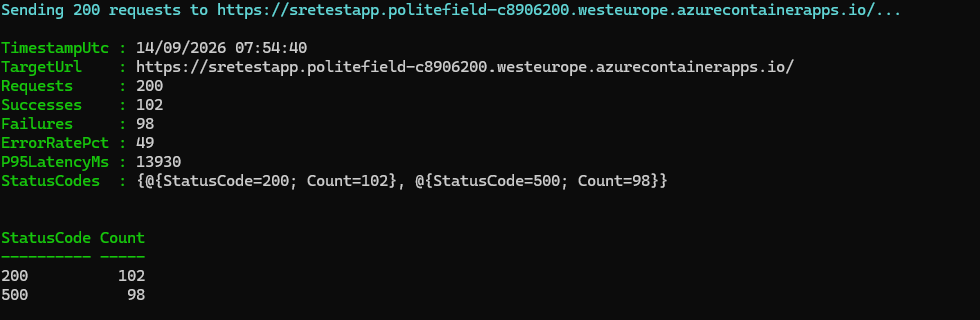
So in this case 102 calls went correctly and 98 failed.
Creating the incident
$endpoint = Get-SREEndpoint -SubscriptionId $subscriptionId -ResourceGroup $resourceGroup -AgentName $agentName
$threads  = @(Get-SREThread -Endpoint $endpoint)
$threadId = $threads[0].id

$drill = Start-SREChaosDrill `
    -ResourceGroup $resourceGroup -ContainerApp $containerApp `
    -StableRevision $stableRevision -FaultyRevision $faultyRevision `
    -FaultyWeight 20 -RequestCount 300 -Concurrency 25 `
-Endpoint $endpoint -ThreadId $threadIdAnd you should get the response back;
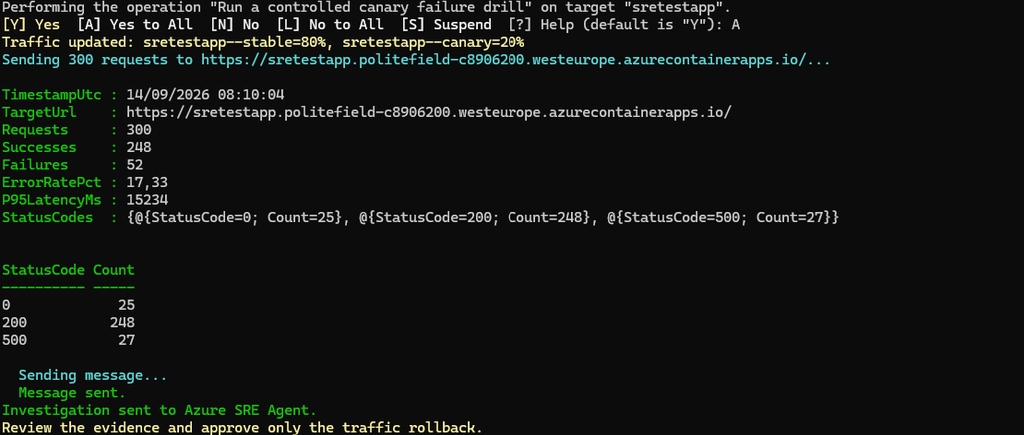
PowerShell confirms before changing the traffic split (`SupportsShouldProcess`), then runs the equivalent of:
 az containerapp ingress traffic set --resource-group "rg-bartpasmans" --name "sretestapp"
 --revision-weight "sretestapp--stable=80" "sretestapp--canary=20"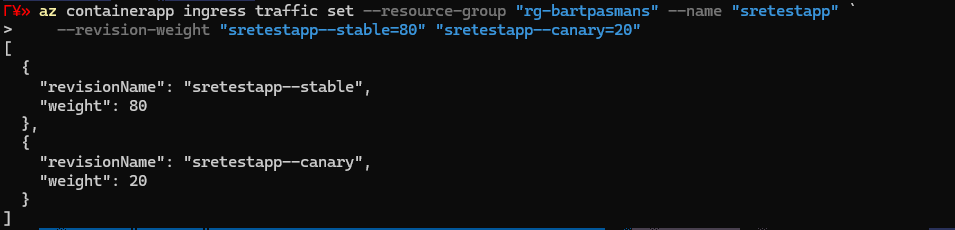
waits for it to settle, sends load, and reports something and then sends the investigation to SRE Agent. That error rate is the trap, most dashboards still look green, but one in ten customers can’t check out.
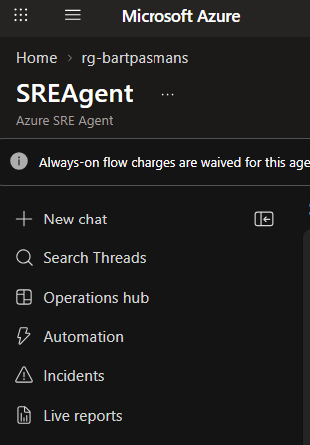
You can also see this conversation now going on in the SREAgent by going to search threads:
You will see what we shared with the Agent:
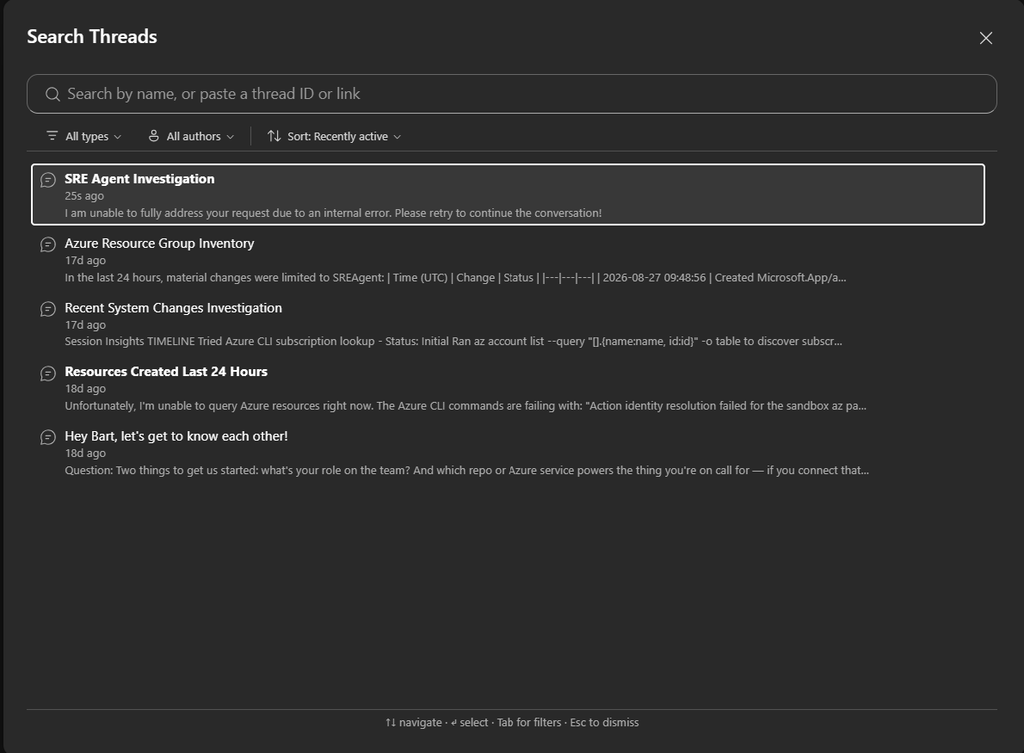
⚠️ No clue why, haven’t figured out yet. But sometimes you have to delete all threads and create a new one.
- Go to the thread and start one (if permissions are required it will be prompted here and you can assign them from there)
You will see the analysis:
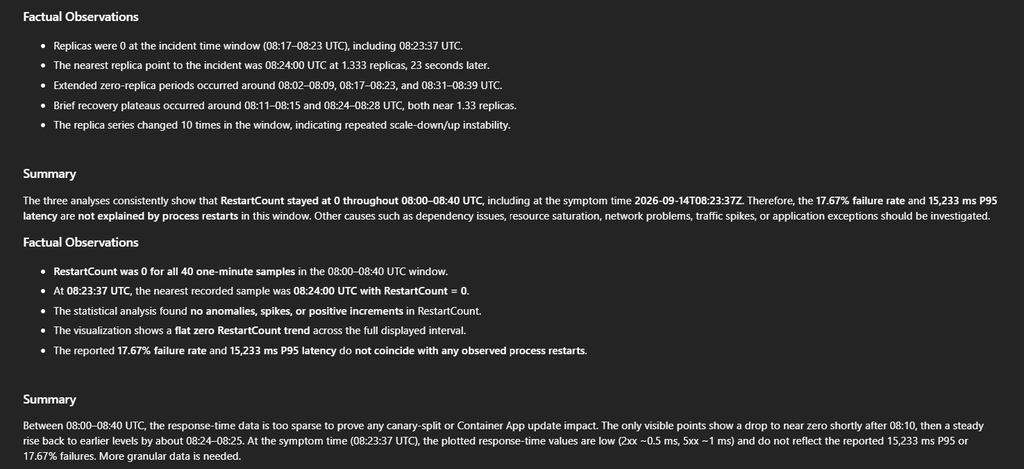
And the suggestion:
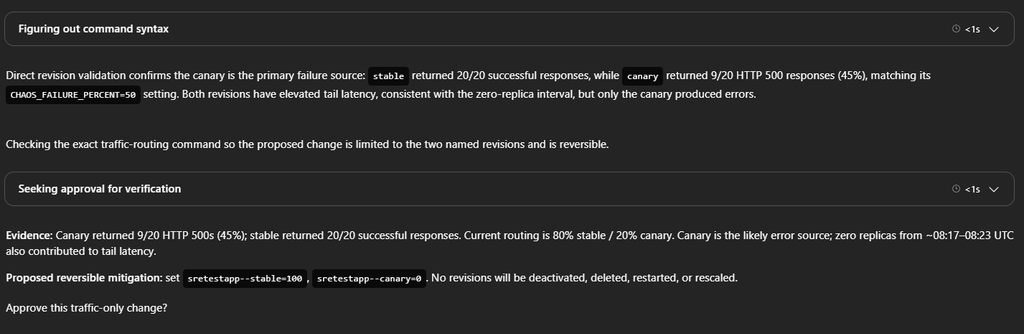
So I’m very to the point here 😆 And tell it to save my app

SRE Agent asks if it can do so:
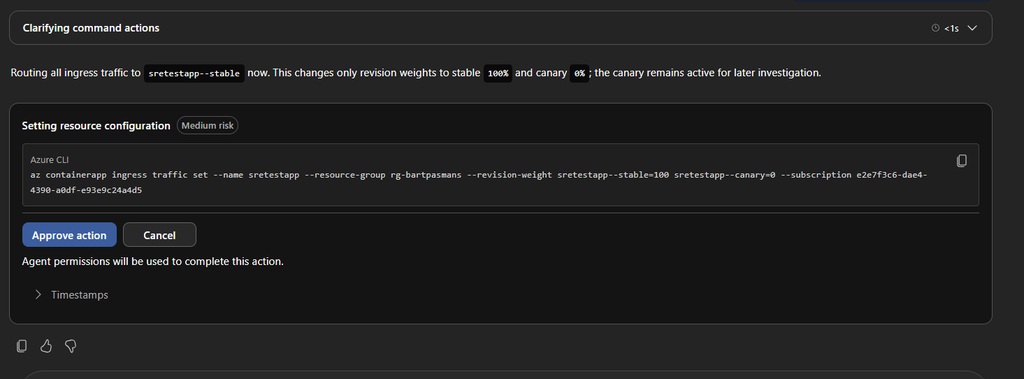
And of course I approve as I really want to get back to bed again! (if you need to give permissions do so)
Well, fingers crossed!
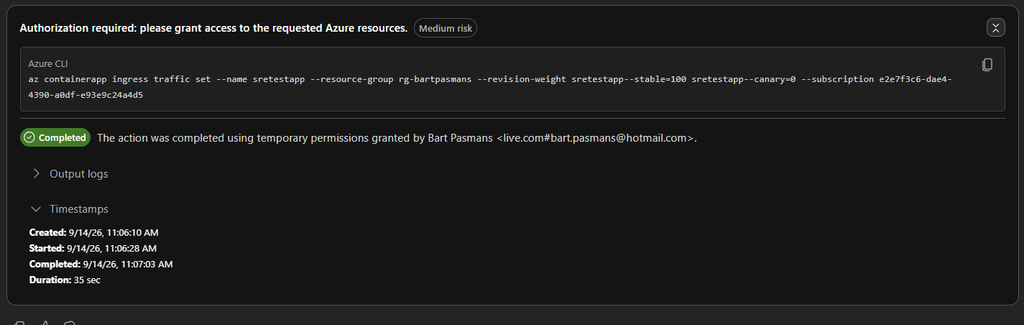
Let’s rerun the health check again and see if the SRE agent got it sorted out!
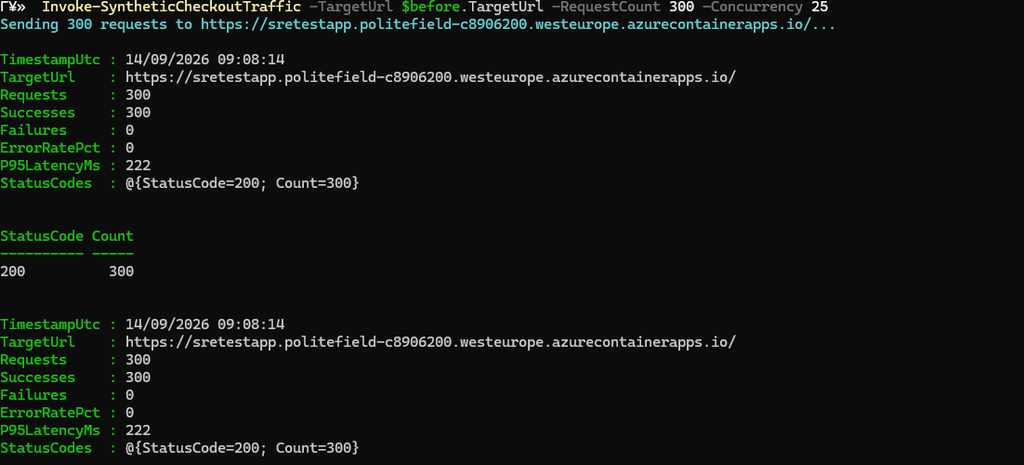
Ohh nice! Thats looks good 😉 I can go back to bed again. SRE agent fixed the issue for me, without me having to do all sorts of complicated things. In the morning I can do a proper analysis and for now I can earn my well deserved rest again!
Summary
Our previous blog deployed and controlled Azure SRE Agent. This blog made it prove it can do more than summarize a dashboard: correlate telemetry, revision state, activity history, and source control, then act on one reversible fix with a human at the approval boundary.
**Investigate broadly. Act narrowly. Verify everything.**
Until next time, happy scripting, and break things responsibly! 🚀