

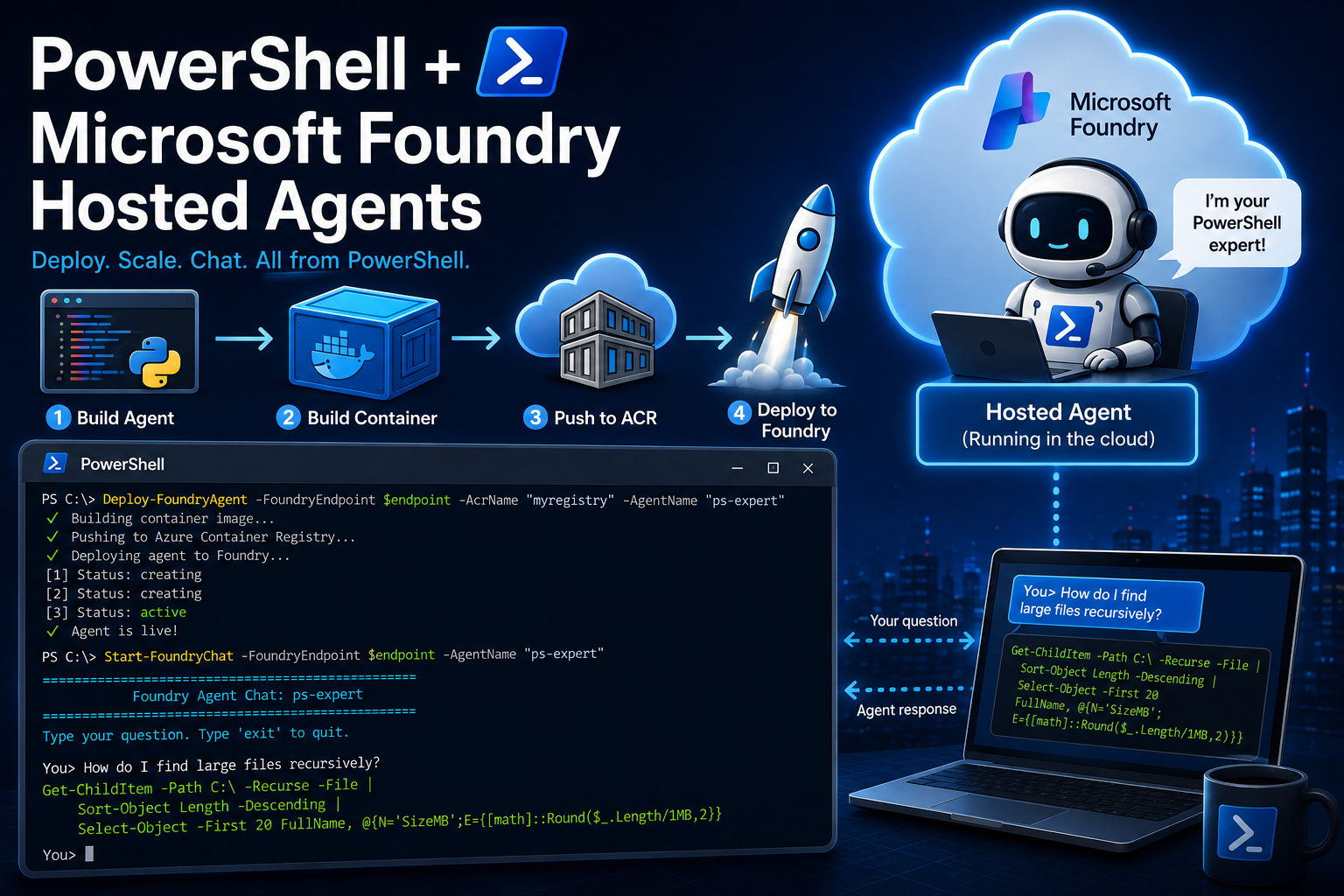
First blog after 3 weeks of vacation, wish me luck! 😆
I need to be honest (and lost count already) but for the latest 10/15 blogs or so , we’ve been calling Azure OpenAI directly. Build a prompt, fire an API call, parse the response. It works. It’s simple. And for scripts you run from your own
machine, it’s exactly what you need.
But what if you want other people to use your AI tool? What if you want to deploy it somewhere, give it an endpoint, let it scale, let it handle multiple users, let it run without your laptop being on? That’s where it gets interesting, and that’s where Hosted
Agents come in! And yes I’ve already created a blog on how to create agents etc. even hosted ones. But this time will be different!
Microsoft Foundry (formerly Azure AI Foundry) launched Hosted Agents as GA in July! The idea: you package your agent as a container, push it to Azure, and Foundry handles the rest! Compute, scaling, identity, sessions, monitoring. Your agent gets its
own endpoint that anyone (or anything) can call. How cool is that?! 😁
And the best part? You can manage the entire lifecycle from PowerShell. Build, deploy, invoke, monitor, delete, all from within the power of the terminal.
Like always, (this is my signature it seems)
throughout this post, you’ll see 🎬for action steps you can follow along with, and 📒 for the technical deep-dives where I explain what’s actually happening under the hood.
What We’re Building
Three things. First: a minimal AI agent in Python that acts as a PowerShell expert. Yes, Python 🤢 the Foundry agent protocol libraries only exist for Python and .NET. Don’t worry, it’s just like 30 or 50 lines and the Python is not the point.
Second: a PowerShell deployment script 🙏 that builds the container, pushes it to Azure Container Registry, deploys it to Foundry, and waits until it’s live. One command, fully automated.
Second: a PowerShell deployment script that builds the container, pushes it to Azure Container Registry, deploys it to Foundry, and waits until it’s live. One command, fully automated.
Prerequisites
This blog has more setup than usual. You need:
- A Microsoft Foundry project – if you don’t have one, create it in the Foundry
portal (ai.azure.com). - An Azure Container Registry – for storing your agent’s container image.
- Docker Desktop – for building the container.
- Azure CLI – for authentication and ACR access.
- A model deployment in your Foundry project (GPT-4o or similar).
📒 The Foundry project endpoint looks like https://youraccount.services.ai.azure.com/api/projects/your-project. You’ll find it in the Foundry portal under your project settings. This is different from the Azure OpenAI endpoint
we’ve been using, it’s the Foundry data plane, where agents, conversations, and tools live.
📒 Authentication is also different. Instead of API keys, Hosted Agents use Entra ID tokens. We’ll grab these via az account the cloud handles the remaining part of the identity topic.
The Agent Code
The agent itself is Python. I know, I know 🤢. But the Foundry protocol libraries only exist for Python and .NET (and I don’t want you to fully dive into .NET for this blog), so we don’t have a choice. The good news: it’s minimal.
🎬 Create a folder agent with three files
- agent/main.py and give it the content below
📒 I’ve been given comments that the variables I use in my blogs where not according how it should be done. Which is true, sometimes I place keys/secrets for my blogs in the code itself. As the learning goal during that time is not ‘how should i store a key/secret’ but showing you the theory on the topic we’re discussing. Well, during this post I’ll store it in an env variable. Again, if you need to store it somewhere else / more secure follow up on your security principles. This blog isn’t about telling you where to store them. 😉
import os
import asyncio
from azure.ai.agentserver.responses import (
    CreateResponse,
    ResponseContext,
    ResponsesAgentServerHost,
    TextResponse,
)
from openai import AzureOpenAI

api_key = os.environ.get("AZURE_OPENAI_API_KEY")
openai_endpoint = os.environ.get("AZURE_OPENAI_ENDPOINT", os.environ.get("FOUNDRY_PROJECT_ENDPOINT"))
model = os.environ.get("MODEL_DEPLOYMENT_NAME", "gpt-4o")

if api_key:
    client = AzureOpenAI(
        azure_endpoint=openai_endpoint,
        api_key=api_key,
        api_version="2024-10-21",
    )
else:
    from azure.identity import DefaultAzureCredential, get_bearer_token_provider
    credential = DefaultAzureCredential()
    token_provider = get_bearer_token_provider(credential, "https://cognitiveservices.azure.com/.default")
    client = AzureOpenAI(
        azure_endpoint=openai_endpoint,
        azure_ad_token_provider=token_provider,
        api_version="2024-10-21",
    )

app = ResponsesAgentServerHost()

SYSTEM_PROMPT = (
    "You are an expert PowerShell assistant. "
    "You help users write scripts, debug errors, and automate tasks. "
    "Always provide working code examples. "
    "Use PowerShell 7+ syntax where possible. "
    "Be concise and practical."
)


@app.response_handler
async def handler(request: CreateResponse, context: ResponseContext, cancellation_signal: asyncio.Event):
    input_text = await context.get_input_text()

    completion = client.chat.completions.create(
        model=model,
        messages=[
            {"role": "system", "content": SYSTEM_PROMPT},
            {"role": "user", "content": input_text},
        ],
    )

    answer = completion.choices[0].message.content
    return TextResponse(context, request, text=answer)


if __name__ == "__main__":
    app.run()
📒 The agent implements the Responses protocol, Foundry’s standard for conversational agents. When someone sends a message, create_async receives it, forwards it to GPT-4o via the Azure OpenAI SDK, and returns the answer as a TextResponse.
The FOUNDRY_PROJECT_ENDPOINT environment variable is injected automatically by the platform. The DefaultAzureCredential uses the agent’s managed identity.
- agent/requirements.txt and give it the content below (wont be using the latest versions here, check which are relevant for you)
azure-ai-agentserver-responses>=1.0.0b7
azure-identity>=1.21.0
openai>=1.60.0
uvicorn>=0.34.0- agent/Dockerfile and give it the content below
FROM python:3.13-slim

WORKDIR /app

COPY requirements.txt .
RUN pip install --no-cache-dir -r requirements.txt

COPY . .

EXPOSE 8088

CMD ["python", "main.py"]Testing Locally
Never deploy something you haven’t tested. The nice thing about the Responses protocol is that your agent is just an HTTP server on port 8088. You can run it locally and poke it with PowerShell before touching Azure.
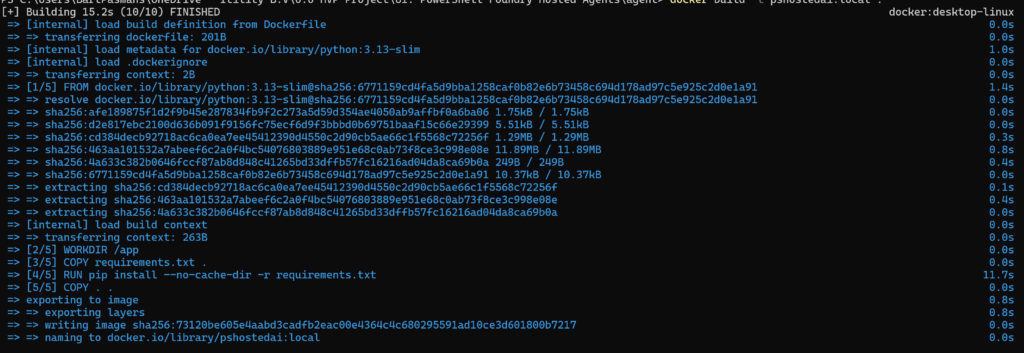
🎬Build and run the container locally (don’t forget to modify the project_endpoint)
docker build -t pshostedai:local .
docker run -p 8088:8088 -e MODEL_DEPLOYMENT_NAME=gpt-4o `
 -e FOUNDRY_PROJECT_ENDPOINT=https://xxxxxxxxxxxxx.openai.azure.com/ `
 -e AZURE_OPENAI_API_KEY=xxxxxxxxxxxxxx `
 pshostedai:local
Docker build should not be spectaculair and should just show you the result of the build
🎬 Test with a simple HTTP request from PowerShell:
$body = @{ input = "How do I list all services in PowerShell?"; stream = $false } | ConvertTo-Json
Invoke-RestMethod -Method Post -Uri "http://localhost:8088/responses" `
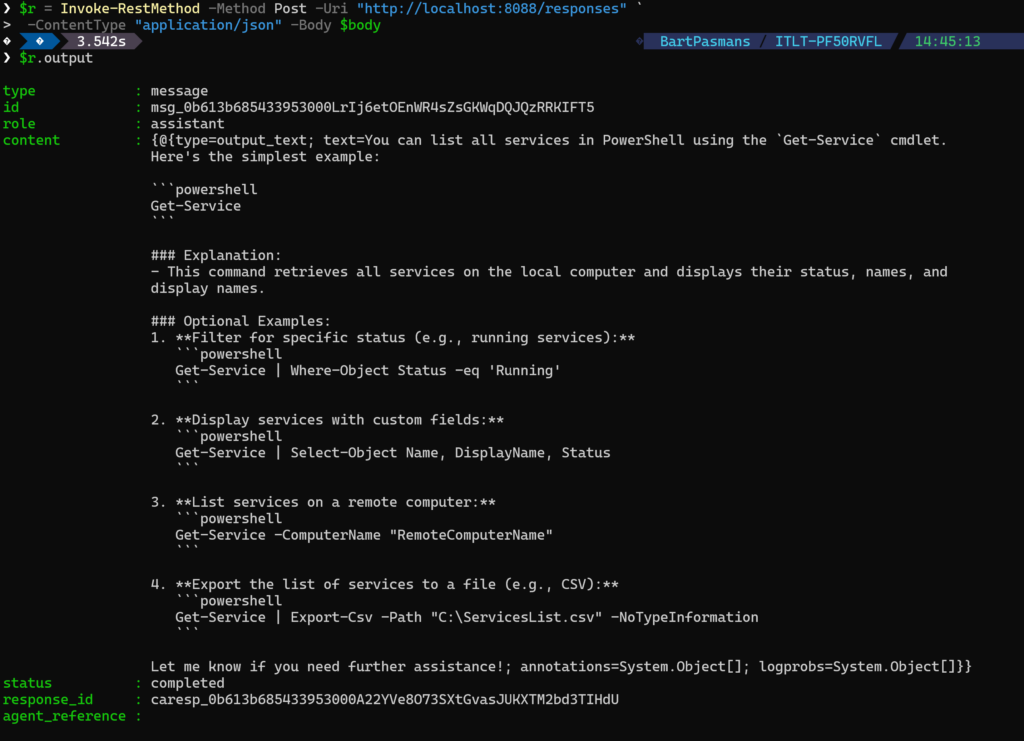
-ContentType "application/json" -Body $bodyYou should get a JSON response back with the agent’s answer. If that works, your agent is good to go.
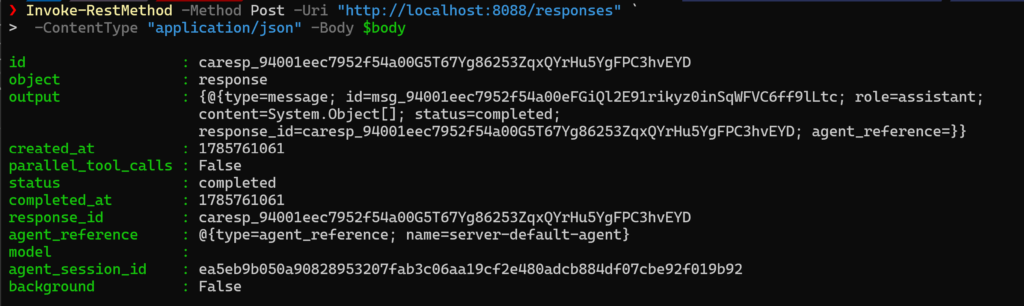
And the details of the result:
Deploying with PowerShell
If you tested and know that your AI agent works locally it’s time to get it up and running in Azure!
🎬Create Deploy-FoundryAgent.ps1 and give it the content below
function Deploy-FoundryAgent {
    param(
        [Parameter(Mandatory)]
        [string]$FoundryEndpoint,

        [Parameter(Mandatory)]
        [string]$AcrName,

        [Parameter(Mandatory)]
        [string]$AgentName,

        [Parameter(Mandatory)]
        [string]$OpenAIEndpoint,

        [string]$ImageTag = "v1",

        [string]$ModelDeployment = "gpt-4o",

        [string]$Cpu = "1",

        [string]$Memory = "2Gi",

        [string]$AgentPath = ".\agent"
    )

    $acrHost = if ($AcrName -match '\.') { $AcrName } else { "$AcrName.azurecr.io" }
    $imageName = "$acrHost/$($AgentName):$ImageTag"

    Write-Host ""
    Write-Host "  Building container image..." -ForegroundColor Cyan
    Write-Host "  Image: $imageName" -ForegroundColor DarkGray

    docker build --platform linux/amd64 -t $imageName $AgentPath
    if ($LASTEXITCODE -ne 0) {
        throw "Docker build failed."
    }

    Write-Host ""
    Write-Host "  Pushing to Azure Container Registry..." -ForegroundColor Cyan

    az acr login --name $AcrName 2>$null
    docker push $imageName
    if ($LASTEXITCODE -ne 0) {
        throw "Docker push failed. Check ACR permissions."
    }

    Write-Host ""
    Write-Host "  Deploying agent to Foundry..." -ForegroundColor Cyan

    $token = az account get-access-token --resource https://ai.azure.com --query accessToken -o tsv
    $headers = @{
        "Authorization" = "Bearer $token"
        "Content-Type"  = "application/json"
    }

    $definition = @{
        kind                       = "hosted"
        image                      = $imageName
        cpu                        = $Cpu
        memory                     = $Memory
        container_protocol_versions = @(
            @{ protocol = "responses"; version = "1.0.0" }
        )
        environment_variables      = @{
            MODEL_DEPLOYMENT_NAME  = $ModelDeployment
            AZURE_OPENAI_ENDPOINT  = $OpenAIEndpoint
        }
    }

    $existingAgent = $null
    try {
        $checkUrl = "$FoundryEndpoint/agents/$AgentName`?api-version=v1"
        $existingAgent = Invoke-RestMethod -Method Get -Uri $checkUrl -Headers $headers -ErrorAction SilentlyContinue
    } catch {}

    if ($existingAgent) {
        Write-Host "  Agent exists, deploying new version..." -ForegroundColor DarkGray
        $url = "$FoundryEndpoint/agents/$AgentName/versions?api-version=v1"
        $body = @{ definition = $definition }
    } else {
        Write-Host "  Creating new agent..." -ForegroundColor DarkGray
        $url = "$FoundryEndpoint/agents?api-version=v1"
        $body = @{ name = $AgentName; definition = $definition }
    }

    $json = $body | ConvertTo-Json -Depth 20
    $jsonBytes = [System.Text.Encoding]::UTF8.GetBytes($json)

    try {
        $response = Invoke-RestMethod -Method Post -Uri $url -Headers $headers -Body $jsonBytes
        $version = if ($response.version) { $response.version } else { $response.versions.latest.version }
        Write-Host "  Agent deployed: $AgentName (version $version)" -ForegroundColor Green
    }
    catch {
        $errBody = $_.ErrorDetails.Message
        Write-Host "  Deploy failed: $errBody" -ForegroundColor Red
        throw
    }

    Write-Host ""
    Write-Host "  Waiting for agent to become active..." -ForegroundColor Cyan

    $statusUrl = "$FoundryEndpoint/agents/$AgentName`?api-version=v1"
    $maxAttempts = 60
    $attempt = 0

    while ($attempt -lt $maxAttempts) {
        Start-Sleep -Seconds 5
        $attempt++

        $token = az account get-access-token --resource https://ai.azure.com --query accessToken -o tsv
        $headers["Authorization"] = "Bearer $token"

        $agentInfo = Invoke-RestMethod -Method Get -Uri $statusUrl -Headers $headers
        $status = $agentInfo.versions.latest.status

        Write-Host "  [$attempt] Status: $status" -ForegroundColor DarkGray

        if ($status -eq "active") {
            Write-Host ""
            Write-Host "  Agent is live!" -ForegroundColor Green
            Write-Host "  Endpoint: $FoundryEndpoint/agents/$AgentName/endpoint/protocols/openai/responses" -ForegroundColor White
            Write-Host ""
            return [PSCustomObject]@{
                AgentName = $AgentName
                Version   = $agentInfo.versions.latest.version
                Status    = "active"
                Endpoint  = "$FoundryEndpoint/agents/$AgentName/endpoint/protocols/openai/responses"
                Image     = $imageName
            }
        }

        if ($status -eq "failed") {
            Write-Host "  Provisioning failed." -ForegroundColor Red
            throw "Agent provisioning failed."
        }
    }

    throw "Timeout waiting for agent to become active."
}
This script does everything: builds the Docker image, pushes it to ACR, creates the agent in Foundry via the REST API, and polls until it’s active.
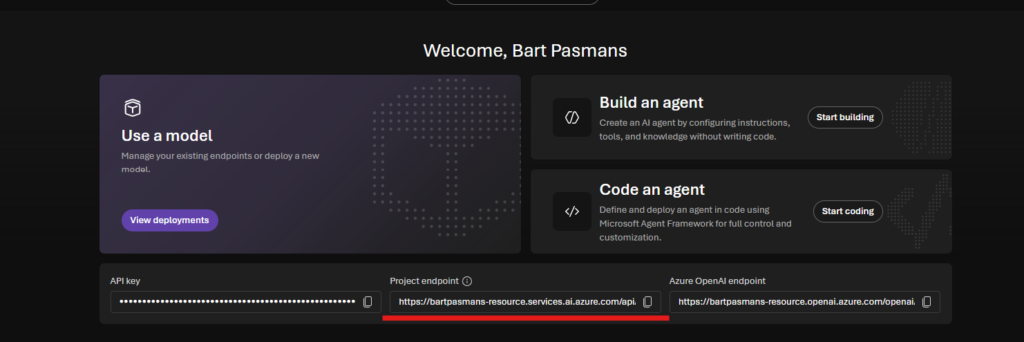
⚠️ Make sure you have your project URL for foundry before continuing with the next step. In foundry you can find it here:
- Now run the command below to deploy everything (make sure the deployment matches yours)
. .\Deploy-FoundryAgent.ps1
$endpoint = "https://xxxxxxxxxxx-resource.services.ai.azure.com/api/projects/xxxxxxxxxxx"

Deploy-FoundryAgent `
    -FoundryEndpoint "https://xxxxxxxxx-resource.services.ai.azure.com/api/projects/xxxxxxxxx" `
    -AcrName "yourAcrName" `
    -AgentName "ps-expert" `
    -OpenAIEndpoint "https://xxxxxxxxx-resource.openai.azure.com" `
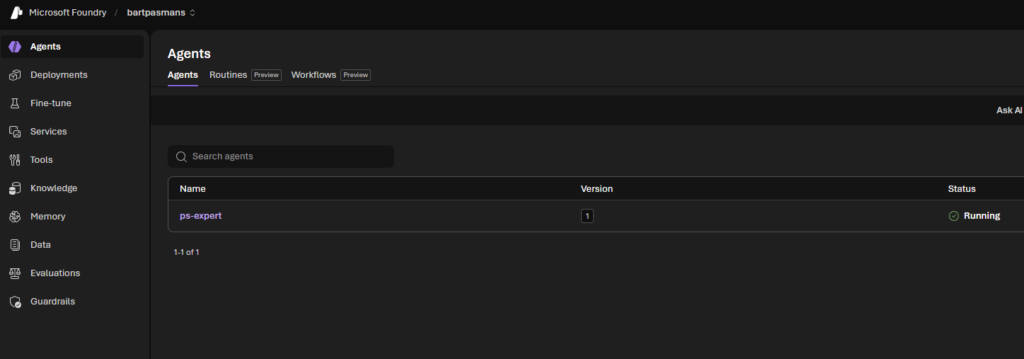
-ImageTag "v1"When everything is done you should see our agent running in foundry
🎬 After the first deploy, grab the agent’s principal_id from the response and assign AcrPull:
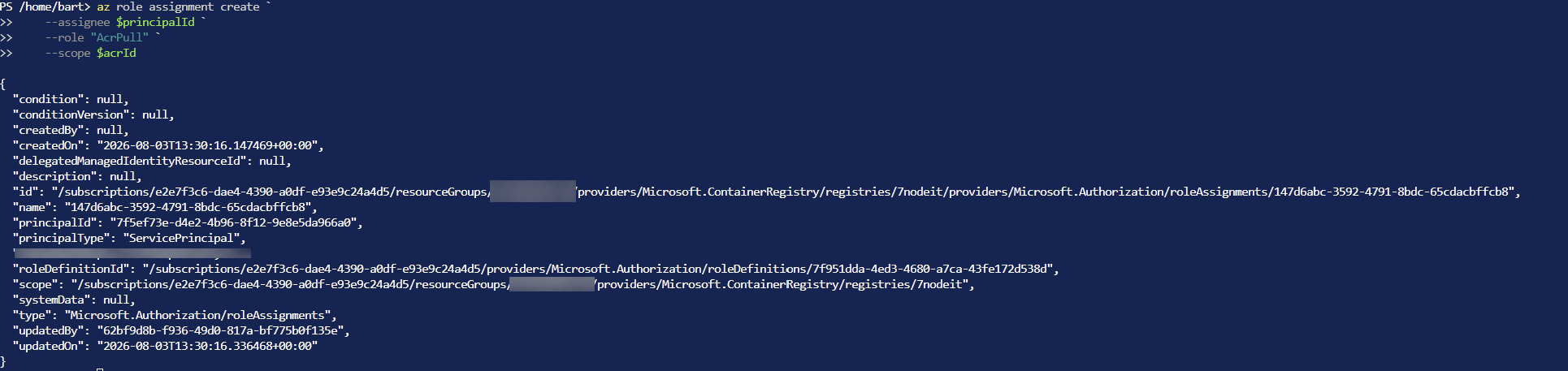
Grant AcrPull to the agent’s managed identity. This is the step that will bite you if you skip it. When Foundry deploys your agent, it needs to pull the container image from your ACR. But the agent runs under its own managed identity, and that identity has no access to your registry by default. You’ll get a cryptic ImageError: Container registry authentication failed at runtime.
You should use the foundry project principal id.
$principalId = "your-agent-principal-id"
$acrId = az acr show --name your-acr-name --query id -o tsv

az role assignment create `
    --assignee $principalId `
    --role "AcrPull" `
--scope $acrIdYou should see the operation succeed:
Now deploy the agent again (sorry I’m still trying out how to fix this in one run, my head still needs to keep up after vacation 😆)
Deploy-FoundryAgent `
    -FoundryEndpoint "https://xxxxxxxxx-resource.services.ai.azure.com/api/projects/xxxxxxxxx" `
    -AcrName "yourAcrName" `
    -AgentName "ps-expert" `
    -OpenAIEndpoint "https://xxxxxxxxx`
-ImageTag "v12"You also need to make sure your agent can communicate with the AI model so it needs permissions. You can do so by running the command below:
az role assignment create `
    --assignee "[id here]" `
    --role "Cognitive Services OpenAI User" `
    --scope "/subscriptions/xxxxxxxxxxxxxxxxxxxxx/resourceGroups/xxxxxxxxxxxxxx/providers/Microsoft.CognitiveServices/accounts/[name of foundry]"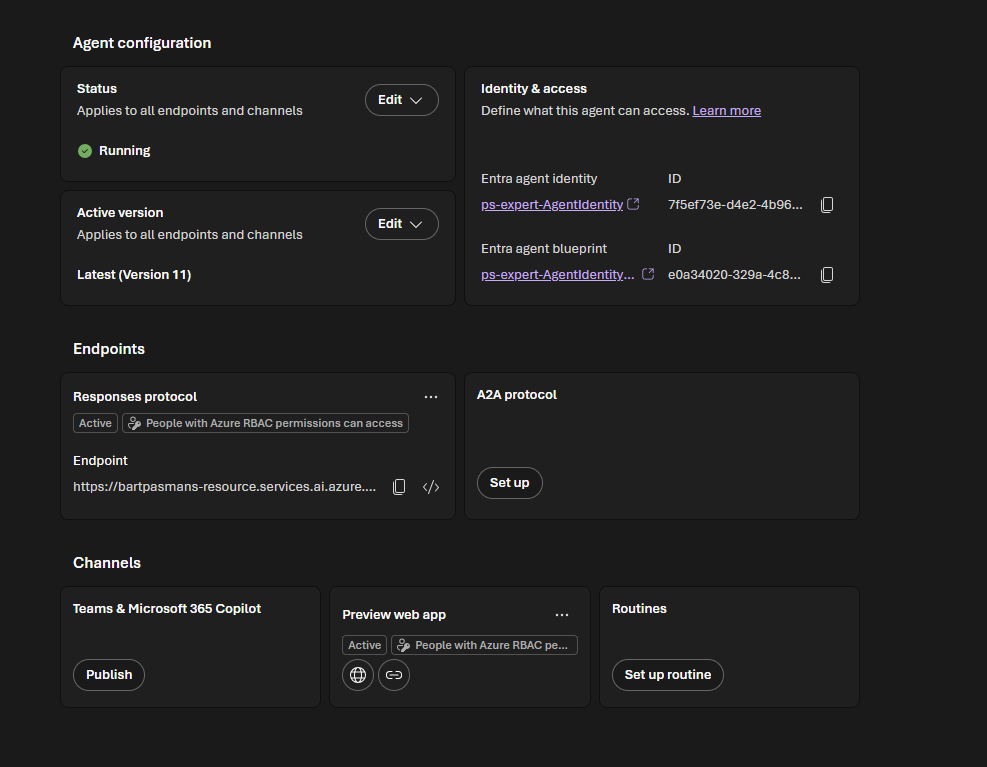
Chatting with Your Agent
Once the agent is active, you have two options. Send a single message, or start an interactive chat. You can directly interact with the agent through the foundry portal:
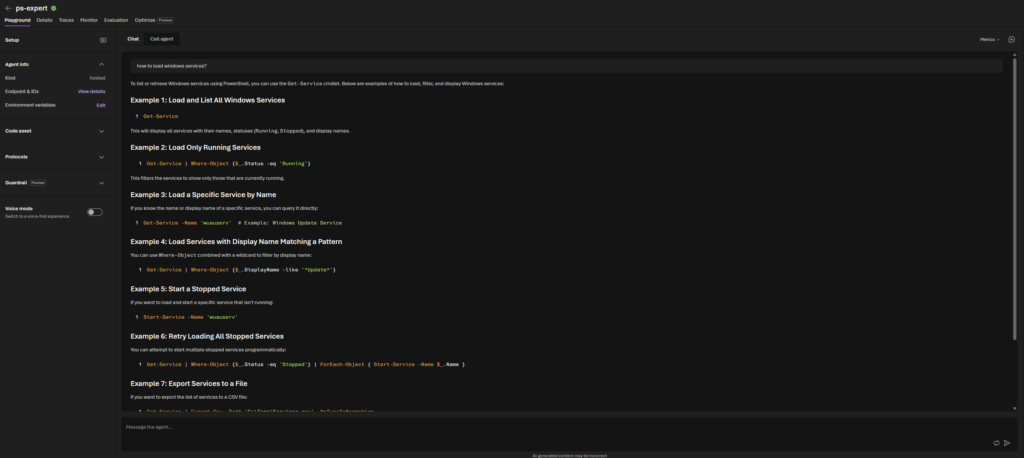
Or follow the steps below
🎬 Use the invoke script below for interaction with the agent (call it Invoke-FoundryAgent.ps1)
function Invoke-FoundryAgent {
    param(
        [Parameter(Mandatory)]
        [string]$FoundryEndpoint,

        [Parameter(Mandatory)]
        [string]$AgentName,

        [Parameter(Mandatory)]
        [string]$Message
    )

    $token = az account get-access-token --resource https://ai.azure.com --query accessToken -o tsv
    $headers = @{
        "Authorization" = "Bearer $token"
        "Content-Type"  = "application/json"
    }

    $body = @{
        input  = $Message
        stream = $false
        store  = $true
    }

    $url = "$FoundryEndpoint/agents/$AgentName/endpoint/protocols/openai/responses?api-version=v1"
    $json = $body | ConvertTo-Json -Depth 10
    $jsonBytes = [System.Text.Encoding]::UTF8.GetBytes($json)

    Write-Host ""
    Write-Host "  Thinking..." -ForegroundColor Cyan

    try {
        $response = Invoke-RestMethod -Method Post -Uri $url -Headers $headers -Body $jsonBytes
    }
    catch {
        $errBody = $_.ErrorDetails.Message
        Write-Host "  Error: $errBody" -ForegroundColor Red
        throw
    }

    $outputText = ($response.output | Where-Object { $_.type -eq "message" } |
        ForEach-Object { $_.content } |
        Where-Object { $_.type -eq "output_text" } |
        ForEach-Object { $_.text }) -join "`n"

    if ([string]::IsNullOrWhiteSpace($outputText)) {
        $outputText = $response.output_text
    }

    Write-Host ""
    Write-Host $outputText
    Write-Host ""

    return [PSCustomObject]@{
        ResponseId = $response.id
        Text       = $outputText
        Model      = $response.model
        Usage      = $response.usage
    }
}

function Start-FoundryChat {
    param(
        [Parameter(Mandatory)]
        [string]$FoundryEndpoint,

        [Parameter(Mandatory)]
        [string]$AgentName
    )

    Write-Host ""
    Write-Host "  ==============================================" -ForegroundColor Cyan
    Write-Host "     Foundry Agent Chat: $AgentName" -ForegroundColor Cyan
    Write-Host "  ==============================================" -ForegroundColor Cyan
    Write-Host "  Type your question. Type 'exit' to quit." -ForegroundColor DarkGray
    Write-Host ""

    $history = @()

    while ($true) {
        Write-Host "  You>" -NoNewline -ForegroundColor Green
        $input = Read-Host " "

        if ([string]::IsNullOrWhiteSpace($input)) { continue }
        if ($input.Trim().ToLower() -eq "exit") {
            Write-Host ""
            Write-Host "  Chat ended. $($history.Count) messages exchanged." -ForegroundColor Cyan
            Write-Host ""
            return
        }

        $result = Invoke-FoundryAgent -FoundryEndpoint $FoundryEndpoint -AgentName $AgentName -Message $input

        $history += @{
            question = $input
            answer   = $result.Text
        }
    }
}

function Get-FoundryAgentStatus {
    param(
        [Parameter(Mandatory)]
        [string]$FoundryEndpoint,

        [string]$AgentName
    )

    $token = az account get-access-token --resource https://ai.azure.com --query accessToken -o tsv
    $headers = @{
        "Authorization" = "Bearer $token"
        "Content-Type"  = "application/json"
    }

    if ($AgentName) {
        $url = "$FoundryEndpoint/agents/$AgentName`?api-version=v1"
        $agent = Invoke-RestMethod -Method Get -Uri $url -Headers $headers

        $latestVersion = $agent.versions.latest
        $status = $latestVersion.status
        $version = $latestVersion.version

        Write-Host ""
        Write-Host "  Agent: $($agent.name)" -ForegroundColor White
        Write-Host "  State: $($agent.state)" -ForegroundColor $(if ($agent.state -eq "enabled") { "Green" } else { "Yellow" })
        Write-Host "  Status: $status" -ForegroundColor $(if ($status -eq "active") { "Green" } else { "Yellow" })
        Write-Host "  Version: $version" -ForegroundColor DarkGray
        Write-Host ""

        return $agent
    }

    $url = "$FoundryEndpoint/agents?api-version=v1"
    $agents = Invoke-RestMethod -Method Get -Uri $url -Headers $headers

    Write-Host ""
    Write-Host "  Hosted Agents:" -ForegroundColor White
    Write-Host "  ───────────────────────────────────────" -ForegroundColor DarkGray

    $agentList = if ($agents.data) { $agents.data } else { $agents.value }
    foreach ($a in $agentList) {
        $aStatus = $a.versions.latest.status
        if (-not $aStatus) { $aStatus = $a.state }
        $statusColor = switch ($aStatus) {
            "active"   { "Green" }
            "enabled"  { "Green" }
            "creating" { "Yellow" }
            "failed"   { "Red" }
            default    { "DarkGray" }
        }
        Write-Host "  $($a.name)" -NoNewline -ForegroundColor White
        Write-Host " [$aStatus]" -ForegroundColor $statusColor
    }

    Write-Host ""
    return $agents.value
}

function Remove-FoundryAgent {
    param(
        [Parameter(Mandatory)]
        [string]$FoundryEndpoint,

        [Parameter(Mandatory)]
        [string]$AgentName,

        [switch]$Force
    )

    if (-not $Force) {
        $confirm = Read-Host "  Delete agent '$AgentName' and all versions? (y/N)"
        if ($confirm -ne 'y') {
            Write-Host "  Cancelled." -ForegroundColor DarkGray
            return
        }
    }

    $token = az account get-access-token --resource https://ai.azure.com --query accessToken -o tsv
    $headers = @{
        "Authorization" = "Bearer $token"
    }

    $url = "$FoundryEndpoint/agents/$AgentName`?api-version=v1"

    try {
        Invoke-RestMethod -Method Delete -Uri $url -Headers $headers
        Write-Host "  Agent '$AgentName' deleted." -ForegroundColor Green
    }
    catch {
        $errBody = $_.ErrorDetails.Message
        Write-Host "  Delete failed: $errBody" -ForegroundColor Red
        throw
    }
}- Now let’s interact!
. .\Invoke-FoundryAgent.ps1

Invoke-FoundryAgent `
    -FoundryEndpoint $endpoint `
    -AgentName "ps-expert" `
    -Message "How do I monitor a folder for new files?"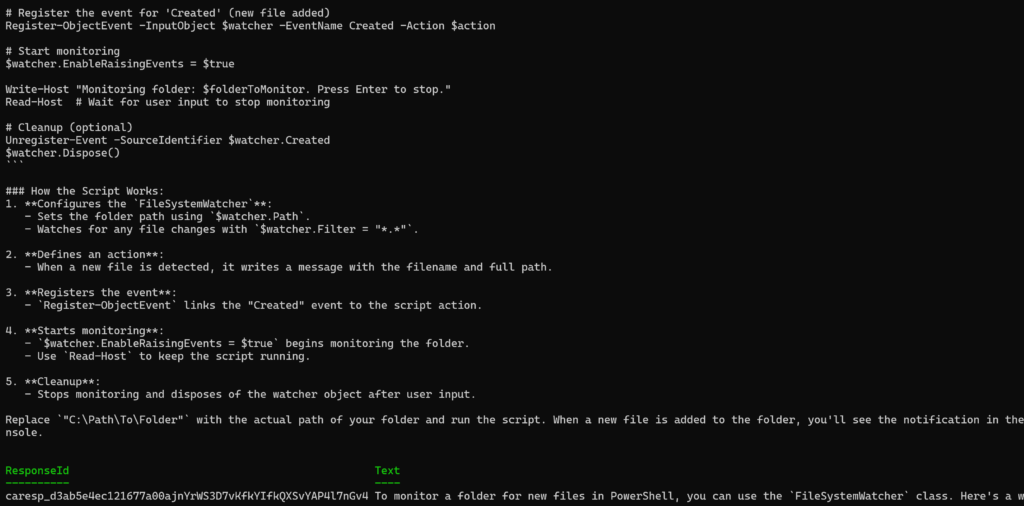
Cool right?! You now have containerized hosted agents directly available in Azure Foundry. Enjoy! 🙂
The Bigger Picture
This blog is different from the previous sixty. We’re not just calling an API, we’re deploying infrastructure. The agent runs in the cloud with its own identity, its own endpoint, its own scaling. It’s a real service.
And the management layer is pure PowerShell. No portal clicking, no Azure DevOps pipelines (unless you want them). Just scripts that automate the entire agent lifecycle.
Some ideas for what you could deploy:
- A documentation bot that knows your internal runbooks
- An incident helper that reads logs and suggests fixes
- A code review agent that other tools can call via HTTP
- A chat assistant that your team accesses through a simple endpoint
The agent code can be as simple or complex as you want. Swap the system prompt, add more tools, integrate with MCP, the Foundry platform handles the hosting.
Wrapping Up
I must admit, this one was difficult for me. Starting fresh after my vacation with this idea in mind and the GA of the hosted agents in foundry it took me some evening hours to create it. But here it is!
I will save you the long wrapping up, at this point you’ve read enough, and to be honest, I’m already up to a next vacation 😆
Hope you all enjoyed it, and on to the next one!
And some cool URLs I’ve been using as well
https://learn.microsoft.com/en-us/azure/foundry/agents/concepts/hosted-agents
https://devblogs.microsoft.com/foundry/agent-service-build2026/