


Welcome back!
Last time, we explored the “Zero-Footprint” world of In-Memory XML, leaving the “script-kiddie” disk-writing habits in the dust. Today, we’re moving from data handling to the very DNA of your logic.
I’ll be honest: I love a robust if-else statement as much as the next architect, but sometimes your code starts looking like a birds nest. It’s cluttered, it’s prone to typos, and frankly, it’s a bit 2012.
With PowerShell 7+, the team brought in the Modern Operators. These are the “Short-Circuit” and “Ternary” tools that C# developers have been bragging about for years. They allow you to compress 10 lines of “if-this-is-null-then-do-that” logic into a single, elegant line of code.
Ready to stop writing “Wall-of-Text” logic and start writing clean, lethal code? Let’s go!
Throughout this post, look for the 🎬 icon for follow-along steps and 💡 notes for that deep-dive technical context.
The Null-Coalescing Operator (??)
We’ve all been there. You’re building a professional automation script, and you’re expecting data from an API, a database, or a user input. But there’s a ghost in the machine: The Null Value. To prevent your script from crashing like a house of cards, you start building “defensive walls.” We’ve all written this classic block of defensive code:
if ($username -eq $null) {
    $username = "Unknown"
}It works. It’s explicit. But let’s be real: it’s verbose. If you have ten variables to check, your script suddenly gains forty lines of “clutter” that bury your actual logic. It’s the equivalent of building a manual scaffold every time you want to paint a wall.
Enter the “Safety Net” (??)
PowerShell 7 changed the game by introducing the Null Coalescing Operator (??). It’s the ultimate shortcut for setting default values. Instead of that bulky if statement, you now simply write:
$username = $username ?? "Unknown"Done. In one elegant line, you’ve secured your variable.
What Actually Happens?
The ?? operator is like a high-speed filter. It tells PowerShell: “Look at the left side. If it’s actually something, keep it. If it’s nothing ($null), use the right side instead.”
However, as an Automation Architect, you need to understand the precision of this tool. It is a scalp, not a sledgehammer:
❌ It does not check for empty strings: “” is still a string.
❌ It does not check for $false: A boolean false is a valid value.
✅ It checks specifically for $null: It only triggers when a variable is truly empty/uninitialized.
💡 Deep Dive: Short-Circuit Evaluation PowerShell is smart about performance. Internally, it evaluates the left operand first. If it finds a value that isn’t $null, it stops right there and returns it. It doesn’t even bother looking at the right side. This is called short-circuit evaluation.
This is crucial because if your “fallback” (the right side) is a heavy function call, like “Get-ExpensiveData”, PowerShell will only run that function if the left side is null. This saves your CPU 😉
🎬 Try This: Witness the Short-Circuit
The best way to feel the power of the “Safety Net” is to see it in action. Open your PowerShell 7 terminal and run these two scenarios. Pay attention to how the logic pivots instantly.
Scenario A: The Safety Net Catches You
$apiResponse = $null
$result = $apiResponse ?? "Fallback Data"
$result
Scenario B: The Safety Net Stays Stored Now, simulate a successful data fetch:
$apiResponse = "Live Data"
$result = $apiResponse ?? "Fallback Data"
$result
Real-World Use Cases: Clean Code in the Wild
Why does this matter for your daily scripts? Because it replaces “Clutter” with “Intent.” Here are two scenarios where the ?? operator makes you look like a Senior Developer:
1. Zero-Config Loading
Imagine you’re deploying a containerized app. You want to use an Environment Variable if it exists, but you need a sensible default if it doesn’t.
$configPort = $env:APP_PORT ?? 80802. Optional Parameter Handling
When writing functions, you often have optional parameters. Instead of checking if they are empty inside your function body with nested if statements, you can sanitize them in one line:
param( [string]$LogPath )
$LogPath = $LogPath ?? "C:\Logs\default.log"The “Architect” Verdict
By using the Null Coalescing operator, your code stops being a list of instructions on how to check for empty data and starts being a declaration of what the data should be.
- No more sprawling if-blocks.
- No more repeated variable assignments.
- Just pure intent.
Null-Coalescing Assignment (??=)
The Lazy Initializer
If the ?? operator is a safety net, the Null-Coalescing Assignment operator (??=) is your personal assistant who only does the work if it hasn’t been done yet.
It takes the logic of “check and assign” and crushes it down into a single, beautiful expression.
$cache ??= @{}The Translation: “Check the variable $cache. If it is $null, initialize it as an empty hashtable. If it already has data, leave it exactly as it is.”
💡 Think of ??= as a “Lazy Constructor.” It ensures a variable is ready for use without accidentally overwriting existing data.
Why this is a Game-Changer
Before PowerShell 7, you had to write a three-line guard clause to protect your objects. Now, you can handle complex initialization in the margin of your code.
This is incredibly powerful in three specific “Architect” scenarios:
- Module Initialization: Ensuring your configuration objects are live the moment the module loads, without wiping user settings.
- Caching Patterns: Only fetching expensive data (like a heavy SQL query or API call) if the local cache variable is currently empty.
- Long-running Services: Managing state in a loop where you only want to instantiate a connection object on the first iteration.
🎬 Witness the “Lazy” Power
Run this in your session to see how it respects existing data:
$DatabaseConnection = $null
$DatabaseConnection ??= "New Active Connection"
Write-Host "First Pass: $DatabaseConnection"
$DatabaseConnection ??= "A different connection"
Write-Host "Second Pass: $DatabaseConnection"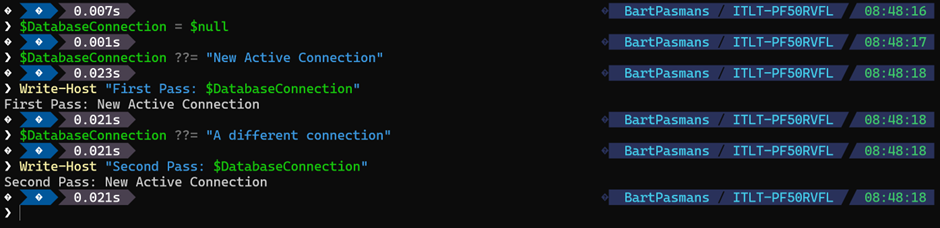
The Ternary Operator (?:)
The “Inline Decision Engine”
Now we enter the realm of true code elegance. If you’ve ever felt that a simple if-else block took up way too much “vertical real estate” in your script, the Ternary Operator is your new best friend. It’s a compact, one-line decision engine that handles binary choices with zero ceremony.
The Old Way (The “Tower” of Braces):
if ($cpu -gt 80) {
    $status = "High"
} else {
    $status = "Normal"
}The Modern Way (The Architect’s Line):
$status = ($cpu -gt 80) ? "High" : "Normal"
See? While CPU doesn’t have a value assigned 😉
How It Works
The syntax is a simple three-part harmony: (condition) ? valueIfTrue : valueIfFalse
💡 Under the hood: Just like the Null-Coalescing operators, the Ternary operator uses short-circuit logic. The condition is evaluated first. If it’s $true, PowerShell returns the left expression and completely ignores the right. If it’s $false, it skips the left and evaluates the right. It’s fast, efficient, and avoids unnecessary processing.
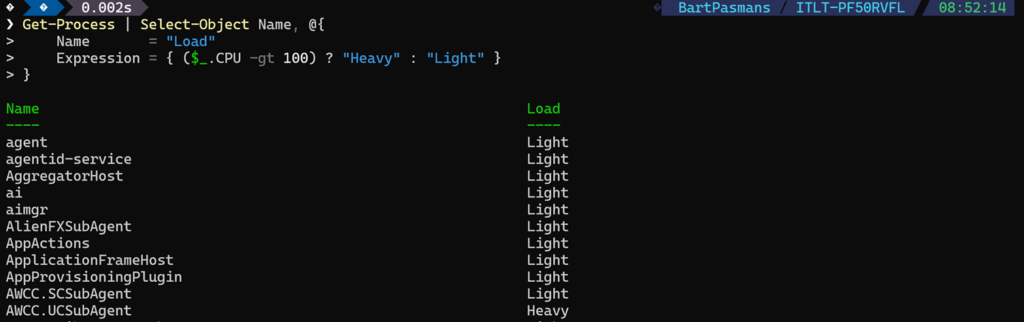
🎬 Example: Formatting Output on the Fly
Where does this shine? Inside calculated properties. Imagine you’re generating a report and want to classify data without writing a 20-line function.
Get-Process | Select-Object Name, @{
    Name       = "Load"
    Expression = { ($_.CPU -gt 100) ? "Heavy" : "Light" }
}You’ve just embedded dynamic classification directly into your pipeline. This is expressive scripting—the code tells you exactly what it’s doing without you having to hunt through nested blocks.
❌ Don’t do this:
$result = ($a -gt 5 -and $b -lt 3 -and (Test-Path $path)) ? "Valid" : "Invalid"If your condition spans multiple logical steps or requires deep concentration to decipher, you’ve failed the “Readability Test.”
The Rule of Thumb:
- Use Ternary for small, binary decisions (True/False, High/Low, On/Off).
- Use If-Blocks for complex, multi-step logic.
Architects choose clarity over cleverness every single time.
Summary
This blog marks the end of the “Nesting Doll Era.” By mastering the Modern Operators of PowerShell 7, you’ve moved beyond writing simple instructions and started writing declarative logic. We have traded the clunky, 2012-style if-else towers for sleek, high-performance “short-circuit” engines.
We’ve shifted our mindset from manually checking for errors to building Self-Healing Variables and Inline Decision Engines. Whether you are initializing complex caches with ??=, safeguarding API responses with ??, or classifying data on-the-fly with ?:, you are now writing code that is built for the modern, high-velocity automation world.
Key Takeaways to Remember:
- Logical Precision: Use
??and??=to handle$nullwithout accidentally overwriting empty strings or$falsevalues. It’s the professional way to ensure data integrity. - Performance First: Modern operators use Short-Circuit Evaluation. By only executing fallback code when absolutely necessary, you save CPU cycles and speed up your bulk-data processing.
- Architectural Clarity: Clean code isn’t just about fewer lines; it’s about Intent. Use these operators to remove the “noise” of defensive programming so your script’s true purpose can shine through.
- The Readability Rule: Just because you can fit it on one line doesn’t mean you should. Use ternary operators for simple binary choices, and keep the robust
ifblocks for your heavy, multi-step business logic.
Remember my motto: ‘Don’t lift a finger, unless it’s to automate,’ and now, you’re automating with the surgical precision and elegance of a true PowerShell Architect.
Stay clean, stay lethal, and I’ll see you in the next deep dive!