

First of all, sorry! I’m absolutely short on time so this blog is gonna be a short one (hopefully for the next one I can spent more time on it) – I add a script in the end of the blog which you first need in order to run everything (this manages foundry, the creation of skills and the harness agent)
Remember my previous blog about the PowerShell expert agent running in Foundry? I needed a Dockerfile, lines of Python, an Azure Container Registry, an `AcrPull` role assignment that everybody forgets, and a deploy script that polls until the container says `active`. It worked, and I’d do it again. But it’s a lot of plumbing for an agent whose real value sits in a system prompt.
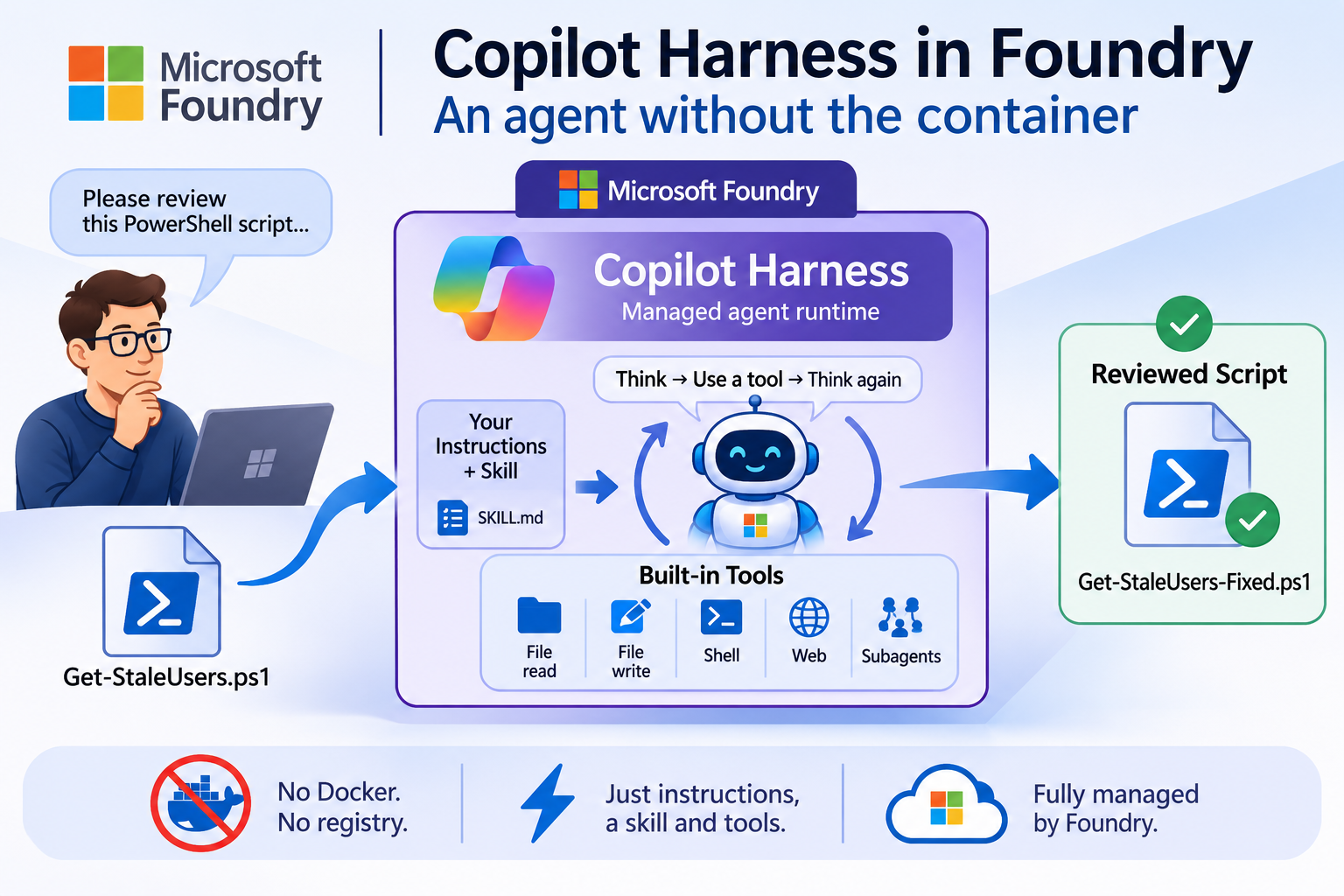
On 28 October Microsoft put something in public preview that removes most of that plumbing: the Microsoft Copilot harness in Foundry Agent Service. It’s the same agent loop GitHub built for Copilot, now offered as a managed runtime. You bring instructions, a skill and a list of tools. Microsoft runs the loop, the sandbox, the file workspace and the shell.
The documentation shows you how to do that with `azd` and Python. We’re doing it with PowerShell, straight against the REST API.
🎬 marks steps to follow, 📒 marks deep-dives. Let’s go!
What to choose?
So you can choose between running a hosted agent and a harness short summary on the difference between the two
| Hosted Agent | CoPilot Harness | |
| What you write | A container with your own agent loop | Instructions, skills, tool config |
| Who runs the loop | You | Microsoft |
| Compute | You choose the CPU/memory for the agent, langgraph | Managed by Foundry, not configurable |
| Framework | Anything: Agent Framework, LangGraph, your own | The harness |
| Model | Your choice | A Foundry model with reasoning and tool calling, no bring-your-own-model |
| Foundry Memory | Yes | Not supported |
| Status | GA | Public preview, no SLA |
📒 My rule of thumb: if the interesting part of your agent is the *code*, pick a hosted agent. If the interesting part is the *instructions and the method*, pick the harness and stop maintaining a container.
Please make sure before you start that you have foundry deployed with a model deployment and that you have azure CLI logged in.
The harness basically works when you send it a message, Foundry starts (or resumes) a sandbox and runs the agent loop for you: the model thinks, calls a tool, reads the result and thinks again until it has an answer.
Enough talking, lets get going!
Write and Publish the Skill
So now it’s time to create a custom skill, we’ll be giving the harness this skill so it follows exactly what we want it to follow.
But, what is a skill? Well let me explain it below before jumping into the actual content
A skill is set of instructions, workflows, and resources that teaches an AI assistant how to perform a specific, specialized task.
Think of it like an app or a plugin for your AI: instead of relying only on its general knowledge, the AI can “load” a skill to gain expert-level guidance on how to execute a particular job, follow a specific company format, or use specialized tools.
🎬 Save the skill below as we will be publishing it through az commands to foundry
---
name: powershell-review
description: Review a PowerShell script against house coding guidelines and return a prioritised list of findings with fixes.
---

# PowerShell script review

Use this skill whenever the user hands you a PowerShell script, a function or a snippet and asks for a review, feedback, a cleanup or "is this OK?".

## Working method

1. Save the script to the workspace as `review/<original-name>.ps1` so you can read it back line by line. If no name was given, use `review/script.ps1`.
2. If a shell is available, check whether `pwsh` is installed (`pwsh -NoProfile -Command '$PSVersionTable.PSVersion'`).
   - If it is, parse the script without running it:

     ```bash
     pwsh -NoProfile -Command '$e = $null; [System.Management.Automation.Language.Parser]::ParseFile("review/<name>.ps1", [ref]$null, [ref]$e) | Out-Null; $e | ForEach-Object { "Line $($_.Extent.StartLineNumber): $($_.Message)" }'
     ```

     No output means no parse errors. Report every parse error with its line number.
   - If it isn't, say so in one line and continue with the manual review. Never claim a syntax check you didn't run.
3. Never execute the script itself. Parsing is allowed, running is not.
4. Walk through the checklist below and collect findings.
5. Write the corrected script to `review/<name>.fixed.ps1` and show it in the answer.

## Checklist

**Security (always High)**
- Hardcoded secrets, passwords, connection strings or tokens. Suggest `Microsoft.PowerShell.SecretManagement` or a managed identity.
- `Invoke-Expression` on anything built from input.
- Disabled certificate validation or `-SkipCertificateCheck` without a comment explaining why.

**Reliability (High or Medium)**
- Empty `catch {}` blocks that swallow errors.
- Missing `-ErrorAction Stop` on calls inside `try` that would otherwise only write a non-terminating error.
- `$array += $item` inside a loop over large collections. Suggest a `[System.Collections.Generic.List[object]]` or capturing loop output.

**Conventions (Medium or Low)**
- Function names follow `Verb-Noun` with an approved verb (`Get-Verb`) and a singular noun.
- Advanced functions use `[CmdletBinding()]` and typed, named parameters.
- No aliases in scripts (`gci`, `%`, `?`, `select`). Spell out the cmdlet.
- `Write-Host` is for messages to the user, never for data. Data goes to the pipeline.
- 4 spaces per indentation level, lines under 120 characters, opening brace on the same line.

## Answer format

Start with a one-line verdict: **Ship it**, **Fix first** or **Rewrite**.

Then a table:

| # | Severity | Line | Finding | Fix |
|---|----------|------|---------|-----|

Order by severity, High first. Keep each finding to one sentence. After the table, show the corrected script in a single `powershell` code block and list which checklist items you could not verify.
- Now we need to publish this skill to foundry
- Run the commands below to publish to foundry
$endpoint = "https://xxxxxxxxxxxxxxxxxxxxx.services.ai.azure.com/api/projects/xxxxxxxx"
az login

$skill = Publish-FoundrySkill -FoundryEndpoint $endpoint -SkillPath .\skills\powershell-reviewYou should see that the script published the skills

After this the skill becomes visible in foundry
Now we go to the harness itself!
Creating the harness agent
🎬 Follow the steps below to create the agent
$instructions = @"
You are a senior PowerShell reviewer.
Use the powershell-review skill for every review request.
Be direct. Don't praise code that has problems.
"@

Deploy-HarnessAgent -FoundryEndpoint $endpoint -AgentName "harness-ps-reviewer" `
    -ModelDeployment "gpt-5.4-mini" -Instructions $instructions -Skills $skill `
-EnabledTools filesystem_read, filesystem_write, shellYou should see that the harness agent is deployed

Talk to It
🎬 Now it’s time to talk to our new agent! Let’s start by doing this from PowerShell first:
The sample has the usual suspects: a hardcoded password, aliases, `Write-Host` used for data, `$result +=` in a loop, an `Invoke-Expression` and an empty `catch {}`. There’s also one that’s easy to miss: the password sits in a variable called `$pwd`, which shadows PowerShell’s own automatic variable. Let’s see if the reviewer spots that one too.
$conversation = New-HarnessConversation -FoundryEndpoint $endpoint -AgentName "harness-ps-reviewer"

Invoke-HarnessAgent -FoundryEndpoint $endpoint -AgentName "harness-ps-reviewer" `
    -ConversationId $conversation -Message "Review this script." `
-ScriptPath .\samples\Get-StaleUsers.ps1And you will get the result of the harness agent showing the result:
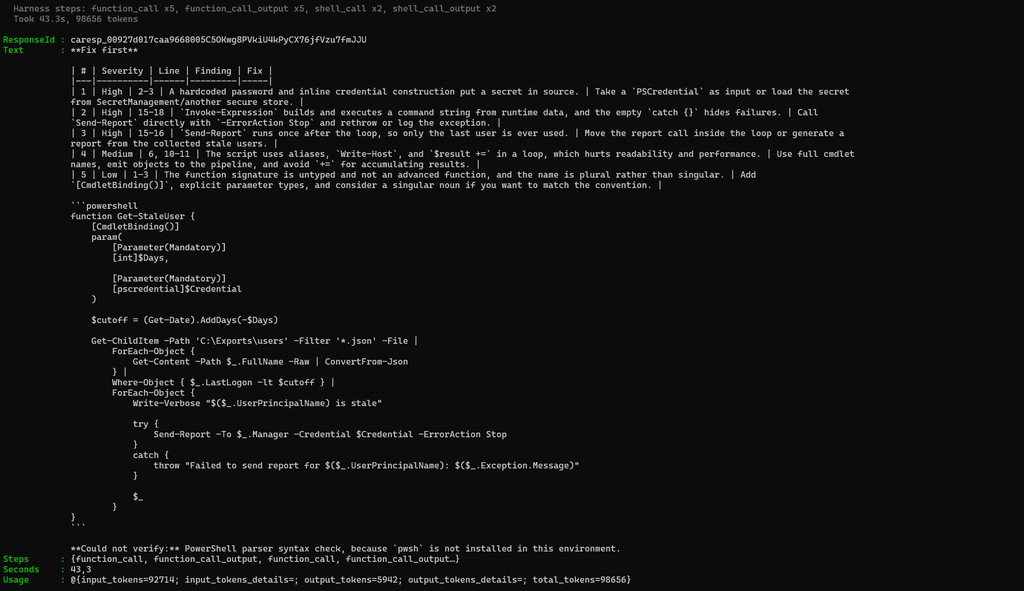
Everything in the response `output` that isn’t the final message is something the harness *did* on the way: writing the file, running the parser, reading the result. This is the loop you’d otherwise build yourself, made visible. For the full picture with arguments and timings, open the agent’s **Traces** view in the portal.
What Does It Cost?
Until **1 December 2026** the harness runtime is free. You only pay for model tokens and for tools that are billed separately. Perfect timing to try it.
From 1 December the sandbox is billed on consumption:
vCPU $0.0994 per vCPU-hour
Memory $0.0118 per GiB-hour
Plus model inference, as always. 📒 Because Foundry sizes and idles the sandbox for you, you can’t predict the compute part from a calculator. Run your real workload in November, then compare token costs with what Cost Analysis shows after 1 December. Prices can vary by region and agreement.
Summary
In the previous blog the agent was a container I had to build, push, secure and babysit. Here it’s a definition, a skill file and one PowerShell script to manage both. The harness doesn’t replace hosted agents; when your agent *is* code, a container is still the right tool. But for the many agents that are really a good set of instructions with a few tools, this is a much shorter path.
And it’s free until December. You know what to do. 😉
Until next time, happy scripting! 🚀
The harness script 🤖 (AI helped to create this)
$script:HarnessTools    = 'filesystem_read', 'filesystem_write', 'shell', 'web', 'subagents'
$script:HarnessFeatures = 'MicrosoftCopilot=V1Preview,Skills=V1Preview'   # comma-separated, like the Python SDK does

function Get-HarnessHeaders {
    param([string]$Features)

    $token = az account get-access-token --resource "https://ai.azure.com" --query accessToken -o tsv
    if ($LASTEXITCODE -ne 0) {
        throw "Failed to get an access token. Run 'az login' first."
    }

    $headers = @{ Authorization = "Bearer $token" }
    if ($Features) { $headers['Foundry-Features'] = $Features }
    return $headers
}

function Publish-FoundrySkill {
    param(
        [Parameter(Mandatory)] [string]$FoundryEndpoint,
        [Parameter(Mandatory)] [string]$SkillPath        # folder that contains SKILL.md
    )

    $skillFile = Join-Path $SkillPath 'SKILL.md'
    if (-not (Test-Path $skillFile)) { throw "No SKILL.md found in '$SkillPath'." }

    # The frontmatter name is also the URL key of the skill, so read it from the file itself
    $match = Select-String -Path $skillFile -Pattern '^name:\s*(\S+)\s*$' | Select-Object -First 1
    if (-not $match) { throw "SKILL.md has no 'name:' line in its frontmatter." }
    $name = $match.Matches[0].Groups[1].Value

    $splat = @{
        Method  = 'Post'
        Uri     = "$FoundryEndpoint/skills/$name/versions?api-version=v1"
        Headers = Get-HarnessHeaders -Features 'Skills=V1Preview'
        Form    = @{ files = Get-Item $skillFile; default = 'true' }
    }

    try {
        $response = Invoke-RestMethod @splat
    }
    catch {
        Write-Host "  Skill upload failed: $($_.ErrorDetails.Message)" -ForegroundColor Red
        throw
    }

    Write-Host "  Skill published: $name (version $($response.version))" -ForegroundColor Green
    return [pscustomobject]@{ Name = $name; Version = "$($response.version)" }
}

function Deploy-HarnessAgent {
    param(
        [Parameter(Mandatory)] [string]$FoundryEndpoint,
        [Parameter(Mandatory)] [string]$AgentName,
        [Parameter(Mandatory)] [string]$Instructions,
        [string]$ModelDeployment = 'gpt-5.4-mini',
        [object[]]$Skills = @(),                         # output of Publish-FoundrySkill

        [ValidateSet('filesystem_read', 'filesystem_write', 'shell', 'web', 'subagents')]
        [string[]]$EnabledTools = @('filesystem_read', 'filesystem_write', 'shell')
    )

    $features = 'MicrosoftCopilot=V1Preview'
    if ($Skills) { $features += ',Skills=V1Preview' }
    $headers = Get-HarnessHeaders -Features $features

    # The harness is picked at creation time. A new version of an existing
    # non-harness agent stays non-harness, so stop before we create a confusing version.
    $existing = $null
    try {
        $existing = Invoke-RestMethod -Method Get -Uri "$FoundryEndpoint/agents/$AgentName`?api-version=v1" -Headers $headers
    }
    catch {
        if ($_.Exception.Response.StatusCode.value__ -ne 404) { throw }
    }

    if ($existing -and $existing.versions.latest.definition.harness.type -ne 'microsoft_copilot_preview') {
        throw "Agent '$AgentName' already exists without the Copilot harness. Pick a new name."
    }

    # Built-in harness tools: switch everything off, then switch on what this agent needs
    $toolset = @{
        type           = 'microsoft_copilot_toolset_preview'
        default_config = @{ enabled = $false }
        configs        = @($EnabledTools | ForEach-Object { @{ name = $_; enabled = $true } })
    }

    $definition = @{
        kind         = 'prompt'
        model        = $ModelDeployment
        instructions = $Instructions
        harness      = @{ type = 'microsoft_copilot_preview' }
        tools        = @($toolset)
    }
    if ($Skills) {
        $definition.skills = @($Skills | ForEach-Object { @{ name = $_.Name; version = $_.Version } })
    }

    if ($existing) {
        $uri  = "$FoundryEndpoint/agents/$AgentName/versions?api-version=v1"
        $body = @{ definition = $definition }
    }
    else {
        $uri  = "$FoundryEndpoint/agents?api-version=v1"
        $body = @{ name = $AgentName; definition = $definition }
    }

    $json = [Text.Encoding]::UTF8.GetBytes(($body | ConvertTo-Json -Depth 10))

    try {
        $response = Invoke-RestMethod -Method Post -Uri $uri -Headers $headers -Body $json -ContentType 'application/json; charset=utf-8'
    }
    catch {
        Write-Host "  Deploy failed: $($_.ErrorDetails.Message)" -ForegroundColor Red
        throw
    }

    $version = if ($response.version) { $response.version } else { $response.versions.latest.version }
    $off = $script:HarnessTools | Where-Object { $_ -notin $EnabledTools }

    Write-Host "  Harness agent deployed: $AgentName (version $version)" -ForegroundColor Green
    Write-Host "  Built-in tools on : $($EnabledTools -join ', ')" -ForegroundColor DarkGray
    Write-Host "  Built-in tools off: $($off -join ', ')" -ForegroundColor DarkGray

    return [pscustomobject]@{ AgentName = $AgentName; Version = $version; Model = $ModelDeployment }
}

function Get-HarnessAgentEndpoint {
    param(
        [Parameter(Mandatory)] [string]$FoundryEndpoint,
        [Parameter(Mandatory)] [string]$AgentName
    )
    # Harness agents only work through their own OpenAI-compatible endpoint.
    # Conversations live there too: one created on /openai/v1 isn't visible to the agent.
    return "$($FoundryEndpoint.TrimEnd('/'))/agents/$AgentName/endpoint/protocols/openai"
}

function New-HarnessConversation {
    param(
        [Parameter(Mandatory)] [string]$FoundryEndpoint,
        [Parameter(Mandatory)] [string]$AgentName
    )

    $base = Get-HarnessAgentEndpoint -FoundryEndpoint $FoundryEndpoint -AgentName $AgentName
    $response = Invoke-RestMethod -Method Post -Uri "$base/conversations?api-version=v1" `
        -Headers (Get-HarnessHeaders -Features $script:HarnessFeatures) -Body '{}' -ContentType 'application/json'
    return $response.id
}

function Invoke-HarnessAgent {
    param(
        [Parameter(Mandatory)] [string]$FoundryEndpoint,
        [Parameter(Mandatory)] [string]$AgentName,
        [Parameter(Mandatory)] [string]$ConversationId,
        [Parameter(Mandatory)] [string]$Message,
        [string]$ScriptPath                               # optional: a .ps1 to send along
    )

    $text = $Message
    if ($ScriptPath) {
        $fileName = Split-Path $ScriptPath -Leaf
        $content  = Get-Content -Path $ScriptPath -Raw
        $text     = "$Message`n`nFile name: $fileName`n`n``````powershell`n$content`n``````"
    }

    $base = Get-HarnessAgentEndpoint -FoundryEndpoint $FoundryEndpoint -AgentName $AgentName
    $uri  = "$base/responses?api-version=v1"
    $body = @{
        conversation = $ConversationId                    # required by the harness
        input        = $text
    }
    $json = [Text.Encoding]::UTF8.GetBytes(($body | ConvertTo-Json -Depth 10))

    Write-Host "  Working..." -ForegroundColor Cyan
    $timer = [Diagnostics.Stopwatch]::StartNew()

    try {
        $response = Invoke-RestMethod -Method Post -Uri $uri `
            -Headers (Get-HarnessHeaders -Features $script:HarnessFeatures) -Body $json `
            -ContentType 'application/json; charset=utf-8' -TimeoutSec 600
    }
    catch {
        Write-Host "  Error: $($_.ErrorDetails.Message)" -ForegroundColor Red
        throw
    }
    $timer.Stop()

    $answer = ($response.output |
        Where-Object type -eq 'message' |
        ForEach-Object { $_.content } |
        Where-Object type -eq 'output_text' |
        ForEach-Object { $_.text }) -join "`n"

    # Everything that isn't the final message is something the harness did along the way
    $steps = @($response.output | Where-Object type -ne 'message' | ForEach-Object type)

    Write-Host ""
    Write-Host $answer
    Write-Host ""
    if ($steps) {
        $summary = $steps | Group-Object | ForEach-Object { "$($_.Name) x$($_.Count)" }
        Write-Host "  Harness steps: $($summary -join ', ')" -ForegroundColor DarkGray
    }
    Write-Host "  Took $([math]::Round($timer.Elapsed.TotalSeconds, 1))s, $($response.usage.total_tokens) tokens" -ForegroundColor DarkGray

    return [pscustomobject]@{
        ResponseId = $response.id
        Text       = $answer
        Steps      = $steps
        Seconds    = [math]::Round($timer.Elapsed.TotalSeconds, 1)
        Usage      = $response.usage
    }
}

function Start-HarnessChat {
    param(
        [Parameter(Mandatory)] [string]$FoundryEndpoint,
        [Parameter(Mandatory)] [string]$AgentName
    )

    # One conversation = one workspace. Files the agent writes survive between turns.
    $conversationId = New-HarnessConversation -FoundryEndpoint $FoundryEndpoint -AgentName $AgentName

    Write-Host ""
    Write-Host "  Harness chat with '$AgentName'  (conversation $conversationId)" -ForegroundColor Cyan
    Write-Host "  Type a question, 'file <path>' to send a script, or 'exit'." -ForegroundColor DarkGray
    Write-Host ""

    while ($true) {
        $prompt = Read-Host "  You"
        if ([string]::IsNullOrWhiteSpace($prompt)) { continue }
        if ($prompt.Trim() -eq 'exit') { break }

        $call = @{
            FoundryEndpoint = $FoundryEndpoint
            AgentName       = $AgentName
            ConversationId  = $conversationId
            Message         = $prompt
        }
        if ($prompt -match '^file\s+(.+)$') {
            $call.ScriptPath = $Matches[1].Trim('"', "'")
            $call.Message    = 'Review this script.'
        }

        Invoke-HarnessAgent @call | Out-Null
    }

    return $conversationId
}

function Remove-HarnessDemo {
    param(
        [Parameter(Mandatory)] [string]$FoundryEndpoint,
        [string]$AgentName,
        [string]$SkillName,
        [string[]]$ConversationId
    )

    # Responses can't be deleted one by one with the harness; deleting the
    # conversation also cleans up its workspace. Do this before deleting the agent,
    # because the conversations live on the agent's own endpoint.
    if ($ConversationId -and -not $AgentName) { throw "Pass -AgentName to delete conversations." }
    foreach ($id in $ConversationId) {
        $base = Get-HarnessAgentEndpoint -FoundryEndpoint $FoundryEndpoint -AgentName $AgentName
        Invoke-RestMethod -Method Delete -Uri "$base/conversations/$id`?api-version=v1" `
            -Headers (Get-HarnessHeaders -Features $script:HarnessFeatures) | Out-Null
        Write-Host "  Conversation deleted: $id" -ForegroundColor Green
    }
    if ($AgentName) {
        Invoke-RestMethod -Method Delete -Uri "$FoundryEndpoint/agents/$AgentName`?api-version=v1" -Headers (Get-HarnessHeaders) | Out-Null
        Write-Host "  Agent deleted: $AgentName" -ForegroundColor Green
    }
    if ($SkillName) {
        Invoke-RestMethod -Method Delete -Uri "$FoundryEndpoint/skills/$SkillName`?api-version=v1" `
            -Headers (Get-HarnessHeaders -Features 'Skills=V1Preview') | Out-Null
        Write-Host "  Skill deleted: $SkillName" -ForegroundColor Green
    }
}