

Which model should I use?
If I had a euro for every time I got that question, I could probably pay for a full month of GPT-6 Astra tokens 😉. It comes up during meetings, at the coffee machine, in Teams chats on a Friday afternoon. And every single time I catch myself starting my answer with the same two words: “it depends.” (and even I have this question like… a lot!)
Now, let me be fair to myself here: that answer is true! It depends on what you’re building, how fast it needs to respond, how much you’re willing to spend and how much a wrong answer will cost you. But let’s be honest… it’s also a completely useless answer. Nobody walks away from “it depends” knowing what to do next.
So this time we’re doing it differently. No more guessing. No more gut feeling. No! We’re going to measure it.
In this blog post we’ll build a PowerShell function that fires the exact same prompt at multiple Microsoft Foundry deployments and reports back the response time, the token usage and the estimated cost for each one. Will the numbers pick the model for you? Nope. But they will put the trade-offs on the table in a form you can actually argue with. And trust me, that makes the next architecture discussion a lot more fun.
Like always, you’ll see these two icons throughout the post:
- 🎬 marks the steps where you need to take action and follow along
- 📒 marks the deep-dives where I explain what’s happening below the waterline
This time I’m testing something new, I’m implementing AI in my blogs and checking if it creates usefull content (so please be gently on me in this one)
Let’s dive in! 🚀
What are we actually measuring?
Before we write a single line of code, we need to agree on what the numbers mean. Because a benchmark where everybody has a different definition in their head is just a very expensive way of starting an argument 😄.
We’re looking at three metrics, and each one answers a different question:
Latency is how long you wait for the full answer. We measure from the moment the request leaves our terminal until the complete response is back. Note that this is not the same as “time to first token”. That one matters a lot for streaming chat UIs (remember my post on live LLM streaming in your terminal?), but that’s a different script for a different day.
Tokens are the units models process and bill. A token is a chunk of text, roughly three-quarters of a word in English. And here’s the thing: you pay separately for input tokens (your prompt plus any context you send along) and output tokens (whatever the model writes back).
Cost is just simple arithmetic on top of the tokens: input tokens × input price + output tokens × output price. Prices are quoted per million tokens, which is why you’ll see the script divide by a million.
📒 Now here’s the catch that trips up a lot of people. Reasoning models think before they answer. And those thinking tokens? They’re counted (and billed!) as output tokens. You can find them in the response under usage.completion_tokens_details.reasoning_tokens. So a model can hand you a cute three-sentence answer and still bill you for two thousand tokens of reasoning you never saw. 😧
That’s exactly the first thing a proper cost comparison should expose. And it’s why we measure tokens from the API response instead of guessing based on how long the answer looks.
The contenders
Foundry’s GPT-6 family currently comes in three flavours: Astra, Sol and Luna. Microsoft’s own launch posts position them differently: Astra is the top-end model, while Luna is the lightweight option aimed at production agents. Sol sits somewhere in between. Which one fits your workload? Well, that’s exactly what we’re about to find out. Quick heads-up from my own tenant: when I listed the model catalog in West Europe, there were already newer versions next to these three (gpt-6.1-sol, gpt-6.1-terra, gpt-6.2-sol and gpt-6.2-astra). The family moves fast, so check what’s available in your region before you deploy. In this post I stick to the original three.

az cognitiveservices model list.A quick word on prices, because this is important. Prices change, and they differ per deployment type. So please, don’t copy numbers from my blog post into a budget (yes, including this one!). At the time of writing, Microsoft lists GPT-6 Astra at $10 per million input tokens and $50 per million output tokens on Global Standard, short context. For Luna, the November 2026 price overview quotes $0.10 per million input tokens and $0.50 per million output tokens.
For Sol I couldn’t find a price I’d put my name under. So instead of making something up, the example config below leaves it empty on purpose. Fill it in from the official pricing page before you rely on the cost column.
And that actually brings me to a design principle I care about a lot: the script treats prices as data, not as code. When Microsoft changes a price (and they will), you edit a JSON file. You don’t touch the script. Keep that in mind, we’ll come back to it.
Prerequisites
Before we start, make sure you’ve got the following in place:
- A Microsoft Foundry resource with the models you want to compare deployed. Write down the deployment names, you’ll pass those to the script.
- Azure CLI, logged in with
az login. - PowerShell 7 or later.
- A prompt you actually care about. Seriously, don’t benchmark with “write me a haiku about clouds” if you’re building a code assistant. More on that in a minute.
- Quota for the models in your subscription. Don’t skip this one! My Visual Studio subscription had 0 TPM for every GPT-6 model, and the deployment simply failed with
InsufficientQuota. Check it withaz cognitiveservices usage list -l westeurope -o table. - Data-plane permissions on the Foundry resource. If you get a 401/403 later on, assign yourself the Cognitive Services OpenAI User role on the resource.
🎬 No models deployed yet? No problem, this is exactly what I used to set up my test environment for this post. It creates a resource group, an AI Services (Foundry) resource and the three deployments with 10K tokens per minute each:
$rg   = 'rg-blog69-modelcompare'
$name = 'your-foundry-resource'   # must be globally unique, also used as custom domain

# Only needed once per subscription (otherwise: MissingSubscriptionRegistration)
az provider register -n Microsoft.CognitiveServices --wait

az group create -n $rg -l westeurope
az cognitiveservices account create -n $name -g $rg -l westeurope `
    --kind AIServices --sku S0 --custom-domain $name --yes

$models = @{ 'gpt-6-astra' = '2026-09-03'; 'gpt-6-sol' = '2026-09-22'; 'gpt-6-luna' = '2026-09-22' }
foreach ($m in $models.Keys) {
    az cognitiveservices account deployment create -g $rg -n $name `
        --deployment-name $m --model-name $m --model-version $models[$m] `
        --model-format OpenAI --sku-name GlobalStandard --sku-capacity 10
}📒 Two things that bit me while testing: a brand-new subscription first needs the Microsoft.CognitiveServices provider registered, and a resource name you just deleted stays reserved (soft-delete) for 48 hours. So if you get CustomDomainInUse, just pick another name 😉.
Step 1: Put the prices in a file
🎬 Create a file called prices.json next to the script:
{
  "AsOf": "2026-11-16",
  "Note": "USD per 1M tokens, Global Standard, short context. Verify on the Azure pricing page before using for budgeting.",
  "Models": {
    "gpt-6-astra": { "InputPerMillion": 10.00, "OutputPerMillion": 50.00 },
    "gpt-6-sol":   { "InputPerMillion": null,  "OutputPerMillion": null },
    "gpt-6-luna":  { "InputPerMillion": 0.10,  "OutputPerMillion": 0.50 }
  }
}📒 That little AsOf date matters way more than it looks. A cost table without a date is a cost table that will quietly go wrong, and nobody will notice until finance starts asking questions 😉. By keeping the date inside the file, anyone reading the output (including future you, six months from now) knows exactly how old the numbers are.
One more thing: the keys are your deployment names, not necessarily the model names. If you deployed Luna as ps-luna-prod, then the key becomes ps-luna-prod.
🎬 Want to see that safety net in action? I deployed Sol as well, but left its price empty. The script refuses to start instead of quietly reporting a cost of zero:

prices.json, so the script stops before it sends a single request.That’s exactly the behaviour you want. A comparison with a “free” model in it is worse than no comparison at all 😉. The check now covers both the input and the output price.
Step 2: Authenticate
🎬 Grab a token for the Azure OpenAI data plane. Since we’re calling the chat completions endpoint directly, the resource is cognitiveservices.azure.com:
az login
az account get-access-token --resource https://cognitiveservices.azure.com --query accessToken -o tsv📒 Did you notice? This is a different resource audience than the ai.azure.com token we used for the Foundry project APIs in my earlier posts. Same az command, different --resource. So if you ever get a 401 with a token that looks perfectly fine: check the audience first. It’ll save you an hour of staring at your screen (been there, done that!). And if the audience is right but you still get a 401/403? Then you’re missing data-plane permissions: assign yourself Cognitive Services OpenAI User on the Foundry resource and wait a minute for it to kick in.
Step 3: Write the function
Now for the fun part! 🎬 Save the code below as Compare-FoundryModel.ps1. Don’t worry, I’ll walk you through the parts that matter right after.
function Compare-FoundryModel {
    [CmdletBinding()]
    param(
        [Parameter(Mandatory)] [string]   $ResourceEndpoint,   # https://<resource>.openai.azure.com
        [Parameter(Mandatory)] [string[]] $Deployments,        # deployment names to compare
        [Parameter(Mandatory)] [string]   $Prompt,
        [string] $PricesPath = (Join-Path $PSScriptRoot 'prices.json'),
        [ValidateRange(1, 20)] [int] $Runs = 3,
        [int] $MaxOutputTokens = 8000,
        [switch] $ShowOutput
    )

    $prices = Get-Content -Path $PricesPath -Raw | ConvertFrom-Json
    foreach ($d in $Deployments) {
        $p = $prices.Models.$d
        if (-not $p -or $null -eq $p.InputPerMillion -or $null -eq $p.OutputPerMillion) {
            throw "No complete price entry for '$d' in $PricesPath"
        }
    }

    $token   = az account get-access-token --resource https://cognitiveservices.azure.com --query accessToken -o tsv
    $headers = @{ Authorization = "Bearer $token" }
    $uri     = "$($ResourceEndpoint.TrimEnd('/'))/openai/v1/chat/completions"

    $results = [System.Collections.Generic.List[object]]::new()

    # Outer loop over runs, inner loop over deployments: each round tries every model once,
    # so no model always goes first or always runs while the others are idle.
    for ($run = 1; $run -le $Runs; $run++) {
        foreach ($deployment in $Deployments) {
            $body = @{
                model                 = $deployment
                messages              = @(@{ role = 'user'; content = $Prompt })
                max_completion_tokens = $MaxOutputTokens
            } | ConvertTo-Json -Depth 5

            $sw = [System.Diagnostics.Stopwatch]::StartNew()
            $response = Invoke-RestMethod -Method Post -Uri $uri -Headers $headers `
                -ContentType 'application/json' -Body $body
            $sw.Stop()

            $in  = [int]$response.usage.prompt_tokens
            $out = [int]$response.usage.completion_tokens
            $rsn = [int]$response.usage.completion_tokens_details.reasoning_tokens   # part of $out
            $p   = $prices.Models.$deployment
            $cost = ($in / 1e6 * $p.InputPerMillion) + ($out / 1e6 * $p.OutputPerMillion)

            $results.Add([pscustomobject]@{
                Deployment   = $deployment
                Run          = $run
                LatencyMs    = $sw.ElapsedMilliseconds
                InputTokens  = $in
                OutputTokens = $out
                ReasonTokens = $rsn
                CostUsd      = $cost
                Answer       = $response.choices[0].message.content
            })
        }
    }

    $summary = $results | Group-Object Deployment | ForEach-Object {
        $rows   = $_.Group
        $sorted = @($rows.LatencyMs | Sort-Object)
        $n      = $sorted.Count
        $median = ($sorted[[int][math]::Floor(($n - 1) / 2)] + $sorted[[int][math]::Ceiling(($n - 1) / 2)]) / 2

        [pscustomobject]@{
            Deployment    = $_.Name
            MedianMs      = $median
            MinMs         = $sorted[0]
            MaxMs         = $sorted[-1]
            AvgInTokens   = [int][math]::Round(($rows.InputTokens  | Measure-Object -Average).Average)
            AvgOutTokens  = [int][math]::Round(($rows.OutputTokens | Measure-Object -Average).Average)
            AvgReasoning  = [int][math]::Round(($rows.ReasonTokens | Measure-Object -Average).Average)
            CostPerRunUsd = '{0:N5}' -f ($rows.CostUsd | Measure-Object -Average).Average   # string: PS 7.6 tables show only 3 decimals
            EmptyAnswers  = @($rows | Where-Object { [string]::IsNullOrWhiteSpace($_.Answer) }).Count
        }
    }

    if ($ShowOutput) {
        foreach ($r in $results) {
            Write-Host "`n--- $($r.Deployment), run $($r.Run) ($($r.OutputTokens) output tokens) ---" -ForegroundColor Cyan
            Write-Host $r.Answer
        }
    }

    $summary
}📒 Looks like quite a bit, right? But there are really only six decisions in here that do the heavy lifting. Let’s go through them one by one.
1. The median, not the average
The first request to a deployment is often slower than the rest. Connection setup, cold paths, you name it. An average gets dragged all over the place by one single outlier. The median? That’s the number you’d actually quote to a colleague when they ask “how fast is it?”. We keep the min and max as well, so you can see at a glance how noisy your measurement was.
2. Interleaved runs
Look closely at the loops: the outer loop is over runs, the inner loop over deployments. Why? Imagine you ran all requests for Astra first, and only then all requests for Luna. If the load on the service changed halfway through your session, that change would land on one model only. And suddenly your “winner” is just the model that happened to run at a quiet moment. By interleaving, every round tries each model once, and the noise gets spread fairly across all of them.
3. max_completion_tokens, not max_tokens
Reasoning models expect max_completion_tokens, and that budget covers their hidden reasoning and the visible answer. Set it too low and here’s what happens: the model burns through the budget thinking, you get an empty answer back… and you still get billed for the reasoning. Ouch. That’s exactly why the summary has an EmptyAnswers column. An empty answer isn’t an error, it’s a result! And usually it’s telling you that your budget is too small.
📒 And this isn’t theory, it happened during my own test run for this post! I started with a budget of 2000 tokens (the original default of the script). Look at what Luna did:

-MaxOutputTokens 2000: Luna spent ~1,900 of its 2,000 tokens on reasoning and came back empty 4 out of 5 times.Four out of five answers… empty! 😧 Luna burned around 1,900 of its 2,000 tokens on reasoning, and there was simply nothing left for the actual answer. And yes, I still paid for every single one of those tokens. That’s why the default in the script is now 8000. Is that the magic number? No. It’s a safer starting point. Keep an eye on that EmptyAnswers column and raise the budget when it’s not zero.
4. Cost comes from the usage block, not the answer
We never count characters in the response. Never. The service tells us exactly how many tokens it processed, and we multiply those by the prices from our file. That’s the same number your invoice will use at the end of the month, so that’s the number we want.
5. Sequential, not parallel
Now I know what some of you are thinking: “Bart, you wrote a whole post about ForEach-Object -Parallel, why not fire everything at once?!” 😄 Fair point! But not for this job. Parallel calls compete with each other for capacity and rate limits, and before you know it you’re measuring your own traffic instead of the model. Slower is more honest here. Sometimes patience really is a virtue.
6. Show the reasoning tokens, and show the cents
Remember the hidden bill from the beginning of this post? The script now pulls usage.completion_tokens_details.reasoning_tokens out of every response and shows the average in the AvgReasoning column. So you see in one glance how much of AvgOutTokens was “thinking” and how much was actual answer.
And a small one that surprised me: PowerShell 7.6 shows numbers in Format-Table with only three decimals. That turned Luna’s $0.00113 into a very misleading 0.001. That’s why CostPerRunUsd is formatted as a string with five decimals. Not the prettiest trick in the book, but now the cents stay visible 😉.
Step 4: Run the comparison
🎬 Time to let it rip! Dot-source the script and point it at your deployments:
. .\Compare-FoundryModel.ps1

$prompt = @"
A PowerShell function accepts a list of Azure subscription IDs and returns, for each one,
the number of resource groups that have no tags. Write the function, with parameter
validation and comments that explain the design choices.
"@

Compare-FoundryModel `
    -ResourceEndpoint "https://your-resource.openai.azure.com" `
    -Deployments "gpt-6-astra", "gpt-6-luna" `
    -Prompt $prompt `
    -Runs 5 |
Format-Table -AutoSizeNotice the prompt? That’s a real-world task I’d actually give to a model. Not a toy example, but something that reflects the work I do every day. That’s what you want to benchmark against.
The output is a table with one row per deployment. Notice the Format-Table -AutoSize at the end? The summary has nine columns, and from five properties onwards PowerShell switches to a list view by default. Fine for one model, pretty useless when you want to compare two side by side. Here’s my run:
Deployment  MedianMs MinMs MaxMs AvgInTokens AvgOutTokens AvgReasoning CostPerRunUsd EmptyAnswers
----------  -------- ----- ----- ----------- ------------ ------------ ------------- ------------
gpt-6-astra    22841 21793 30559          49         1268          580 0.06388                  0
gpt-6-luna     24170 21730 27340          49         2507         2003 0.00126                  0
So what do we see here? A couple of things I honestly didn’t expect:
- Luna is not faster. The “lightweight” model had a higher median latency (24.2s vs 22.8s). Why? Look at the token columns: Luna wrote almost twice as many output tokens, and 2,003 of those were reasoning.
- Luna is still ~50x cheaper. Even with all that extra thinking, a Luna run cost $0.00126 against $0.06388 for Astra. That’s the price difference per million tokens doing its work.
- Astra thinks less, answers more. Only 580 of its 1,268 output tokens were reasoning. More than half of what you pay for is actual answer.
Is Luna the winner then? Well… not so fast. Cheap is only a win when the answer is good. Which brings us to the next step!
📒 And please, whatever you do: record the context with the results, every single time. The region. The deployment type (Global Standard and Data Zone have different prices). The AsOf date of your price file. The exact prompt. Because a benchmark without its context isn’t a benchmark. It’s a rumour. 😉
Step 5: Actually look at the answers!
Here’s something that’s easy to forget when you’re staring at a nice table full of numbers: a fast, cheap model that writes wrong code is the most expensive option of all. Latency and cost tell you what something costs. They don’t tell you whether it works.
🎬 So run it again, this time with -ShowOutput, and read what came back:
Compare-FoundryModel `
    -ResourceEndpoint "https://your-resource.openai.azure.com" `
    -Deployments "gpt-6-astra", "gpt-6-luna" `
    -Prompt $prompt `
    -Runs 1 `
    -ShowOutput |
    Format-Table -AutoSize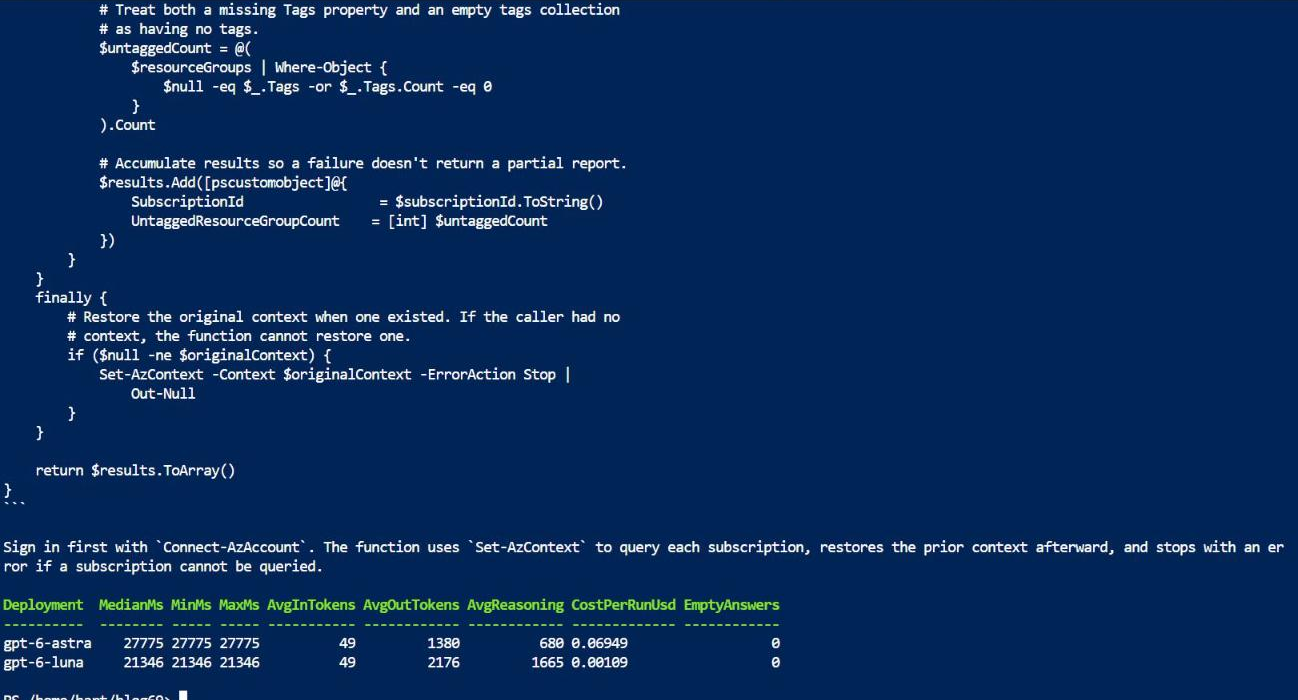
-ShowOutput prints every answer first, the summary table comes last.📒 The screenshot shows the tail end of the last answer: a try/finally that restores your Az context, a [pscustomobject] per subscription and even a note to sign in with Connect-AzAccount first. Looks great, right? Would I ship it without testing? Nope! And that’s exactly the point of this step: you read the answers, the table doesn’t.
For code prompts, the cheapest quality check is simple: paste both answers into your editor and run them against a test subscription. Does it work? Does it handle the edge cases? For prose, put them side by side and ask yourself one question: which one would I be happy to send without editing?
The script won’t judge quality for you, and that’s on purpose. What it does do is make sure you look at the answers before you make a decision. And that alone already puts you ahead of most “which model is best” discussions I’ve been in.
The rules for a fair fight
Before you trust any comparison (yours or somebody else’s), check it against this list:
- Same prompt, same settings, same day. Don’t compare a prompt you carefully tuned for one model against a different prompt for another. That’s not a fight, that’s a setup.
- Same deployment type. Global Standard and Data Zone prices differ, and the routing differs too.
- Enough runs. One run tells you a story. Five runs start to tell you a distribution.
- Several prompts. One prompt is one data point. Keep a small set of prompts that match the work you actually do, and run all of them.
- Record the date. Prices and models change. The same comparison in February and in November can have completely different winners.
How it all fits together
For those who like the overview (I know I do!), this is how the pieces fit together:
| File | Purpose |
|---|---|
Compare-FoundryModel.ps1 | Sends the prompt, measures, summarises |
prices.json | Prices per deployment, with an AsOf date |
| (your prompt file, optional) | The prompts you run every time |
Remember when I said we’d come back to the prices-as-data principle? Here it is: keeping prices in a separate file is the design decision I’d defend the hardest. The script itself doesn’t need to change when Microsoft changes a price, and your comparison is only ever as good as the numbers you feed it.
What I learned
Reasoning tokens are the hidden bill. A model that gives you a short answer can still be the expensive one. Always look at OutputTokens, not at the length of the answer.
Median beats average for latency. One cold request can double your average. The median tells you what a normal call actually feels like.
An empty answer is a result. When a reasoning model runs out of output budget, you get a blank answer and you still pay for the tokens. Count the empties! With a 2,000-token budget, Luna came back empty 4 out of 5 times in my test.
Prices are a moving target. Sources disagree, Microsoft updates its pricing page, and the same model can cost different amounts on different deployment types. Put a date next to every number, and always check the official page before you budget.
Wrapping up
In this post we built a small but honest comparison tool for Foundry models. Does it tell you which model is “the best”? No, and it never will. What it does tell you is what each model costs, how long it takes and what it actually gave you back, for the prompts you care about.
So the next time someone walks up to you and asks “which model should I use?”, you’ve got something way better than “it depends”. Run the comparison on the work that matters, look at the answers, and let the numbers and the output make the case for you.
Got questions, or did you find a surprising winner in your own runs? Let me know in the comments, I’m really curious what you find!
Until next time, happy scripting! 🚀
Sources
- GPT-6 Astra now available in Microsoft Foundry (Azure blog)
- GPT-6 Astra, Sol and Luna for production agents in Microsoft Foundry (Azure blog)
- Azure OpenAI pricing, November 2026 (AI Business Weekly)
- Azure OpenAI pricing page