

On my own system I’m using AI for assisting me creating solutions, helping me write code (who doesn’t?) and explaining topics to me which sometimes require a lot of time to catch-up with all documentation available online.
And on my own system I’m using memory to make sure my own AI doesn’t act like a goldfish and forgets about what it did the last time it ran. This brought me to the idea of this blog!
Creating memory away agents in Foundry! After all, foundry now has the implementation for this! A managed, long-term memory service that lets your agents remember things across sessions, devices and workflows! How cool is that?!
And of course as we are working with PowerShell as well in these blogs we can manage it with PowerShell!
Like always, (this is my signature)
throughout this post, you’ll see 🎬for action steps you can follow along with, and 📒 for the technical deep-dives where I explain what’s actually happening under the hood.
What we’re building
We’ll be creating this:
- Memory store for foundry
- Add and search memories
Prerequisites
We don’t need everything from the previous blog. We’ll be not using containers this time but you should at least have the following listed below:
- A Microsoft Foundry project
- A model deployed (GPT-4o) for instance
- An embedding model deployed (text-embedding-3-small) for instance
- Azure CLI for authentication to the Azure services (installed, authenticated and authorized)
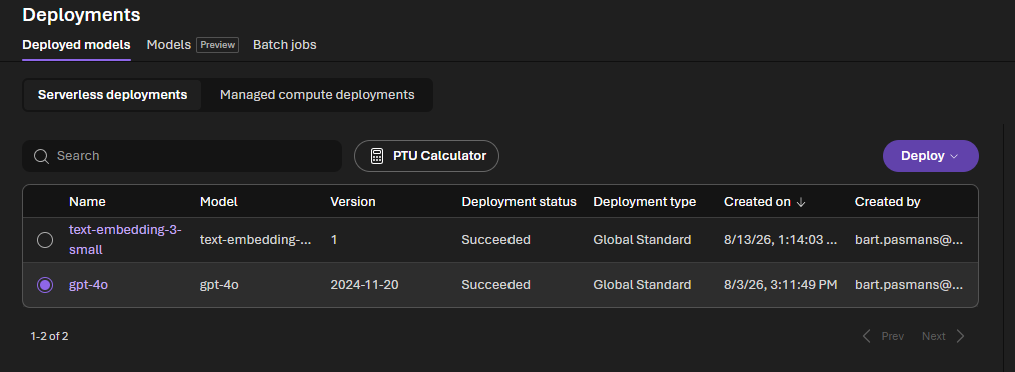
🎬 The embedding model is new, memory needs it to vectorize memory for semantic search. Deploy text-embedding-3-small in your foundry project if you haven’t already
Making sure it looks like this:
How foundry memory works
📒 Time for explanation here:
Memory stores are basically top-level containers which run per agent. Each has a chat model which is used for extraction and an embedding model which is used for searching.
Scopes are part of partitions per user to make sure that User A can’t do the stuff or see what User B has done
Memory items the name already says it, this is the actual memory in types;
- User profile preferences like ‘use powershell7’ ‘use c#’ ‘don’t use python!!! 😆’ those sort of things
- Chat summary summarizes of past conversations you had with the agent
- Procedural patterns like ‘how-to’ from already recurred workflows in the agent
When you feed conversations into a memory store, Foundry’s LLM extracts the relevant facts, classifies them and consolidates them automatically so you don’t have to!
Time to get started!
🎬 We’ll be starting the project by setting up variables
- Follow the steps below to start setting up your variables for foundry (run the commands below from a single shell)
⚠️ Always update your vars accordingly throughout this blog
$endpoint = "https://your-resource.services.ai.azure.com/api/projects/your-project"
az login- Now save the script below (i saved it as ‘Manage-FoundryMemoryStore.ps1″
function Get-FoundryToken {
    param(
        [string]$Resource = "https://ai.azure.com"
    )

    $token = az account get-access-token --resource $Resource --query accessToken -o tsv
    if ($LASTEXITCODE -ne 0) {
        throw "Failed to get access token. Run 'az login' first."
    }
    return $token
}

function Get-FoundryHeaders {
    $token = Get-FoundryToken
    return @{
        "Authorization" = "Bearer $token"
        "Content-Type"  = "application/json"
    }
}

function New-FoundryMemoryStore {
    param(
        [Parameter(Mandatory)]
        [string]$FoundryEndpoint,

        [Parameter(Mandatory)]
        [string]$StoreName,

        [Parameter(Mandatory)]
        [string]$ChatModel,

        [Parameter(Mandatory)]
        [string]$EmbeddingModel,

        [string]$Description = "",

        [switch]$UserProfileEnabled,

        [switch]$ChatSummaryEnabled,

        [switch]$ProceduralMemoryEnabled,

        [int]$DefaultTtlSeconds = 0,

        [string]$UserProfileDetails = "",

        [string]$ApiVersion = "2025-11-15-preview"
    )

    $headers = Get-FoundryHeaders

    $options = @{
        user_profile_enabled     = [bool]$UserProfileEnabled
        chat_summary_enabled     = [bool]$ChatSummaryEnabled
        procedural_memory_enabled = [bool]$ProceduralMemoryEnabled
    }

    if ($DefaultTtlSeconds -gt 0) {
        $options.default_ttl_seconds = $DefaultTtlSeconds
    }

    if ($UserProfileDetails) {
        $options.user_profile_details = $UserProfileDetails
    }

    $body = @{
        name        = $StoreName
        description = $Description
        definition  = @{
            kind            = "default"
            chat_model      = $ChatModel
            embedding_model = $EmbeddingModel
            options         = $options
        }
    }

    $url = "$FoundryEndpoint/memory_stores?api-version=$ApiVersion"
    $json = $body | ConvertTo-Json -Depth 10
    $jsonBytes = [System.Text.Encoding]::UTF8.GetBytes($json)

    try {
        $response = Invoke-RestMethod -Method Post -Uri $url -Headers $headers -Body $jsonBytes
        Write-Host "  Created memory store: $($response.name)" -ForegroundColor Green
        return $response
    }
    catch {
        Write-Host "  Failed: $($_.ErrorDetails.Message)" -ForegroundColor Red
        throw
    }
}

function Get-FoundryMemoryStore {
    param(
        [Parameter(Mandatory)]
        [string]$FoundryEndpoint,

        [string]$StoreName,

        [string]$ApiVersion = "2025-11-15-preview"
    )

    $headers = Get-FoundryHeaders

    if ($StoreName) {
        $url = "$FoundryEndpoint/memory_stores/$StoreName`?api-version=$ApiVersion"
        $response = Invoke-RestMethod -Method Get -Uri $url -Headers $headers
        return $response
    }

    $url = "$FoundryEndpoint/memory_stores?api-version=$ApiVersion"
    $response = Invoke-RestMethod -Method Get -Uri $url -Headers $headers

    $stores = if ($response.value) { $response.value } else { @($response) }

    if ($stores.Count -eq 0) {
        Write-Host "  No memory stores found." -ForegroundColor Yellow
        return
    }

    foreach ($store in $stores) {
        Write-Host "  $($store.name)" -ForegroundColor Cyan -NoNewline
        Write-Host " — $($store.description)" -ForegroundColor DarkGray
    }

    return $stores
}

function Update-FoundryMemoryStore {
    param(
        [Parameter(Mandatory)]
        [string]$FoundryEndpoint,

        [Parameter(Mandatory)]
        [string]$StoreName,

        [string]$Description,

        [string]$ApiVersion = "2025-11-15-preview"
    )

    $headers = Get-FoundryHeaders

    $body = @{}
    if ($Description) { $body.description = $Description }

    $url = "$FoundryEndpoint/memory_stores/$StoreName`?api-version=$ApiVersion"
    $json = $body | ConvertTo-Json -Depth 10
    $jsonBytes = [System.Text.Encoding]::UTF8.GetBytes($json)

    $response = Invoke-RestMethod -Method Post -Uri $url -Headers $headers -Body $jsonBytes
    Write-Host "  Updated memory store: $($response.name)" -ForegroundColor Green
    return $response
}

function Remove-FoundryMemoryStore {
    param(
        [Parameter(Mandatory)]
        [string]$FoundryEndpoint,

        [Parameter(Mandatory)]
        [string]$StoreName,

        [string]$ApiVersion = "2025-11-15-preview"
    )

    $headers = Get-FoundryHeaders
    $url = "$FoundryEndpoint/memory_stores/$StoreName`?api-version=$ApiVersion"

    Invoke-RestMethod -Method Delete -Uri $url -Headers $headers | Out-Null
    Write-Host "  Deleted memory store: $StoreName" -ForegroundColor Green
}- Dot source it and run it in the shell:
. .\Manage-FoundryMemoryStore.ps1

New-FoundryMemoryStore -FoundryEndpoint $endpoint `
    -StoreName "ps-assistant" `
    -ChatModel "gpt-4o" `
    -EmbeddingModel "text-embedding-3-small" `
    -Description "Memory for my PowerShell assistant" `
    -UserProfileEnabled -ChatSummaryEnabled `
    -ProceduralMemoryEnabled `
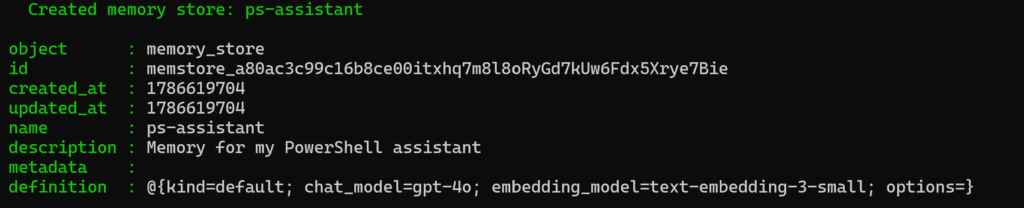
-DefaultTtlSeconds 2592000You should be presented with the memory store now created:
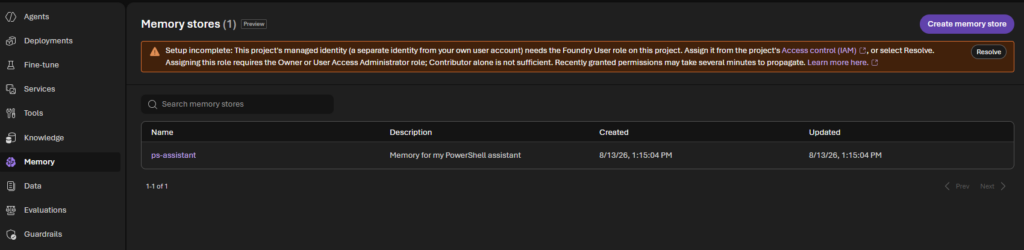
If you now check Foundry you should see the memory added (although we’re not done yet)
Adding memory
The next step is making sure we feed a conversation into memory state. I prepared a script for you which I’ll drop below which helps adding things into the memory store.
🎬 Follow the steps below for adding your first memory entry
- Copy the script below (save it as Invoke-FoundryMemory)
. "$PSScriptRoot\Manage-FoundryMemoryStore.ps1"

function Add-FoundryMemory {
    param(
        [Parameter(Mandatory)]
        [string]$FoundryEndpoint,

        [Parameter(Mandatory)]
        [string]$StoreName,

        [Parameter(Mandatory)]
        [string]$Scope,

        [Parameter(Mandatory)]
        [string[]]$Messages,

        [string]$Role = "user",

        [int]$UpdateDelay = 0,

        [string]$ApiVersion = "2025-11-15-preview"
    )

    $headers = Get-FoundryHeaders

    $items = foreach ($msg in $Messages) {
        @{
            type    = "message"
            role    = $Role
            content = @(
                @{ type = "input_text"; text = $msg }
            )
        }
    }

    $body = @{
        scope        = $Scope
        items        = @($items)
        update_delay = $UpdateDelay
    }

    $url = "$FoundryEndpoint/memory_stores/$($StoreName):update_memories?api-version=$ApiVersion"
    $json = $body | ConvertTo-Json -Depth 10
    $jsonBytes = [System.Text.Encoding]::UTF8.GetBytes($json)

    $response = Invoke-RestMethod -Method Post -Uri $url -Headers $headers -Body $jsonBytes
    $updateId = $response.update_id

    Write-Host "  Memory update started (ID: $updateId)" -ForegroundColor Cyan
    Write-Host "  Waiting for extraction and consolidation..." -ForegroundColor DarkGray

    $statusUrl = "$FoundryEndpoint/memory_stores/$StoreName/updates/$updateId`?api-version=$ApiVersion"
    $maxAttempts = 30

    for ($i = 1; $i -le $maxAttempts; $i++) {
        Start-Sleep -Seconds 3

        $headers = Get-FoundryHeaders
        $status = Invoke-RestMethod -Method Get -Uri $statusUrl -Headers $headers

        if ($status.status -eq "completed") {
            $ops = $status.result.memory_operations
            Write-Host "  Done! $($ops.Count) memory operation(s):" -ForegroundColor Green
            foreach ($op in $ops) {
                Write-Host "    [$($op.kind)] $($op.memory_item.content)" -ForegroundColor White
            }
            return $status.result
        }

        if ($status.status -eq "failed") {
            Write-Host "  Memory update failed: $($status.error)" -ForegroundColor Red
            throw "Memory update failed."
        }

        Write-Host "  [$i] Status: $($status.status)" -ForegroundColor DarkGray
    }

    throw "Timeout waiting for memory update."
}

function Search-FoundryMemory {
    param(
        [Parameter(Mandatory)]
        [string]$FoundryEndpoint,

        [Parameter(Mandatory)]
        [string]$StoreName,

        [Parameter(Mandatory)]
        [string]$Scope,

        [string]$Query,

        [int]$MaxMemories = 10,

        [string]$ApiVersion = "2025-11-15-preview"
    )

    $headers = Get-FoundryHeaders

    $body = @{
        scope   = $Scope
        options = @{ max_memories = $MaxMemories }
    }

    if ($Query) {
        $body.items = @(
            @{
                type    = "message"
                role    = "user"
                content = @(
                    @{ type = "input_text"; text = $Query }
                )
            }
        )
    }

    $url = "$FoundryEndpoint/memory_stores/$($StoreName):search_memories?api-version=$ApiVersion"
    $json = $body | ConvertTo-Json -Depth 10
    $jsonBytes = [System.Text.Encoding]::UTF8.GetBytes($json)

    $response = Invoke-RestMethod -Method Post -Uri $url -Headers $headers -Body $jsonBytes

    $memories = $response.memories
    if (-not $memories -or $memories.Count -eq 0) {
        Write-Host "  No memories found." -ForegroundColor Yellow
        return @()
    }

    Write-Host "  Found $($memories.Count) memory item(s):" -ForegroundColor Green
    foreach ($mem in $memories) {
        $kind = $mem.memory_item.kind
        $content = $mem.memory_item.content
        Write-Host "    [$kind] $content" -ForegroundColor White
    }

    return $memories
}

function New-FoundryMemoryItem {
    param(
        [Parameter(Mandatory)]
        [string]$FoundryEndpoint,

        [Parameter(Mandatory)]
        [string]$StoreName,

        [Parameter(Mandatory)]
        [string]$Scope,

        [Parameter(Mandatory)]
        [string]$Content,

        [ValidateSet("user_profile", "chat_summary", "procedural")]
        [string]$Kind = "user_profile",

        [string]$ApiVersion = "2025-11-15-preview"
    )

    $headers = Get-FoundryHeaders

    $body = @{
        scope   = $Scope
        content = $Content
        kind    = $Kind
    }

    $url = "$FoundryEndpoint/memory_stores/$StoreName/items?api-version=$ApiVersion"
    $json = $body | ConvertTo-Json -Depth 5
    $jsonBytes = [System.Text.Encoding]::UTF8.GetBytes($json)

    $response = Invoke-RestMethod -Method Post -Uri $url -Headers $headers -Body $jsonBytes
    Write-Host "  Created memory item: $($response.memory_id) [$Kind]" -ForegroundColor Green
    return $response
}

function Get-FoundryMemoryItem {
    param(
        [Parameter(Mandatory)]
        [string]$FoundryEndpoint,

        [Parameter(Mandatory)]
        [string]$StoreName,

        [string]$MemoryId,

        [string]$Scope,

        [string]$ApiVersion = "2025-11-15-preview"
    )

    $headers = Get-FoundryHeaders

    if ($MemoryId) {
        $url = "$FoundryEndpoint/memory_stores/$StoreName/items/$MemoryId`?api-version=$ApiVersion"
        $response = Invoke-RestMethod -Method Get -Uri $url -Headers $headers
        Write-Host "  [$($response.kind)] $($response.content)" -ForegroundColor White
        return $response
    }

    $url = "$FoundryEndpoint/memory_stores/$StoreName/items:list?scope=$Scope&api-version=$ApiVersion"
    $response = Invoke-RestMethod -Method Get -Uri $url -Headers $headers

    $items = if ($response.value) { $response.value } else { @($response) }

    if (-not $items -or $items.Count -eq 0) {
        Write-Host "  No memory items found." -ForegroundColor Yellow
        return @()
    }

    Write-Host "  $($items.Count) memory item(s):" -ForegroundColor Cyan
    foreach ($item in $items) {
        Write-Host "    $($item.memory_id) [$($item.kind)] $($item.content)" -ForegroundColor White
    }

    return $items
}

function Update-FoundryMemoryItem {
    param(
        [Parameter(Mandatory)]
        [string]$FoundryEndpoint,

        [Parameter(Mandatory)]
        [string]$StoreName,

        [Parameter(Mandatory)]
        [string]$MemoryId,

        [Parameter(Mandatory)]
        [string]$Content,

        [string]$ApiVersion = "2025-11-15-preview"
    )

    $headers = Get-FoundryHeaders

    $body = @{ content = $Content }
    $url = "$FoundryEndpoint/memory_stores/$StoreName/items/$MemoryId`?api-version=$ApiVersion"
    $json = $body | ConvertTo-Json
    $jsonBytes = [System.Text.Encoding]::UTF8.GetBytes($json)

    $response = Invoke-RestMethod -Method Post -Uri $url -Headers $headers -Body $jsonBytes
    Write-Host "  Updated: $($response.memory_id)" -ForegroundColor Green
    return $response
}

function Remove-FoundryMemoryItem {
    param(
        [Parameter(Mandatory)]
        [string]$FoundryEndpoint,

        [Parameter(Mandatory)]
        [string]$StoreName,

        [Parameter(Mandatory)]
        [string]$MemoryId,

        [string]$ApiVersion = "2025-11-15-preview"
    )

    $headers = Get-FoundryHeaders
    $url = "$FoundryEndpoint/memory_stores/$StoreName/items/$MemoryId`?api-version=$ApiVersion"

    Invoke-RestMethod -Method Delete -Uri $url -Headers $headers | Out-Null
    Write-Host "  Deleted memory item: $MemoryId" -ForegroundColor Green
}

function Remove-FoundryMemoryScope {
    param(
        [Parameter(Mandatory)]
        [string]$FoundryEndpoint,

        [Parameter(Mandatory)]
        [string]$StoreName,

        [Parameter(Mandatory)]
        [string]$Scope,

        [string]$ApiVersion = "2025-11-15-preview"
    )

    $headers = Get-FoundryHeaders

    $body = @{ scope = $Scope }
    $url = "$FoundryEndpoint/memory_stores/$($StoreName):delete_scope?api-version=$ApiVersion"
    $json = $body | ConvertTo-Json
    $jsonBytes = [System.Text.Encoding]::UTF8.GetBytes($json)

    Invoke-RestMethod -Method Post -Uri $url -Headers $headers -Body $jsonBytes | Out-Null
    Write-Host "  Deleted all memories for scope: $Scope" -ForegroundColor Green
}

function Start-FoundryMemoryChat {
    param(
        [Parameter(Mandatory)]
        [string]$FoundryEndpoint,

        [Parameter(Mandatory)]
        [string]$StoreName,

        [Parameter(Mandatory)]
        [string]$Scope,

        [Parameter(Mandatory)]
        [string]$ChatModel,

        [string]$SystemPrompt = "You are a helpful assistant. Use any memories you have about the user to personalize your responses.",

        [string]$ApiVersion = "2025-11-15-preview"
    )

    Write-Host ""
    Write-Host "  ==============================================" -ForegroundColor Cyan
    Write-Host "     Foundry Memory Chat" -ForegroundColor Cyan
    Write-Host "     Store: $StoreName | Scope: $Scope" -ForegroundColor DarkGray
    Write-Host "  ==============================================" -ForegroundColor Cyan
    Write-Host "  Type your message. Type 'exit' to quit." -ForegroundColor DarkGray
    Write-Host "  Type '/memories' to see stored memories." -ForegroundColor DarkGray
    Write-Host "  Type '/remember <text>' to store something." -ForegroundColor DarkGray
    Write-Host "  Type '/forget <text>' to remove something." -ForegroundColor DarkGray
    Write-Host ""

    $conversationHistory = @(
        @{ role = "system"; content = $SystemPrompt }
    )

    $staticMemories = Search-FoundryMemory `
        -FoundryEndpoint $FoundryEndpoint `
        -StoreName $StoreName `
        -Scope $Scope `
        -MaxMemories 20

    if ($staticMemories -and $staticMemories.Count -gt 0) {
        $memoryContext = ($staticMemories | ForEach-Object {
            "- [$($_.memory_item.kind)] $($_.memory_item.content)"
        }) -join "`n"

        $conversationHistory += @{
            role    = "system"
            content = "Here is what you remember about this user:`n$memoryContext"
        }
        Write-Host "  Loaded $($staticMemories.Count) memories from previous sessions." -ForegroundColor DarkGray
        Write-Host ""
    }

    $token = Get-FoundryToken
    $openaiEndpoint = $FoundryEndpoint -replace '/api/projects/.*', ''

    while ($true) {
        Write-Host "  You> " -ForegroundColor Yellow -NoNewline
        $userInput = Read-Host

        if ($userInput -eq "exit") { break }

        if ($userInput -eq "/memories") {
            Get-FoundryMemoryItem -FoundryEndpoint $FoundryEndpoint -StoreName $StoreName -Scope $Scope
            Write-Host ""
            continue
        }

        if ($userInput -match "^/remember (.+)$") {
            $text = $Matches[1]
            New-FoundryMemoryItem -FoundryEndpoint $FoundryEndpoint -StoreName $StoreName -Scope $Scope -Content $text -Kind "user_profile"
            Write-Host ""
            continue
        }

        if ($userInput -match "^/forget (.+)$") {
            Write-Host "  Searching for matching memory..." -ForegroundColor DarkGray
            $results = Search-FoundryMemory -FoundryEndpoint $FoundryEndpoint -StoreName $StoreName -Scope $Scope -Query $Matches[1] -MaxMemories 1
            if ($results -and $results.Count -gt 0) {
                Remove-FoundryMemoryItem -FoundryEndpoint $FoundryEndpoint -StoreName $StoreName -MemoryId $results[0].memory_item.memory_id
            }
            Write-Host ""
            continue
        }

        $contextMemories = Search-FoundryMemory `
            -FoundryEndpoint $FoundryEndpoint `
            -StoreName $StoreName `
            -Scope $Scope `
            -Query $userInput `
            -MaxMemories 5

        $contextBlock = ""
        if ($contextMemories -and $contextMemories.Count -gt 0) {
            $contextBlock = "`n`nRelevant memories:`n" + (
                ($contextMemories | ForEach-Object {
                    "- $($_.memory_item.content)"
                }) -join "`n"
            )
        }

        $conversationHistory += @{
            role    = "user"
            content = $userInput + $contextBlock
        }

        $token = Get-FoundryToken
        $chatHeaders = @{
            "Authorization" = "Bearer $token"
            "Content-Type"  = "application/json"
        }

        $chatBody = @{
            model    = $ChatModel
            messages = $conversationHistory
        } | ConvertTo-Json -Depth 10

        $chatBytes = [System.Text.Encoding]::UTF8.GetBytes($chatBody)

        try {
            $chatUrl = "$openaiEndpoint/openai/deployments/$ChatModel/chat/completions?api-version=2024-10-21"
            $chatResponse = Invoke-RestMethod -Method Post -Uri $chatUrl -Headers $chatHeaders -Body $chatBytes
            $answer = $chatResponse.choices[0].message.content

            $conversationHistory += @{ role = "assistant"; content = $answer }

            Write-Host ""
            Write-Host "  $answer" -ForegroundColor White
            Write-Host ""
        }
        catch {
            Write-Host "  Error: $($_.ErrorDetails.Message)" -ForegroundColor Red
            Write-Host ""
        }

        Add-FoundryMemory `
            -FoundryEndpoint $FoundryEndpoint `
            -StoreName $StoreName `
            -Scope $Scope `
            -Messages @($userInput) `
            -UpdateDelay 60 *>$null
    }

    Write-Host ""
    Write-Host "  Chat ended. Memories have been saved." -ForegroundColor DarkGray
}
- Dot source it and run it like below
. .\Invoke-FoundryMemory.ps1

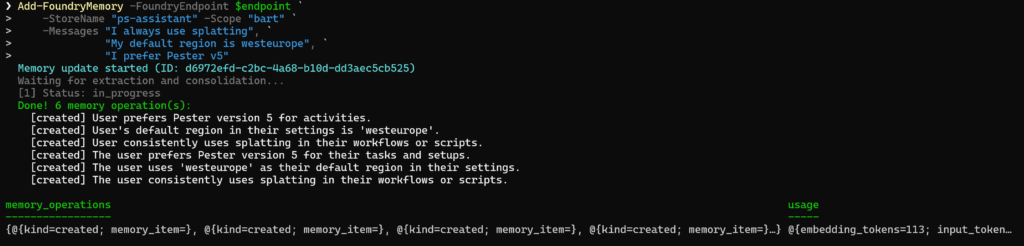
Add-FoundryMemory -FoundryEndpoint $endpoint `
    -StoreName "ps-assistant" -Scope "bart" `
    -Messages "I always use splatting", `
              "My default region is westeurope", `
              "I prefer Pester v5"
You should see the result below:
As explained before you can now also search for the scope ‘bart’ by executing the search functionality as shown below:
Search-FoundryMemory -FoundryEndpoint $endpoint `
    -StoreName "ps-assistant" -Scope "bart"
Now lets start a chat
🎬 Run the command below to start a chat
Start-FoundryMemoryChat -FoundryEndpoint $endpoint `
    -StoreName "ps-assistant" -Scope "bart" `
-ChatModel "gpt-4o"📒 Behind the scenes the session starts, loads the memory into the prompt and each tun the search appends relevant items from memory. After each response the memory is updated
- Now ask it a question like ‘tell me about my preffered region’
You should see that its being called as it’s set in memory:
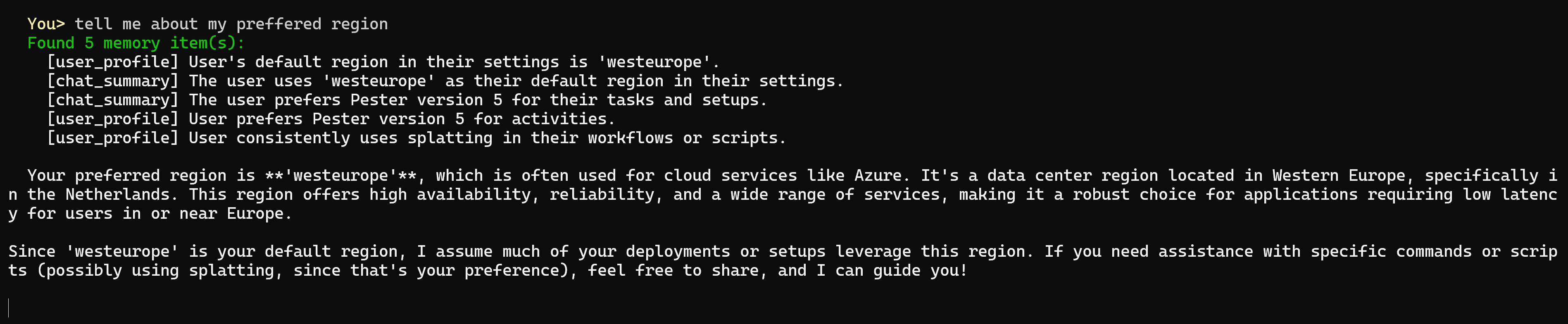
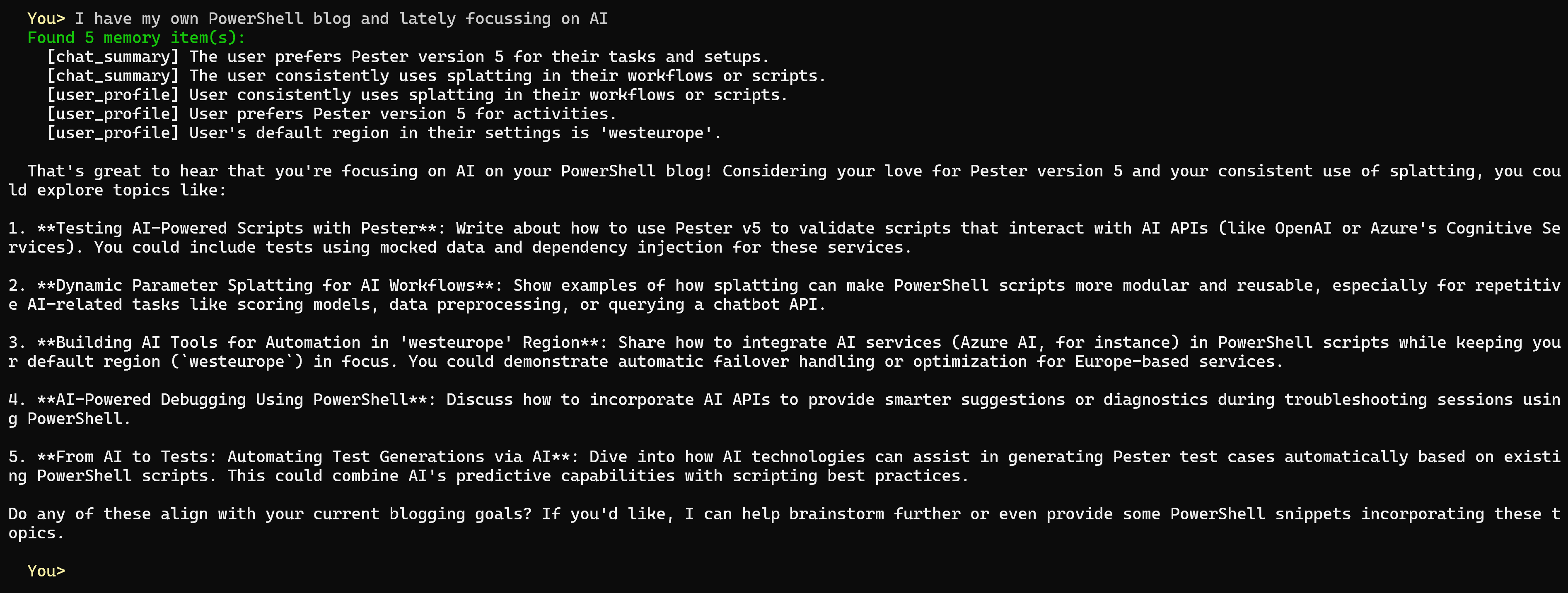
Coolest part thanks to the script we can now add things to memory. Let me challenge my agent with the next comment:
“I have my own PowerShell blog and lately focussing on AI“
The result:
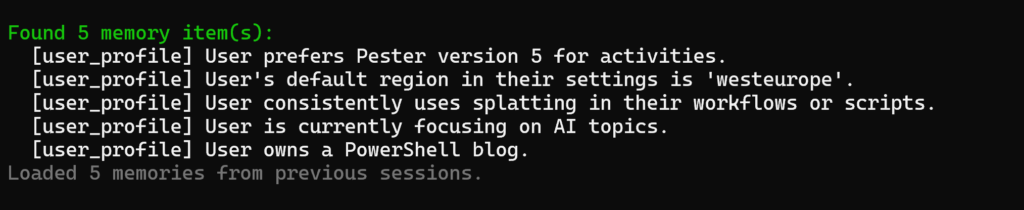
If we ask it to show us what it has in memory it will answer:

And the next time we start the script we’ll be presented with the latest updates as well:
You can even ask it pointed questions about the things in memory:

Super cool right?!
Summary
We built a complete memory management system for Foundry agents in PowerShell. The key insight: memory in Foundry isn’t magic. It’s a REST API with clever LLM calls behind it. Extraction turns conversations into facts. Consolidation keeps things clean. Embedding search makes retrieval semantic. And PowerShell makes it all scriptable.
Next time someone asks “can your AI agent remember things?” you can say yes!!!!
Until next time happy scripting! 🚀