

Welcome to part 5 already of this blog where we will take all the things we did to a higher level. In the previous blog posts I’ve shown you how you can create PowerShell micro services on Azure Kubernetes Service, publish them for the outside world and consume them.
But today we are going to extend the PowerShell micro services to scaled-out level. We’ll introduce a second service which will be running on the AKS cluster and takes care to make sure that all calls to all services we will be creating in the future are authenticated and authorized.
So after this blog you have some guidelines on how to make your PowerShell microservices more secure 😉
👉 This blog is not about debating architecture, cost models, or whether PowerShell microservices are a “good idea.”
Throughout this post, you’ll again see the 🎬 icon highlighting steps you should actively follow along with, as well as 💡 notes that provide helpful context and tips so you don’t get lost on the way.
Ready to make things more secure? Lets go!
Prerequisites
In order to continue with this blog you should have followed the posts in the tracks before. To help you out a bit I’ve summarized them below.
What will we create?
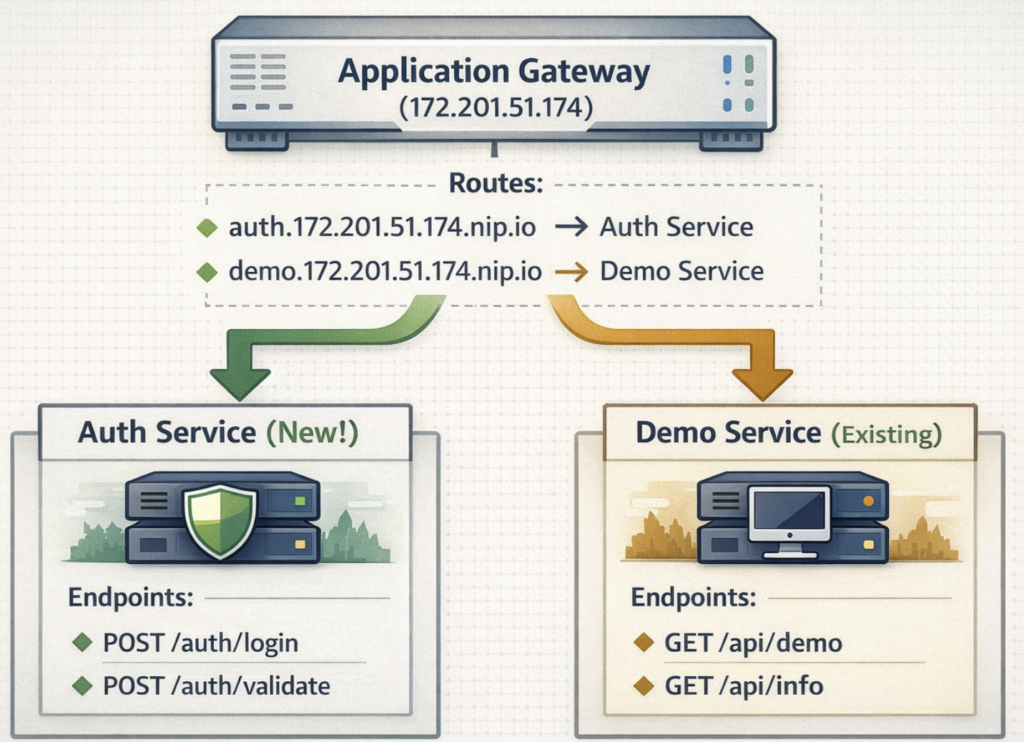
So we have the application gateway and we have the demo service available. We’ll now be working on the auth service.
This new service will receive an endpoint for dealing with authentication requests and a endpoint for validating the requests. Which will look like below;
Create the new authentication service
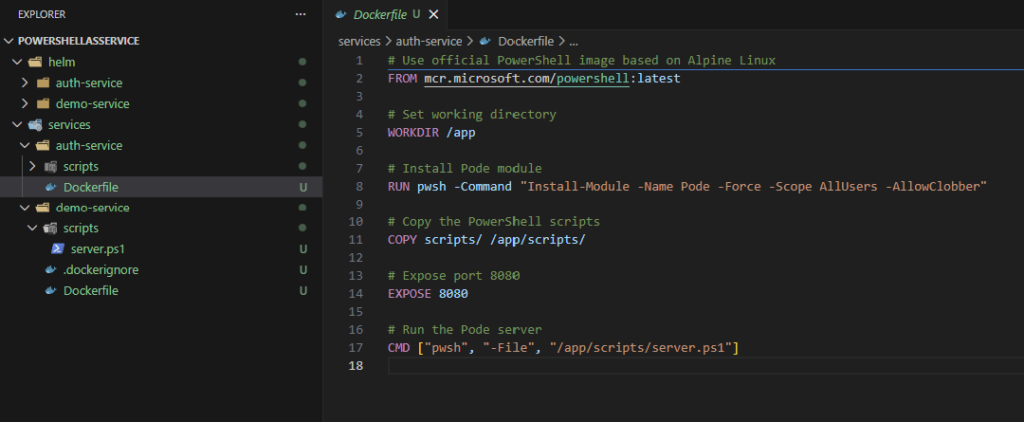
For creating the new authentication service I’m following the same structure as with the demo service. The structure will look like as shown below
We’ll also create the helm structure (later during this blog, but let’s first focus on the authentication service).
⚠️Note: the authentication service is for learning purpose only. Do not use this in a production situation!
Server.ps1 file
A straight forward PowerShell ‘Web service’ which will take care of the requests, validating the token and granting new tokens. This will be the service telling the other services ‘yes this request is allowed to acccess you’.
🎬 Place the file in the server.ps1 file in the directory structure shown above (scripts directory of the auth service)
Write-Host "========================================" -ForegroundColor Cyan
Write-Host "  Authentication Service" -ForegroundColor Cyan
Write-Host "========================================" -ForegroundColor Cyan
Write-Host ""
Write-Host "[$(Get-Date -Format 'yyyy-MM-dd HH:mm:ss')] Starting auth-service..." -ForegroundColor Green
Write-Host "[$(Get-Date -Format 'yyyy-MM-dd HH:mm:ss')] PowerShell Version: $($PSVersionTable.PSVersion)" -ForegroundColor Yellow
Write-Host ""

# Import Pode module
Write-Host "[$(Get-Date -Format 'yyyy-MM-dd HH:mm:ss')] Importing Pode module..." -ForegroundColor Yellow
Import-Module Pode
Write-Host "[$(Get-Date -Format 'yyyy-MM-dd HH:mm:ss')] Pode version: $((Get-Module -Name Pode).Version)" -ForegroundColor Yellow
Write-Host ""

# Start the Pode server
Write-Host "[$(Get-Date -Format 'yyyy-MM-dd HH:mm:ss')] Initializing Pode server..." -ForegroundColor Green
Start-PodeServer {

    # In-memory stores using Pode's state management
    $Users = @{
        "admin" = @{ Password = "demo123"; Roles = @("admin", "user") }
        "user1" = @{ Password = "demo123"; Roles = @("user") }
        "service" = @{ Password = "service123"; Roles = @("service") }
    }

    $ValidTokens = @{}

    # Store in Pode's state (accessible in all routes)
    Set-PodeState -Name 'Users' -Value $Users | Out-Null
    Set-PodeState -Name 'ValidTokens' -Value $ValidTokens | Out-Null

    Write-Host "[$(Get-Date -Format 'yyyy-MM-dd HH:mm:ss')] Initialized user store with $($Users.Count) users" -ForegroundColor Yellow

    Write-Host "[$(Get-Date -Format 'yyyy-MM-dd HH:mm:ss')] Configuring HTTP endpoint on port 8080..." -ForegroundColor Yellow
    Add-PodeEndpoint -Address * -Port 8080 -Protocol Http

    Write-Host "[$(Get-Date -Format 'yyyy-MM-dd HH:mm:ss')] Enabling request logging..." -ForegroundColor Yellow
    New-PodeLoggingMethod -Terminal | Enable-PodeRequestLogging

    Write-Host "[$(Get-Date -Format 'yyyy-MM-dd HH:mm:ss')] Body parsing is enabled automatically for JSON..." -ForegroundColor Yellow
    # Note: Pode automatically parses JSON bodies when Content-Type is application/json

    Write-Host ""
    Write-Host "[$(Get-Date -Format 'yyyy-MM-dd HH:mm:ss')] Registering API endpoints..." -ForegroundColor Green

    # Health check endpoint
    Write-Host "[$(Get-Date -Format 'yyyy-MM-dd HH:mm:ss')]   -> GET /health" -ForegroundColor Cyan
    Add-PodeRoute -Method Get -Path '/health' -ScriptBlock {
        Write-PodeJsonResponse -Value @{
            status = "healthy"
            service = "auth-service"
            timestamp = (Get-Date -Format "o")
        }
    }

    # Root endpoint
    Write-Host "[$(Get-Date -Format 'yyyy-MM-dd HH:mm:ss')]   -> GET /" -ForegroundColor Cyan
    Add-PodeRoute -Method Get -Path '/' -ScriptBlock {
        Write-PodeJsonResponse -Value @{
            service = "auth-service"
            message = "Authentication and Authorization Service"
            version = "1.0.0"
            endpoints = @(
                @{ method = "GET"; path = "/health"; description = "Health check" }
                @{ method = "POST"; path = "/auth/login"; description = "Login and get token" }
                @{ method = "POST"; path = "/auth/validate"; description = "Validate a token" }
                @{ method = "GET"; path = "/auth/info"; description = "Service information" }
            )
        }
    }

    # Login endpoint - generates token
    Write-Host "[$(Get-Date -Format 'yyyy-MM-dd HH:mm:ss')]   -> POST /auth/login" -ForegroundColor Cyan
    Add-PodeRoute -Method Post -Path '/auth/login' -ContentType 'application/json' -ScriptBlock {
        try {
            # Get request body (parsed automatically by Pode)
            $body = $WebEvent.Data

            # Get credentials from body (use bracket notation for hashtable)
            $username = $body['username']
            $password = $body['password']

            # Validate input
            if (-not $username -or -not $password) {
                Write-PodeJsonResponse -Value @{
                    success = $false
                    message = "Username and password required"
                } -StatusCode 400
                return
            }

            # Get users from Pode state
            $Users = Get-PodeState -Name 'Users'
            $ValidTokens = Get-PodeState -Name 'ValidTokens'

            # Check credentials
            if ($Users.ContainsKey($username)) {
                $user = $Users[$username]
                if ($user.Password -eq $password) {
                    # Generate simple token (in production, use JWT!)
                    $token = [Convert]::ToBase64String([System.Text.Encoding]::UTF8.GetBytes("${username}:$(Get-Date -Format 'yyyyMMddHHmmss'):$([Guid]::NewGuid().ToString())"))

                    # Store token with expiration (30 minutes)
                    $ValidTokens[$token] = @{
                        Username = $username
                        Roles = $user.Roles
                        ExpiresAt = (Get-Date).AddMinutes(30)
                        IssuedAt = Get-Date
                    }

                    # Update state
                    Set-PodeState -Name 'ValidTokens' -Value $ValidTokens | Out-Null

                    Write-PodeJsonResponse -Value @{
                        success = $true
                        message = "Login successful"
                        token = $token
                        expiresIn = 1800  # 30 minutes in seconds
                        user = @{
                            username = $username
                            roles = $user.Roles
                        }
                    }
                    return
                }
            }

            # Authentication failed
            Write-PodeJsonResponse -Value @{
                success = $false
                message = "Invalid username or password"
            } -StatusCode 401

        } catch {
            Write-PodeJsonResponse -Value @{
                success = $false
                message = "Internal server error"
            } -StatusCode 500
        }
    }

    # Validate token endpoint
    Write-Host "[$(Get-Date -Format 'yyyy-MM-dd HH:mm:ss')]   -> POST /auth/validate" -ForegroundColor Cyan
    Add-PodeRoute -Method Post -Path '/auth/validate' -ContentType 'application/json' -ScriptBlock {
        $body = $WebEvent.Data
        $token = $body['token']

        if (-not $token) {
            Write-PodeJsonResponse -Value @{
                valid = $false
                message = "Token required"
            } -StatusCode 400
            return
        }

        # Get tokens from Pode state
        $ValidTokens = Get-PodeState -Name 'ValidTokens'

        # Check if token exists and not expired
        if ($ValidTokens.ContainsKey($token)) {
            $tokenInfo = $ValidTokens[$token]

            if ((Get-Date) -lt $tokenInfo.ExpiresAt) {
                # Token is valid
                Write-PodeJsonResponse -Value @{
                    valid = $true
                    message = "Token is valid"
                    user = @{
                        username = $tokenInfo.Username
                        roles = $tokenInfo.Roles
                    }
                    expiresAt = $tokenInfo.ExpiresAt.ToString("o")
                }
                return
            } else {
                # Token expired - remove it
                $ValidTokens.Remove($token)
                Set-PodeState -Name 'ValidTokens' -Value $ValidTokens | Out-Null

                Write-PodeJsonResponse -Value @{
                    valid = $false
                    message = "Token expired"
                } -StatusCode 401
                return
            }
        }

        # Token not found
        Write-PodeJsonResponse -Value @{
            valid = $false
            message = "Invalid token"
        } -StatusCode 401
    }

    # Service info endpoint
    Write-Host "[$(Get-Date -Format 'yyyy-MM-dd HH:mm:ss')]   -> GET /auth/info" -ForegroundColor Cyan
    Add-PodeRoute -Method Get -Path '/auth/info' -ScriptBlock {
        # Get state
        $ValidTokens = Get-PodeState -Name 'ValidTokens'

        Write-PodeJsonResponse -Value @{
            serviceName = "auth-service"
            description = "Authentication and Authorization Service"
            powershellVersion = $PSVersionTable.PSVersion.ToString()
            podeVersion = (Get-Module -Name Pode).Version.ToString()
            platform = $PSVersionTable.Platform
            tokenStore = @{
                activeTokens = $ValidTokens.Count
                validTokens = ($ValidTokens.Values | Where-Object { (Get-Date) -lt $_.ExpiresAt }).Count
                expiredTokens = ($ValidTokens.Values | Where-Object { (Get-Date) -ge $_.ExpiresAt }).Count
            }
            availableUsers = @(
                @{ username = "admin"; roles = @("admin", "user"); note = "Password: demo123" }
                @{ username = "user1"; roles = @("user"); note = "Password: demo123" }
                @{ username = "service"; roles = @("service"); note = "Password: service123" }
            )
            endpoints = @(
                @{ method = "GET"; path = "/health"; description = "Health check endpoint" }
                @{ method = "POST"; path = "/auth/login"; description = "Login with username/password, get token" }
                @{ method = "POST"; path = "/auth/validate"; description = "Validate a token" }
                @{ method = "GET"; path = "/auth/info"; description = "Service information" }
            )
        }
    }

    Write-Host ""
    Write-Host "========================================" -ForegroundColor Green
    Write-Host "  Auth Service Ready!" -ForegroundColor Green
    Write-Host "  Listening on port 8080" -ForegroundColor Green
    Write-Host "========================================" -ForegroundColor Green
}Service content
When deployed our service has the content as shown below;
| Method | Path | Description |
| GET | /health | Health check |
| GET | / | Service info and available endpoints |
| POST | /auth/login | Login with username/password to get a token |
| POST | /auth/validate | Validate a token |
| GET | /auth/info | Service information + active tokens |
These are the user accounts which can be used for testing when the service is deployed
| Username | Password | Roles |
| admin | demo123 | admin, user |
| user1 | demo123 | user |
| service | service123 | service |
Docker file
We need to create a Docker file or our new service. Below I’ve added the code which you can use for creating the service.
🎬 Place the content below in a DockerFile for the auth service
# Use official PowerShell image based on Alpine Linux
FROM mcr.microsoft.com/powershell:latest

# Set working directory
WORKDIR /app

# Install Pode module
RUN pwsh -Command "Install-Module -Name Pode -Force -Scope AllUsers -AllowClobber"

# Copy the PowerShell scripts
COPY scripts/ /app/scripts/

# Expose port 8080
EXPOSE 8080

# Run the Pode server
CMD ["pwsh", "-File", "/app/scripts/server.ps1"]🎬 Follow the steps below for creating the Docker file
- Build and tag the image and push it to your repository
- You should end up with the result below
💡 Make sure to put your own variables in place!

Helm
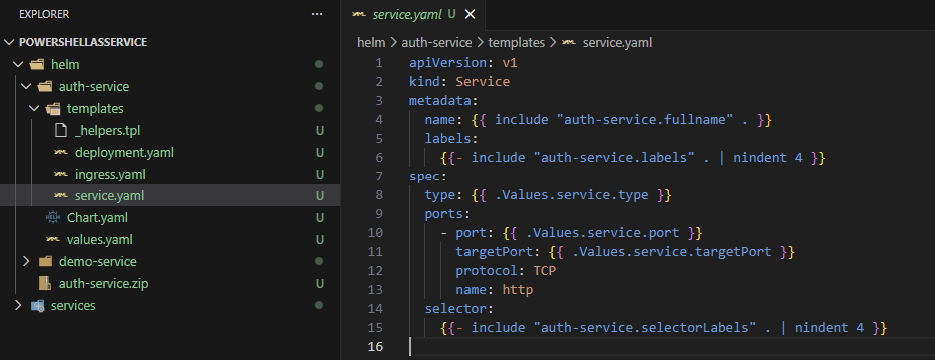
You can deploy the zip file here which contains the helm files for deploying this to your AKS. (which makes life easier 😉)
🎬 Follow the steps below to configure everything required for Helm to deploy the service
- Download the ZIP here:
- Extract the content
- Make sure you end up with the structure as shown below
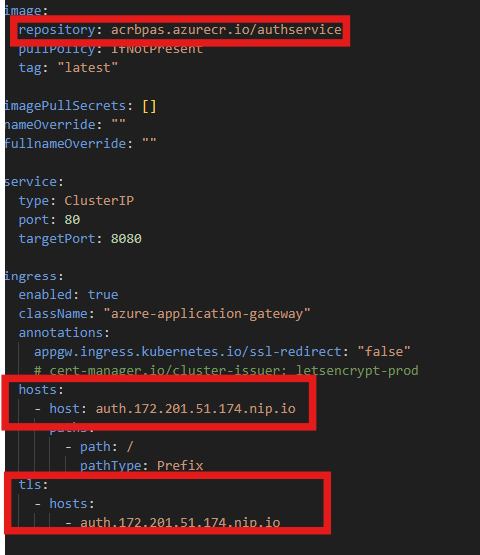
- Make sure you modify these files so the values match;
- Values.yaml (image/repository)
- Values.yaml (Ingress/host & TLS settings)
Deploy
Now we have everything available lets deploy!
🎬 Follow the steps below to deploy the new auth service
- Run the command below
helm install auth .\helm\auth-service- You should see the result below
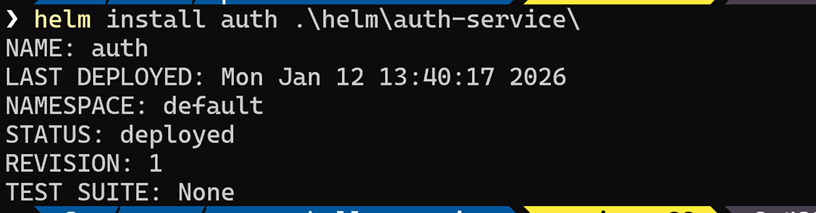
- Now run the command
kubectl get pods- and check the result below to see if your containers are running

Test
🎬 Now run a test by calling the service, follow the steps below to validate
- Run the command curl http://auth.172.201.51.174.nip.io/health
💡 Make sure you modify the IP so it matches with your situation
You should end up with the result shown below

Get a token
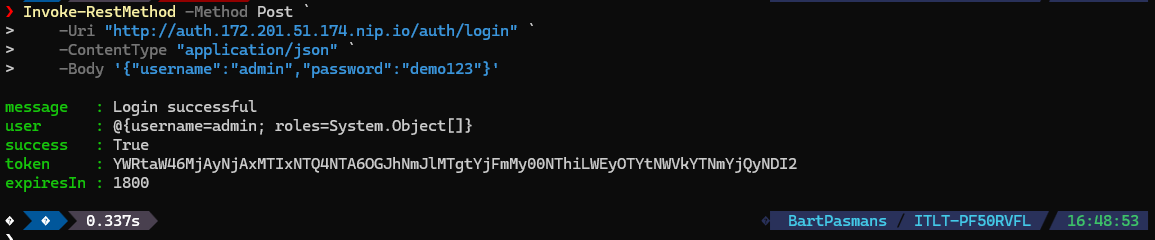
🎬Now run a test by calling the service get token
- Run the command below
Invoke-RestMethod -Method Post -Uri “http://auth.172.201.51.174.nip.io/auth/login” -ContentType “application/json” -Body ‘{“username”:”admin”,”password”:”demo123″}’
You should see the result below
If you validated that everything works it’s time to continue, it’s time to protect the first service!
Protecting the services
🎬 Follow the steps below to protect the initial demo service
💡 Make sure you update the variables to match with your environment!
- Update the demo service PowerShell file so it now matches like below
# Demo Service - Pode Web Server
# This service returns simple static data as JSON

Write-Host "========================================" -ForegroundColor Cyan
Write-Host "  PowerShell as a Service - Demo" -ForegroundColor Cyan
Write-Host "========================================" -ForegroundColor Cyan
Write-Host ""
Write-Host "[$(Get-Date -Format 'yyyy-MM-dd HH:mm:ss')] Starting demo-service..." -ForegroundColor Green
Write-Host "[$(Get-Date -Format 'yyyy-MM-dd HH:mm:ss')] PowerShell Version: $($PSVersionTable.PSVersion)" -ForegroundColor Yellow
Write-Host ""

# Import Pode module
Write-Host "[$(Get-Date -Format 'yyyy-MM-dd HH:mm:ss')] Importing Pode module..." -ForegroundColor Yellow
Import-Module Pode
Write-Host "[$(Get-Date -Format 'yyyy-MM-dd HH:mm:ss')] Pode version: $((Get-Module -Name Pode).Version)" -ForegroundColor Yellow
Write-Host ""

# Start the Pode server
Write-Host "[$(Get-Date -Format 'yyyy-MM-dd HH:mm:ss')] Initializing Pode server..." -ForegroundColor Green
Start-PodeServer {

    Write-Host "[$(Get-Date -Format 'yyyy-MM-dd HH:mm:ss')] Configuring HTTP endpoint on port 8080..." -ForegroundColor Yellow
    # Add HTTP endpoint listening on all interfaces
    Add-PodeEndpoint -Address * -Port 8080 -Protocol Http

    Write-Host "[$(Get-Date -Format 'yyyy-MM-dd HH:mm:ss')] Enabling request logging..." -ForegroundColor Yellow
    # Enable request logging
    New-PodeLoggingMethod -Terminal | Enable-PodeRequestLogging

    # Configure Auth Service URL (using Kubernetes service DNS)
    $AuthServiceUrl = if ($env:AUTH_SERVICE_URL) {
        $env:AUTH_SERVICE_URL
    } else {
        "http://auth-auth-service.default.svc.cluster.local/auth/validate"
    }
    Write-Host "[$(Get-Date -Format 'yyyy-MM-dd HH:mm:ss')] Auth Service URL: $AuthServiceUrl" -ForegroundColor Yellow
    Set-PodeState -Name 'AuthServiceUrl' -Value $AuthServiceUrl

    Write-Host ""
    Write-Host "[$(Get-Date -Format 'yyyy-MM-dd HH:mm:ss')] Setting up authentication middleware..." -ForegroundColor Green
    # Add authentication middleware
    Add-PodeMiddleware -Name 'AuthMiddleware' -ScriptBlock {
        # Skip authentication for health check endpoint
        if ($WebEvent.Path -eq '/health') {
            return $true
        }

        # Get the Authorization header
        $authHeader = $WebEvent.Request.Headers['Authorization']

        if ([string]::IsNullOrWhiteSpace($authHeader)) {
            Write-Host "[$(Get-Date -Format 'yyyy-MM-dd HH:mm:ss')] ❌ Missing Authorization header for $($WebEvent.Path)" -ForegroundColor Red
            Set-PodeResponseStatus -Code 401
            Write-PodeJsonResponse -Value @{
                error = "Unauthorized"
                message = "Missing Authorization header. Please provide a Bearer token."
                hint = "Login at /auth/login to get a token"
            }
            return $false
        }

        # Extract Bearer token
        $token = $null
        if ($authHeader -match '^Bearer\s+(.+)$') {
            $token = $matches[1]
        } else {
            Write-Host "[$(Get-Date -Format 'yyyy-MM-dd HH:mm:ss')] ❌ Invalid Authorization format for $($WebEvent.Path)" -ForegroundColor Red
            Set-PodeResponseStatus -Code 401
            Write-PodeJsonResponse -Value @{
                error = "Unauthorized"
                message = "Invalid Authorization header format. Use: Authorization: Bearer <token>"
            }
            return $false
        }

        # Validate token with auth-service
        try {
            $authServiceUrl = Get-PodeState -Name 'AuthServiceUrl'
            Write-Host "[$(Get-Date -Format 'yyyy-MM-dd HH:mm:ss')] 🔐 Validating token for $($WebEvent.Path)..." -ForegroundColor Cyan

            $validationResponse = Invoke-RestMethod -Method Post -Uri $authServiceUrl `
                -ContentType "application/json" `
                -Body (@{ token = $token } | ConvertTo-Json) `
                -TimeoutSec 5 `
                -SkipHttpErrorCheck

            if ($validationResponse.valid -eq $true) {
                $username = $validationResponse.user.username
                $roles = $validationResponse.user.roles
                Write-Host "[$(Get-Date -Format 'yyyy-MM-dd HH:mm:ss')] ✅ Token valid for user: $username" -ForegroundColor Green
                # Store user info in Pode state with request-specific key
                $requestId = [guid]::NewGuid().ToString()
                Set-PodeState -Name "User_$requestId" -Value @{
                    username = $username
                    roles = $roles
                }
                # Store the request ID in a custom header so routes can retrieve the user info
                $WebEvent.Response.Headers.Add('X-Request-Id', $requestId)
                # Also add directly to Data (might work in newer Pode versions)
                if (-not $WebEvent.Data) {
                    $WebEvent.Data = @{}
                }
                $WebEvent.Data['AuthUser'] = @{
                    username = $username
                    roles = $roles
                    requestId = $requestId
                }
                return $true
            } else {
                Write-Host "[$(Get-Date -Format 'yyyy-MM-dd HH:mm:ss')] ❌ Invalid token for $($WebEvent.Path)" -ForegroundColor Red
                Set-PodeResponseStatus -Code 401
                Write-PodeJsonResponse -Value @{
                    error = "Unauthorized"
                    message = "Invalid or expired token"
                }
                return $false
            }
        } catch {
            Write-Host "[$(Get-Date -Format 'yyyy-MM-dd HH:mm:ss')] ❌ Error contacting auth service: $($_.Exception.Message)" -ForegroundColor Red
            Set-PodeResponseStatus -Code 503
            Write-PodeJsonResponse -Value @{
                error = "Service Unavailable"
                message = "Unable to contact authentication service"
            }
            return $false
        }
    }

    Write-Host ""
    Write-Host "[$(Get-Date -Format 'yyyy-MM-dd HH:mm:ss')] Registering API endpoints..." -ForegroundColor Green
    Write-Host "[$(Get-Date -Format 'yyyy-MM-dd HH:mm:ss')]   -> GET /health" -ForegroundColor Cyan
    # Health check endpoint
    Add-PodeRoute -Method Get -Path '/health' -ScriptBlock {
        Write-PodeJsonResponse -Value @{
            status = "healthy"
            service = "demo-service"
            timestamp = (Get-Date -Format "o")
        }
    }

    Write-Host "[$(Get-Date -Format 'yyyy-MM-dd HH:mm:ss')]   -> GET /api/demo [🔐 Protected]" -ForegroundColor Cyan
    # Main demo endpoint - returns static data
    Add-PodeRoute -Method Get -Path '/api/demo' -ScriptBlock {
        # Try to get user info from WebEvent.Data
        $username = $null
        $roles = @()

        if ($WebEvent.Data -and $WebEvent.Data['AuthUser']) {
            $username = $WebEvent.Data['AuthUser']['username']
            $roles = $WebEvent.Data['AuthUser']['roles']
        }

        Write-PodeJsonResponse -Value @{
            service = "demo-service"
            message = "Hello from PowerShell as a Service!"
            authenticatedUser = @{
                username = $username
                roles = $roles
            }
            data = @{
                items = @(
                    @{ id = 1; name = "Item One"; value = 100 }
                    @{ id = 2; name = "Item Two"; value = 200 }
                    @{ id = 3; name = "Item Three"; value = 300 }
                )
                totalCount = 3
                generatedAt = (Get-Date -Format "o")
            }
            version = "1.0.0"
        }
    }

    Write-Host "[$(Get-Date -Format 'yyyy-MM-dd HH:mm:ss')]   -> GET /api/info [🔐 Protected]" -ForegroundColor Cyan
    # Info endpoint - returns service information
    Add-PodeRoute -Method Get -Path '/api/info' -ScriptBlock {
        # Try to get user info from WebEvent.Data
        $username = $null
        $roles = @()

        if ($WebEvent.Data -and $WebEvent.Data['AuthUser']) {
            $username = $WebEvent.Data['AuthUser']['username']
            $roles = $WebEvent.Data['AuthUser']['roles']
        }

        Write-PodeJsonResponse -Value @{
            serviceName = "demo-service"
            description = "A demo PowerShell service running on Pode"
            authenticatedUser = @{
                username = $username
                roles = $roles
            }
            powershellVersion = $PSVersionTable.PSVersion.ToString()
            podeVersion = (Get-Module -Name Pode).Version.ToString()
            platform = $PSVersionTable.Platform
            os = $PSVersionTable.OS
            endpoints = @(
                @{ method = "GET"; path = "/health"; description = "Health check endpoint"; protected = $false }
                @{ method = "GET"; path = "/api/demo"; description = "Demo endpoint with static data"; protected = $true }
                @{ method = "GET"; path = "/api/info"; description = "Service information"; protected = $true }
                @{ method = "GET"; path = "/"; description = "Welcome page"; protected = $true }
            )
        }
    }

    Write-Host "[$(Get-Date -Format 'yyyy-MM-dd HH:mm:ss')]   -> GET / [🔐 Protected]" -ForegroundColor Cyan
    # Root endpoint
    Add-PodeRoute -Method Get -Path '/' -ScriptBlock {
        # Try to get user info from WebEvent.Data
        $username = $null
        $roles = @()

        if ($WebEvent.Data -and $WebEvent.Data['AuthUser']) {
            $username = $WebEvent.Data['AuthUser']['username']
            $roles = $WebEvent.Data['AuthUser']['roles']
        }

        Write-PodeJsonResponse -Value @{
            message = "Welcome to PowerShell as a Service - Demo Service"
            authenticatedUser = @{
                username = $username
                roles = $roles
            }
            availableEndpoints = @(
                @{ path = "/health"; protected = $false; description = "Health check" }
                @{ path = "/api/demo"; protected = $true; description = "Demo data" }
                @{ path = "/api/info"; protected = $true; description = "Service info" }
            )
            authInfo = @{
                authServiceUrl = "http://auth.172.201.51.174.nip.io"
                loginEndpoint = "/auth/login"
                hint = "Use 'Authorization: Bearer <token>' header for authenticated requests"
            }
        }
    }

    Write-Host ""
    Write-Host "========================================" -ForegroundColor Cyan
    Write-Host "  Demo Service Ready!" -ForegroundColor Green
    Write-Host "  Listening on port 8080" -ForegroundColor Green
    Write-Host "  Authentication: ENABLED 🔐" -ForegroundColor Yellow
    Write-Host "========================================" -ForegroundColor Cyan
}- Build a new image from the service
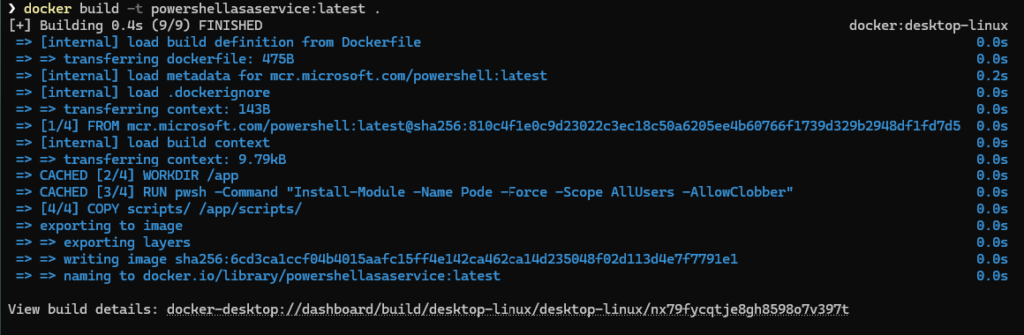
- Tag it and push it to the Azure Container Registry (or your own repository)


- Then restart a new rollout with the command below
kubectl rollout restart deployment/powershellasaservice-demo-serviceYou should see the result below

- Now check with ‘kubectl get pods’ to see if all pods are now running

Testing the service
Now its time to test the service and validate if we cannot access it anymore insecurely 😉
No authentication
🎬 Follow the steps below to validate if the service is now secure
- Run the script below in a PowerShell session
Write-Host "`n========================================" -ForegroundColor Cyan
Write-Host "  Complete Authentication Test Suite" -ForegroundColor Cyan
Write-Host "========================================`n" -ForegroundColor Cyan

$AuthUrl = "http://auth.172.201.51.174.nip.io"
$DemoUrl = "http://demo.172.201.51.174.nip.io"

Write-Host "Test 1: Access WITHOUT token" -ForegroundColor Yellow
try {
    Invoke-RestMethod -Uri "$DemoUrl/api/demo"
    Write-Host "❌ FAILED: Should have been blocked" -ForegroundColor Red
} catch {
    Write-Host "✅ PASSED: 401 Unauthorized (as expected)" -ForegroundColor Green
}You should see that the service now responds with a 401

Health endpoint
🎬 Follow the steps below to validate if the service is now secure
- Run the script below in a PowerShell session
Write-Host "`nTest 2: Health check WITHOUT token" -ForegroundColor Yellow
$health = Invoke-RestMethod -Uri "$DemoUrl/health"
Write-Host "✅ PASSED: $($health.status)" -ForegroundColor GreenYou should see that the service responds (no authentication required)

Authenticated endpoint
🎬 Follow the steps below to validate if the service is now secure
- Run the script below in a PowerShell session
Write-Host "`nTest 3: Login to auth-service" -ForegroundColor Yellow
$login = Invoke-RestMethod -Method Post -Uri "$AuthUrl/auth/login" `
    -ContentType "application/json" -Body '{"username":"admin","password":"demo123"}'
Write-Host "✅ PASSED: Token received" -ForegroundColor Green
$token = $login.token
$token - Test the authenticated endpoint
$headers = @{ "Authorization" = "Bearer $($token)" }
$demo = Invoke-RestMethod -Uri "http://demo.172.201.51.174.nip.io/api/demo" -Headers $headers

Write-Host "✅ User: $($demo.authenticatedUser.username)" -ForegroundColor Green
Write-Host "✅ Roles: $($demo.authenticatedUser.roles -join ', ')" -ForegroundColor Yellow
$demo You should see the result below:

💡 Try manipulating the token. You will see that the service fails
$badHeaders = @{ "Authorization" = "Bearer fake-invalid-token" }
try {
    Invoke-RestMethod -Uri "http://demo.172.201.51.174.nip.io/api/demo" -Headers $badHeaders
} catch {
    Write-Host "Status: $($_.Exception.Response.StatusCode.value__)" -ForegroundColor Yellow
}
💡 If you get 503 or unauthenticated messages it might be that the token still lives in memory on the auth service pod which might not be valid anymore. Run the script below to set the instance to 1 to make sure you don’t have old pods running with an expired token
# Temporarily scale to 1 replica
kubectl scale deployment auth-auth-service --replicas=1

# Wait for scale down
kubectl rollout status deployment auth-auth-service

# Verify
kubectl get pods -l app.kubernetes.io/name=auth-service

# Now test - should work consistently
$login = Invoke-RestMethod -Method Post -Uri "http://auth.172.201.51.174.nip.io/auth/login" -ContentType "application/json" -Body '{"username":"admin","password":"demo123"}'
$headers = @{ "Authorization" = "Bearer $($login.token)" }

# Test 10 times - should ALL succeed now
1..10 | ForEach-Object {
    try {
        $demo = Invoke-RestMethod -Uri "http://demo.172.201.51.174.nip.io/api/demo" -Headers $headers
        Write-Host "Attempt $_`: ✅ User: $($demo.authenticatedUser.username)" -ForegroundColor Green
    } catch {
        Write-Host "Attempt $_`: ❌ FAILED" -ForegroundColor Red
    }
    Start-Sleep -Milliseconds 200
}Summary
We didn’t suddenly invent enterprise-grade identity platforms, we didn’t roll out OAuth at hyperscale, and we definitely didn’t turn PowerShell into the next zero-trust silver bullet…
But what we did do in this part is a big step forward: we added real authentication and authorization to our PowerShell microservices running on AKS, and we did it in a way that scales beyond a single service.
Here’s what you walk away with:
🔐 A dedicated authentication service
You introduced a second PowerShell microservice: an auth service built with Pode. It handles logins, issues short-lived tokens, and validates requests centrally. This means every future service can rely on one place for authentication instead of rolling its own logic.
🧩 Service-to-service security
The demo service is no longer “wide open.” You added authentication middleware that intercepts requests, extracts Bearer tokens, and validates them by calling the auth service inside the cluster using Kubernetes DNS. Health checks stay public, everything else is protected.
You even explored what happens when pods scale and tokens live in memory, an important real-world lesson.
🎉 The bigger picture
This wasn’t about “perfect security,” and it certainly wasn’t production-ready identity management. What you built is a foundational security pattern: central auth, protected services, and clear separation of concerns, all running on AKS with PowerShell.
Next up?
Stay tuned… PowerShell on AKS just leveled up 😉